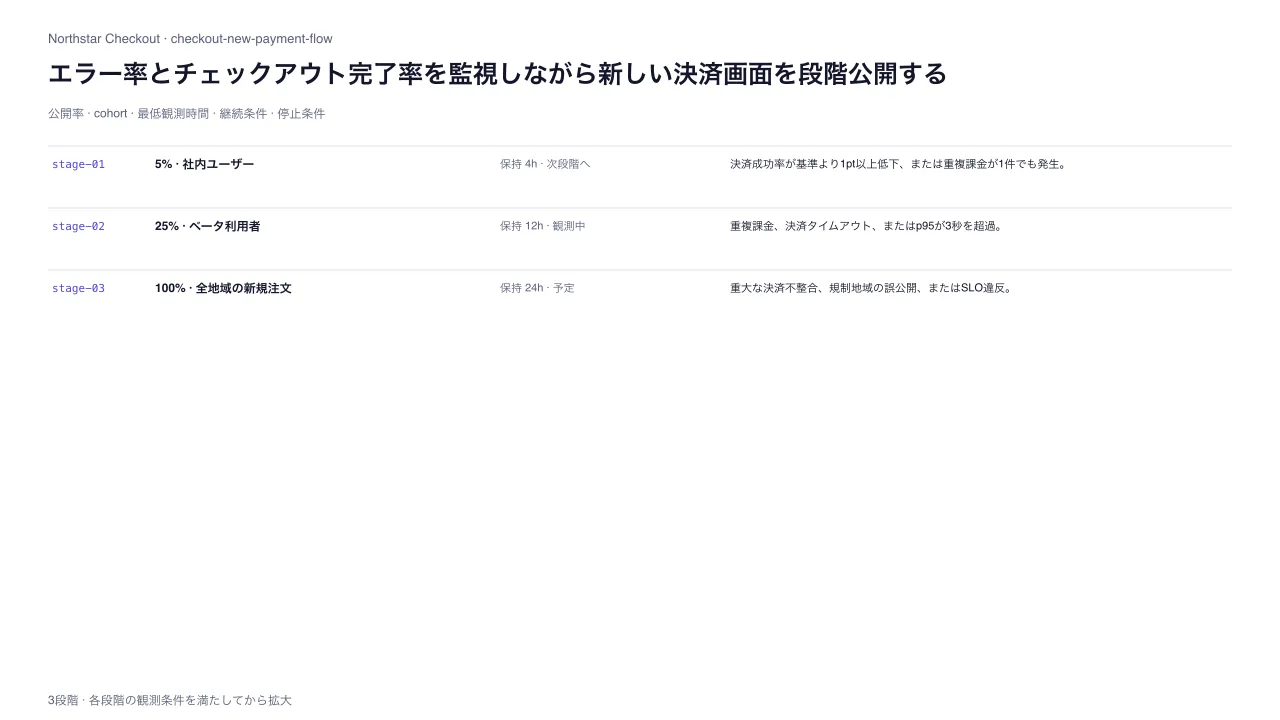
作品として見る 生成された文書そのもの — 切り替えも開閉もそのまま動きます
作品として見る 生成された文書そのもの — 切り替えも開閉もそのまま動きます
コピーして貼るか、ファイルに保存して渡す。ネットにつながらない環境には「全部入り」を 1 つ渡せば足りる。
このパネルの中身を、URL の先にあるファイルの中身まで含めて 1 つにまとめた Markdown — 大きいのでファイルで渡す(コピーは 32KB まで)
「段階的機能公開・ロールアウト計画」でHTML資料を作ってください。この型は実行できるので、版面を組み直す必要はありません — 必要なのは中身です。

## この型がすること
公開率を段階的に広げ、次段階へ進む条件と停止・ロールバック条件を各段階で合意する。

## 渡す必要があるもの
- 各段階の公開率、対象群、観測時間、拡大条件、停止条件、責任者、判断記録を定義する。

## 入力の形
- `title` — string — 公開計画の判断要点
- `subtitle` — string? — リリース・環境・監視窓
- `product` — string — 対象プロダクト
- `flag` — string — 公開制御feature flag
- `stages` — array (3–8) — 増加する公開率、対象cohort、観測時間、拡大条件、停止条件、責任者、状態、任意の観測記録

入力の機械可読な検証は schema.ts が持ちます。足りない入力は推測せず質問してください。

## 向かない場合
- リリース前の全体的な出荷可否と責任者を確認する場合は、リリース準備チェックを使う。

## 作り方
入力を JSON にまとめ、次を実行します。

```bash
node scripts/render.mjs feature-flag-rollout-plan <入力.json> --theme ink -o out.html
```

出力は 1 ファイルで完結し、外部から何も読み込みません。

## 原本
- https://design-vault.pages.dev/designs/feature-flag-rollout-plan/source/template.tsx
- https://design-vault.pages.dev/designs/feature-flag-rollout-plan/source/schema.ts
- https://design-vault.pages.dev/designs/feature-flag-rollout-plan/source/sample-data.json
- https://design-vault.pages.dev/designs/feature-flag-rollout-plan/sample.html
テンプレート・入力スキーマ・サンプルデータ・メタ情報。この文書はこの 4 つから生成されています。 生成された文書
/designs/feature-flag-rollout-plan/source/template.tsx
import type { Props } from "./schema";

const CSS = String.raw`
.asset-feature-flag-rollout-plan{font-family:var(--font-sans);color:var(--color-primary);background:var(--color-surface);max-width:var(--container-slide);margin:auto;padding:3rem 2.5rem;line-height:1.55;font-size:var(--text-body-sm)}
.asset-feature-flag-rollout-plan *{box-sizing:border-box}.asset-feature-flag-rollout-plan header{margin-bottom:1.25rem}.asset-feature-flag-rollout-plan .eyebrow{font-family:var(--font-mono);font-size:var(--text-label);color:var(--color-tertiary);margin:0 0 .6rem}.asset-feature-flag-rollout-plan h1{font-size:var(--text-h1);line-height:1.25;max-width:28em;margin:0}.asset-feature-flag-rollout-plan .subtitle{color:var(--color-secondary);margin:.65rem 0 0}.asset-feature-flag-rollout-plan .identity{display:flex;gap:1.5rem;flex-wrap:wrap;padding:.75rem 0;border-block:1px solid var(--color-outline);margin-bottom:1rem}.asset-feature-flag-rollout-plan .identity span{font-size:var(--text-label);color:var(--color-secondary)}.asset-feature-flag-rollout-plan .identity strong{font-family:var(--font-mono);color:var(--color-primary);margin-left:.35rem;overflow-wrap:anywhere}.asset-feature-flag-rollout-plan .stages{border-left:2px solid var(--color-outline);margin-left:.7rem}.asset-feature-flag-rollout-plan .stage{position:relative;padding:0 0 1.2rem 1.5rem}.asset-feature-flag-rollout-plan .stage:before{content:"";position:absolute;left:-.38rem;top:.25rem;width:.6rem;height:.6rem;background:var(--color-tertiary);border-radius:50%}.asset-feature-flag-rollout-plan .head{display:flex;gap:.6rem;align-items:center;flex-wrap:wrap}.asset-feature-flag-rollout-plan code{font-family:var(--font-mono);font-size:var(--text-label);color:var(--color-tertiary)}.asset-feature-flag-rollout-plan .head h2{font-size:var(--text-body-md);margin:0;flex:1}.asset-feature-flag-rollout-plan .state{font-size:var(--text-label);border:1px solid var(--color-outline);padding:.05rem .4rem;color:var(--color-secondary)}.asset-feature-flag-rollout-plan .metrics{display:grid;grid-template-columns:minmax(7rem,.5fr) minmax(9rem,.7fr) minmax(0,1.8fr);gap:.75rem;padding:.55rem .65rem;margin-top:.55rem;background:var(--color-surface-subtle)}.asset-feature-flag-rollout-plan .metric span{display:block;font-size:var(--text-label);color:var(--color-secondary)}.asset-feature-flag-rollout-plan .metric strong{display:block;font-size:var(--text-label);color:var(--color-primary);overflow-wrap:anywhere}.asset-feature-flag-rollout-plan .cohort{font-weight:600}.asset-feature-flag-rollout-plan .guardrails{display:grid;grid-template-columns:1fr 1fr;gap:.65rem 1.2rem;margin-top:.55rem}.asset-feature-flag-rollout-plan .guardrail{min-width:0}.asset-feature-flag-rollout-plan .guardrail span{display:block;font-size:var(--text-label);color:var(--color-secondary)}.asset-feature-flag-rollout-plan .guardrail p{margin:.08rem 0 0;overflow-wrap:anywhere}.asset-feature-flag-rollout-plan .observation{grid-column:1/3;padding-top:.35rem;border-top:1px dashed var(--color-outline)}.asset-feature-flag-rollout-plan .still-svg{position:absolute;width:1px;height:1px;overflow:hidden;clip-path:inset(50%);white-space:nowrap}
@media(max-width:700px){.asset-feature-flag-rollout-plan{padding:1.5rem 1rem}.asset-feature-flag-rollout-plan h1{font-size:var(--text-h2)}.asset-feature-flag-rollout-plan .metrics{grid-template-columns:1fr 1fr}.asset-feature-flag-rollout-plan .metric.cohort{grid-column:1/3}.asset-feature-flag-rollout-plan .guardrails{grid-template-columns:minmax(0,1fr)}.asset-feature-flag-rollout-plan .guardrail.observation{grid-column:auto}.asset-feature-flag-rollout-plan .identity{gap:.7rem}}
@media print{.asset-feature-flag-rollout-plan{max-width:none;padding:1rem}.asset-feature-flag-rollout-plan .stage{break-inside:avoid}}
`;

const stateLabel = { planned: "予定", observing: "観測中", advance: "次段階へ", hold: "保留", "rolled-back": "ロールバック" };
const compact = (value: string, max: number) => [...value].length > max ? `${[...value].slice(0, max - 1).join("")}…` : value;

function Still({ data }: { data: Props }) {
  return <svg className="still-svg" data-layout-still="true" width="1280" height="720" viewBox="0 0 1280 720" aria-hidden="true">
    <rect width="1280" height="720" fill="var(--color-surface)" />
    <text x="48" y="43" fontSize="13" fontFamily="sans-serif" fill="var(--color-secondary)">{data.product} · {data.flag}</text>
    <text x="48" y="83" fontSize="25" fontWeight="700" fontFamily="sans-serif" fill="var(--color-on-surface)">{compact(data.title, 66)}</text>
    <text x="48" y="118" fontSize="12" fontFamily="sans-serif" fill="var(--color-secondary)">公開率 · cohort · 最低観測時間 · 継続条件 · 停止条件</text>
    {data.stages.map((stage, index) => {
      const y = 165 + index * 62;
      return <g key={stage.id}>
        <line x1="48" x2="1232" y1={y - 19} y2={y - 19} stroke="var(--color-outline)" />
        <text x="52" y={y + 3} fontSize="11" fontFamily="monospace" fill="var(--color-tertiary)">{stage.id}</text>
        <text x="155" y={y + 3} fontSize="12" fontWeight="700" fontFamily="sans-serif" fill="var(--color-on-surface)">{stage.exposurePercent}% · {compact(stage.cohort, 28)}</text>
        <text x="500" y={y + 3} fontSize="11" fontFamily="sans-serif" fill="var(--color-secondary)">保持 {stage.holdHours}h · {stateLabel[stage.state]}</text>
        <text x="730" y={y + 3} fontSize="11" fontFamily="sans-serif" fill="var(--color-on-surface)">{compact(stage.stopWhen, 58)}</text>
      </g>;
    })}
    <text x="48" y="704" fontSize="12" fontFamily="sans-serif" fill="var(--color-secondary)">{data.stages.length}段階 · 各段階の観測条件を満たしてから拡大</text>
  </svg>;
}

export default function Template(data: Props) {
  return <section className="asset asset-feature-flag-rollout-plan">
    <style>{CSS}</style>
    <header>
      <p className="eyebrow">段階的な機能公開 · {data.stages.length}段階</p>
      <h1>{data.title}</h1>
      {data.subtitle && <p className="subtitle">{data.subtitle}</p>}
    </header>
    <div className="identity"><span>対象<strong>{data.product}</strong></span><span>Feature flag<strong>{data.flag}</strong></span></div>
    <div className="stages">
      {data.stages.map((stage) => <article className="stage" key={stage.id}>
        <div className="head"><code>{stage.id}</code><h2>{stage.exposurePercent}% 公開 · {stage.cohort}</h2><span className="state" data-state={stage.state}>{stateLabel[stage.state]}</span></div>
        <div className="metrics">
          <div className="metric"><span>公開率</span><strong>{stage.exposurePercent}%</strong></div>
          <div className="metric"><span>最低観測時間</span><strong>{stage.holdHours}時間</strong></div>
          <div className="metric cohort"><span>対象cohort</span><strong>{stage.cohort}</strong></div>
        </div>
        <div className="guardrails">
          <div className="guardrail"><span>拡大条件</span><p>{stage.proceedWhen}</p></div>
          <div className="guardrail"><span>停止・戻し条件</span><p>{stage.stopWhen}</p></div>
          {stage.observation && <div className="guardrail observation"><span>観測・判断記録</span><p>{stage.observation}</p></div>}
          <div className="guardrail"><span>進行責任</span><p>{stage.owner}</p></div>
        </div>
      </article>)}
    </div>
    <Still data={data} />
  </section>;
}
/designs/feature-flag-rollout-plan/source/schema.ts
import { z } from "zod";

const text = z.string().trim().min(1).max(160);
const short = z.string().trim().min(1).max(48);
const stageSchema = z.object({
  id: short.describe("段階の一意な識別子"),
  cohort: short.describe("この段階で公開する利用者・環境"),
  exposurePercent: z.number().int().min(1).max(100).describe("対象利用者に対する公開率"),
  holdHours: z.number().int().min(1).max(168).describe("次段階へ進む前の最低観測時間"),
  owner: short.describe("進行判断の責任者"),
  proceedWhen: text.describe("拡大を許可する成功条件"),
  stopWhen: text.describe("停止・ロールバックする条件"),
  state: z.enum(["planned", "observing", "advance", "hold", "rolled-back"]).describe("段階の運用状態"),
  observation: text.optional().describe("この段階で観測した結果または判断記録"),
}).strict();

export const schema = z.object({
  title: text.describe("公開計画の判断要点"),
  subtitle: text.optional().describe("リリース・環境・監視窓"),
  product: short.describe("対象プロダクトまたはサービス"),
  flag: short.describe("公開を制御するfeature flag"),
  stages: z.array(stageSchema).min(3).max(8).describe("観測条件つきの段階的な公開手順"),
}).strict().superRefine((data, ctx) => {
  const ids = data.stages.map(({ id }) => id);
  if (new Set(ids).size !== ids.length) {
    ctx.addIssue({ code: "custom", path: ["stages"], message: "段階IDは一意にすること" });
  }
  if (data.stages.at(-1)?.exposurePercent !== 100) {
    ctx.addIssue({ code: "custom", path: ["stages"], message: "最終段階は100%公開にすること" });
  }
  data.stages.forEach((stage, index) => {
    if (index > 0 && stage.exposurePercent <= data.stages[index - 1].exposurePercent) {
      ctx.addIssue({ code: "custom", path: ["stages", index, "exposurePercent"], message: "公開率は段階ごとに増加させること" });
    }
    if (["advance", "hold", "rolled-back"].includes(stage.state) && !stage.observation) {
      ctx.addIssue({ code: "custom", path: ["stages", index, "observation"], message: "判断済み段階には観測記録が必要" });
    }
  });
});

export type Props = z.infer<typeof schema>;
/designs/feature-flag-rollout-plan/source/meta.yaml
id: feature-flag-rollout-plan
name:
  ja: 段階的機能公開・ロールアウト計画
  en: Progressive Feature Rollout Plan
purpose:
  ja: 公開率を段階的に広げ、次段階へ進む条件と停止・ロールバック条件を各段階で合意する。
  en: Expand exposure in stages with explicit advance, stop, and rollback conditions at each gate.
status: published
still: ./still.png
category: planning
catalogOrder: 860
jobs:
  - plan-sequence
  - prioritize-diagnose
useCases:
  - roadmap
  - status
layoutKinds:
  - timeline
  - stack
tags:
  - feature-flag
  - progressive-delivery
  - rollout
  - guardrail
  - rollback
whenToUse:
  - ja: 機能や設定を少量から段階公開し、利用者影響を監視しながら対象を広げるとき。
    en: Use when gradually exposing a feature or configuration while monitoring user impact.
avoidWhen:
  - ja: リリース前の全体的な出荷可否と責任者を確認する場合は、リリース準備チェックを使う。
    en: Use a release readiness checklist for an overall pre-release go/no-go and ownership review.
requiredInputs:
  - ja: 各段階の公開率、対象群、観測時間、拡大条件、停止条件、責任者、判断記録を定義する。
    en: Define exposure, cohort, hold duration, advance and stop criteria, owner, and decision evidence for each stage.
relatedLayouts:
  - release-readiness
  - release-changelog
dataSchema:
  title: string — 公開計画の判断要点
  subtitle: string? — リリース・環境・監視窓
  product: string — 対象プロダクト
  flag: string — 公開制御feature flag
  stages: array (3–8) — 増加する公開率、対象cohort、観測時間、拡大条件、停止条件、責任者、状態、任意の観測記録
sources: []
/designs/feature-flag-rollout-plan/source/sample-data.json
{
  "title": "エラー率とチェックアウト完了率を監視しながら新しい決済画面を段階公開する",
  "subtitle": "Checkout v4.2 · production · 2026-09-28監視開始",
  "product": "Northstar Checkout",
  "flag": "checkout-new-payment-flow",
  "stages": [
    { "id": "stage-01", "cohort": "社内ユーザー", "exposurePercent": 5, "holdHours": 4, "owner": "Release Captain", "proceedWhen": "決済エラー率が基準+0.2pt以内、重大障害なし。", "stopWhen": "決済成功率が基準より1pt以上低下、または重複課金が1件でも発生。", "state": "advance", "observation": "4時間観測。重大障害なし、決済成功率は基準内。" },
    { "id": "stage-02", "cohort": "ベータ利用者", "exposurePercent": 25, "holdHours": 12, "owner": "Payments On-call", "proceedWhen": "チェックアウト完了率が比較群より悪化せず、p95応答が2秒以内。", "stopWhen": "重複課金、決済タイムアウト、またはp95が3秒を超過。", "state": "observing" },
    { "id": "stage-03", "cohort": "全地域の新規注文", "exposurePercent": 100, "holdHours": 24, "owner": "Commerce Duty Manager", "proceedWhen": "24時間の監視で成功条件を満たし、サポート問い合わせ増が許容内。", "stopWhen": "重大な決済不整合、規制地域の誤公開、またはSLO違反。", "state": "planned" }
  ]
}