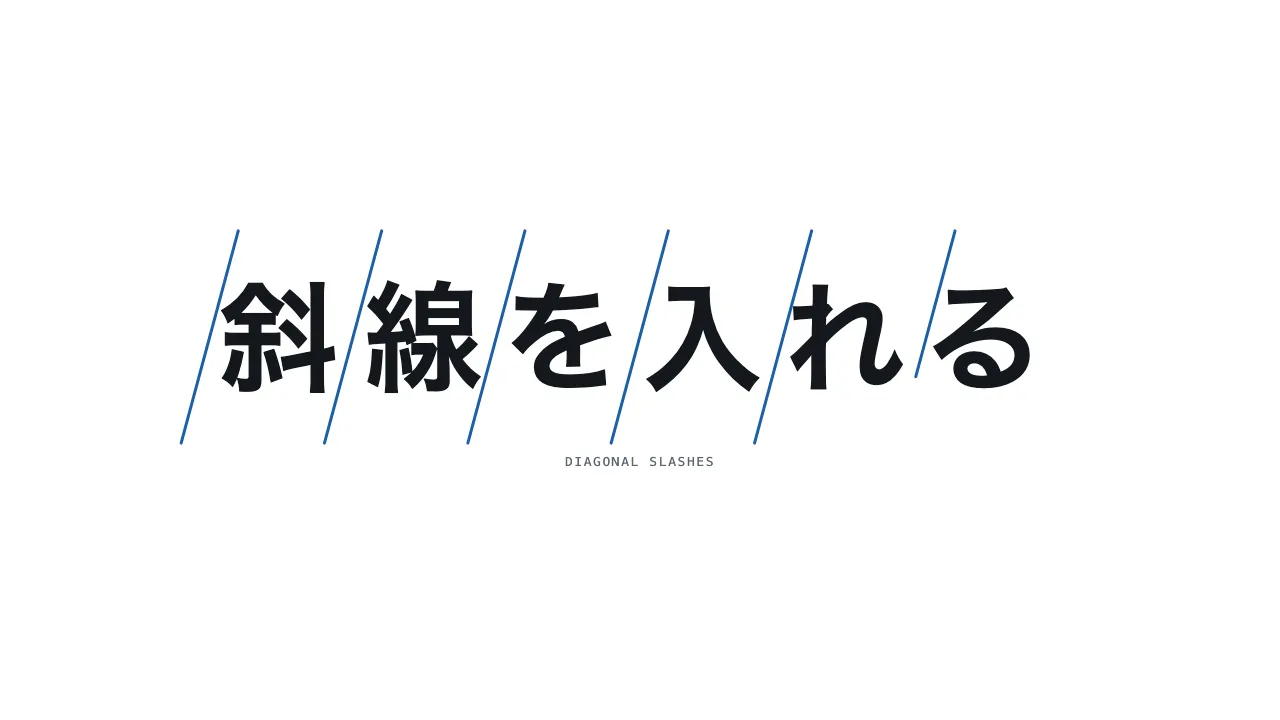
A still — with scripts on, it runs right here The demo itself — scroll inside the frame
A still — with scripts on, it runs right here The demo itself — scroll inside the frame
Copy and paste, or save a file and hand it over. For a machine with no network, one “Everything” file is enough.
Everything in this panel, including the contents behind each URL, in one Markdown file — Large, so it goes as a file (copy is for 32 KB and under)
Diagonal slashes — Diagonal slashes through a title

Draw diagonal slashes between the letters of a heading, left to right. Set the heading in bold with 0.2em letter-spacing and overlay an SVG (its viewBox set to the heading’s real pixel size and re-read on resize) holding seven slashes that run from upper right to lower left and are spread evenly across the heading’s width. Stroke each line with var(--accent), 3px wide, with pathLength="1". In a 340vh pinned section start at 10% progress, delay each line by a further 10%, and draw each over 14% progress from top to bottom with stroke-dashoffset 1 → 0. Keep unstarted lines visibility: hidden. Drawn lines stay, and scrolling back removes them in reverse order. Keep the real heading in aria-label, and with reduced motion show all seven lines drawn. Implement it with CSS and JavaScript only, without any library.

Do not drop:
- Draw each line top to bottom, left to right; the next may start just before the previous finishes
- Match SVG coordinates to the heading’s real pixel size; stretched coordinates distort stroke width and dash length
- Keep unstarted lines visibility: hidden, since a zero-length line still leaves a round-cap dot
- Keep the real heading in aria-label, and rest with every line drawn under reduced motion

A working example (one self-contained HTML file): https://design-vault.pages.dev/designs/motion-slash-strike/demo.html
/designs/motion-slash-strike/demo.html — One self-contained HTML file. CSS and plain JavaScript only; it fetches nothing.
<!doctype html>
<html lang="ja">
<head>
<meta charset="utf-8">
<meta name="viewport" content="width=device-width, initial-scale=1">
<title>56 斜線を入れる — Diagonal slashes through a title</title>
<style>
/* dv-motion-base:start */
:root {
  --ground: #FFFFFF;
  --surface: #F3F5F8;
  --ink: #14181F;
  --muted: #5A6472;
  --accent: #1F5FA8;
  --rule: #D8DDE4;
  --accent-soft: color-mix(in srgb, var(--accent) 12%, var(--ground));
  --accent-mid: color-mix(in srgb, var(--accent) 45%, var(--ground));
  --shade: color-mix(in srgb, var(--ink) 14%, transparent);

  --font: "Zen Kaku Gothic New", "Hiragino Sans", "Noto Sans JP", "Yu Gothic", system-ui, sans-serif;
  --mono: ui-monospace, "SF Mono", Menlo, Consolas, monospace;

  --t-label: 13px;
  --t-body: 16px;
  --t-lead: 20px;
  --t-h2: 32px;
  --t-h1: clamp(40px, 7vw, 72px);

  --s1: 4px;
  --s2: 8px;
  --s3: 16px;
  --s4: 24px;
  --s5: 40px;
  --s6: 64px;
  --s7: 104px;

  --radius: 12px;
  --ease: cubic-bezier(.2, .7, .2, 1);
  --dur: .7s;
  --measure: 1080px;
}
*, *::before, *::after { box-sizing: border-box; }
html { -webkit-text-size-adjust: 100%; }
body {
  margin: 0;
  background: var(--ground);
  color: var(--ink);
  font-family: var(--font);
  font-size: var(--t-body);
  line-height: 1.7;
  font-feature-settings: "palt";
  overflow-x: hidden;
}
h1, h2, h3, p, ul, ol, figure { margin: 0; padding: 0; }
ul, ol { list-style: none; }
.dv-wrap { width: min(100% - 2 * var(--s4), var(--measure)); margin-inline: auto; }
.dv-label {
  min-height: 72vh;
  display: grid;
  align-content: center;
  gap: var(--s3);
  padding-block: var(--s6);
  border-bottom: 1px solid var(--rule);
}
.dv-num { font-family: var(--mono); font-size: var(--t-lead); font-weight: 700; color: var(--accent); letter-spacing: .04em; }
.dv-name { font-size: var(--t-h1); font-weight: 700; line-height: 1.15; letter-spacing: .01em; }
.dv-ai { font-family: var(--mono); font-size: var(--t-lead); color: var(--muted); }
.dv-desc { font-size: var(--t-lead); color: var(--ink); }
.dv-hint { font-size: var(--t-label); color: var(--muted); letter-spacing: .12em; margin-top: var(--s4); }
.dv-stage { padding-block: var(--s7); }
.dv-h2 { font-size: var(--t-h2); font-weight: 700; line-height: 1.3; }
.dv-lead { font-size: var(--t-lead); color: var(--muted); }
.dv-eyebrow { font-family: var(--mono); font-size: var(--t-label); color: var(--accent); letter-spacing: .12em; text-transform: uppercase; }
.dv-card { background: var(--surface); border: 1px solid var(--rule); border-radius: var(--radius); padding: var(--s4); }
.dv-ph {
  border-radius: var(--radius);
  background: linear-gradient(135deg, var(--accent-soft), var(--accent-mid) 60%, var(--accent));
  aspect-ratio: 16 / 9;
}
.dv-ph--alt { background: linear-gradient(200deg, var(--surface), var(--accent-soft) 55%, var(--accent-mid)); }
.dv-ph--ink { background: linear-gradient(160deg, var(--ink), color-mix(in srgb, var(--ink) 55%, var(--accent))); }
.dv-end {
  min-height: 60vh;
  display: grid;
  place-items: center;
  border-top: 1px solid var(--rule);
  color: var(--muted);
  font-family: var(--mono);
  font-size: var(--t-label);
  letter-spacing: .12em;
}
/* dv-motion-base:end */

/* ---- この演出だけの CSS。色は var(--…) か color-mix() のみ ---- */
.stack { display: grid; gap: var(--s6); }
.sl-zone { height: 340vh; }
.sl-stick { position: sticky; top: 0; height: 100vh; display: grid; place-content: center; gap: var(--s4); overflow: clip; }
@media (prefers-reduced-motion: reduce) {
  .sl-zone { height: auto; }
  .sl-stick { position: static; height: auto; padding-block: var(--s6); }
}
.sl-word { position: relative; width: max-content; margin-inline: auto; padding-inline: .3em; font-size: clamp(34px, 9.4vw, 120px); font-weight: 700; line-height: 1.5; letter-spacing: .2em; }
.sl-lines { position: absolute; inset: -.1em 0; width: 100%; height: calc(100% + .2em); overflow: visible; pointer-events: none; }
.sl-line { fill: none; stroke: var(--accent); stroke-width: 3; stroke-linecap: round; }
.sl-cap { text-align: center; font-family: var(--mono); font-size: var(--t-label); letter-spacing: .12em; color: var(--muted); }
</style>
</head>
<body data-motion-number="56">
<header class="dv-label">
  <div class="dv-wrap">
    <p class="dv-num">56</p>
    <h1 class="dv-name">斜線を入れる</h1>
    <p class="dv-ai">Diagonal slashes through a title</p>
    <p class="dv-desc">文字の間に斜線が左から順に引かれる</p>
    <p class="dv-hint">SCROLL ↓</p>
  </div>
</header>

<main class="dv-stage">
<div class="dv-wrap stack">
    <section class="dv-card">
      <p class="dv-eyebrow">Section 1</p>
      <h2 class="dv-h2">見出しが入ります</h2>
      <p class="dv-lead">本文のダミーです。スクロールすると、下の見出しの文字の間に斜線が左から順に引かれていきます。</p>
    </section>
  </div>

  <section class="sl-zone" data-progress="pin">
    <div class="sl-stick">
      <h2 class="sl-word" aria-label="斜線を入れる">斜線を入れる
        <svg class="sl-lines" aria-hidden="true" xmlns="http://www.w3.org/2000/svg"></svg>
      </h2>
      <p class="sl-cap">DIAGONAL SLASHES</p>
    </div>
  </section>

  <div class="dv-wrap stack">
    <section class="dv-card">
      <p class="dv-eyebrow">Section 2</p>
      <h2 class="dv-h2">見出しが入ります</h2>
      <p class="dv-lead">本文のダミーです。引いた線は、そのまま残ります。</p>
    </section>
  </div>
</main>

<footer class="dv-end">END — 56 斜線を入れる</footer>

<script>
/* dv-motion-helpers:start */
const dvReduce = matchMedia('(prefers-reduced-motion: reduce)').matches;
document.documentElement.classList.add('js');

/**
 * 画面に入った要素へ .is-in を付ける。
 * data-reveal="repeat" の要素は画面を出たら外す(何度でも再生)。
 */
function dvReveal(selector = '[data-reveal]', { threshold = 0.2, rootMargin = '0px 0px -8% 0px' } = {}) {
  const els = [...document.querySelectorAll(selector)];
  if (dvReduce || !('IntersectionObserver' in window)) {
    els.forEach((el) => el.classList.add('is-in'));
    return;
  }
  const io = new IntersectionObserver((entries) => {
    for (const e of entries) {
      if (e.isIntersecting) {
        e.target.classList.add('is-in');
        if (e.target.dataset.reveal !== 'repeat') io.unobserve(e.target);
      } else if (e.target.dataset.reveal === 'repeat') {
        e.target.classList.remove('is-in');
      }
    }
  }, { threshold, rootMargin });
  els.forEach((el) => io.observe(el));
}

/**
 * スクロール量を 0〜1 にして、各 [data-progress] 要素の CSS 変数 --p に書く。
 *   data-progress="through" : 要素の上端が画面の下端に来たとき 0、下端が画面の上端を抜けたとき 1
 *   data-progress="pin"     : 要素の上端が画面の上端に来たとき 0、下端が画面の下端に来たとき 1
 *                             (中に position: sticky の箱を持つ、背の高い区画用)
 *   data-progress="page"    : ページ全体のスクロール量
 * onUpdate(el, p) を渡すと、値が変わるたびに呼ばれる。
 */
function dvProgress(onUpdate) {
  const els = [...document.querySelectorAll('[data-progress]')];
  const clamp = (n) => Math.min(1, Math.max(0, n));
  let queued = false;
  const measure = () => {
    queued = false;
    const vh = window.innerHeight;
    for (const el of els) {
      const r = el.getBoundingClientRect();
      let p;
      if (el.dataset.progress === 'pin') p = r.height > vh ? -r.top / (r.height - vh) : 0;
      else if (el.dataset.progress === 'page') {
        const max = document.documentElement.scrollHeight - vh;
        p = max > 0 ? window.scrollY / max : 0;
      } else p = (vh - r.top) / (vh + r.height);
      p = clamp(p);
      el.style.setProperty('--p', p.toFixed(4));
      if (onUpdate) onUpdate(el, p);
    }
  };
  const request = () => {
    if (!queued) { queued = true; requestAnimationFrame(measure); }
  };
  addEventListener('scroll', request, { passive: true });
  addEventListener('resize', request);
  measure();
}
/* dv-motion-helpers:end */

/* ---- この演出だけの JS ---- */
// 文字の間(と両端)に、右上から左下へ向かう斜線を 7 本引く。
// 座標は見出しの実寸(px)にそろえる。引き伸ばした座標だと、線の太さと破線の長さが歪む。
const svg = document.querySelector('.sl-lines');
const NS = 'http://www.w3.org/2000/svg';
const N = 7;
const slashes = [];
for (let i = 0; i < N; i++) {
  const path = document.createElementNS(NS, 'path');
  path.setAttribute('class', 'sl-line');
  path.setAttribute('pathLength', '1');
  path.style.strokeDasharray = '1';
  svg.append(path);
  slashes.push(path);
}
function layout() {
  const box = svg.getBoundingClientRect();   // 重ねた SVG 自身の実寸
  const w = Math.round(box.width), h = Math.round(box.height);
  svg.setAttribute('viewBox', `0 0 ${w} ${h}`);
  const lean = h * 0.14;
  slashes.forEach((path, i) => {
    const x = w * (0.03 + (0.94 * i) / (N - 1));
    path.setAttribute('d', `M${(x + lean).toFixed(1)} ${(-h * 0.02).toFixed(1)} L${(x - lean).toFixed(1)} ${(h * 1.02).toFixed(1)}`);
  });
}
const clamp = (n) => Math.min(1, Math.max(0, n));
function place(p) {
  slashes.forEach((s, i) => {
    // 左から順に、1 本ずつ上から下へ引く。
    const t = clamp((p - 0.1 - i * 0.1) / 0.14);
    s.style.strokeDashoffset = String(1 - t);
    s.style.visibility = t > 0 ? 'visible' : 'hidden';
  });
}
layout();
// 画面の回転だけでなく、書体の差し替えや文字の拡大で見出しの大きさが変わったときも取り直す。
if ('ResizeObserver' in window) new ResizeObserver(layout).observe(svg.parentElement);
else addEventListener('resize', layout);
if (!dvReduce) dvProgress((el, p) => place(p));
</script>
</body>
</html>