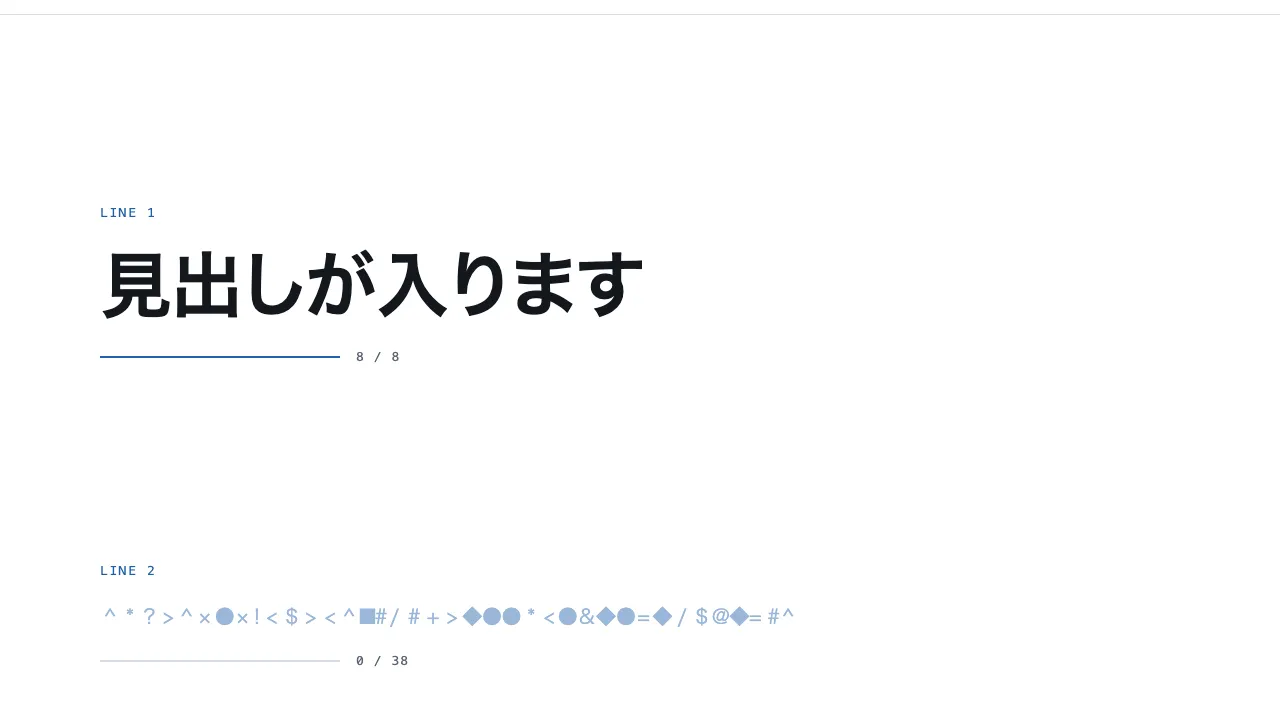
A still — with scripts on, it runs right here The demo itself — scroll inside the frame
A still — with scripts on, it runs right here The demo itself — scroll inside the frame
Copy and paste, or save a file and hand it over. For a machine with no network, one “Everything” file is enough.
Everything in this panel, including the contents behind each URL, in one Markdown file — Large, so it goes as a file (copy is for 32 KB and under)
Text scramble — Text scramble / decode effect

Build a text scramble effect where a row of random glyphs settles into readable text, left to right, as it enters the viewport. Lay out five lines alternating between a bold heading (up to 72px) and body text (20px, muted), and start every line with all of its characters replaced by random glyphs drawn from a set of 20 (# % & * + = ? ◆ ■ and so on). A line starts decoding when it crosses a line 30% up from the bottom of the viewport, and finishes in 1.2 seconds. For the first 20% of that time the whole line stays scrambled; over the rest, characters lock to their real value one by one from the left at even intervals, while the ones still waiting switch to another glyph every 50 milliseconds. Scrambled characters use a lightened accent colour and settled ones take the normal text colour over 0.2 seconds, and each character keeps the width of its real glyph so the line never shifts. Implement it with plain JavaScript (requestAnimationFrame and IntersectionObserver) and CSS only, with no library.

Do not drop:
- Characters settle from left to right, and a settled character is never scrambled again
- Lock each character to the width of its real glyph so swapping never changes the line's width or wrapping
- Keep the real text in the HTML and in aria-label, and hide the scrambled glyphs from screen readers
- With reduced motion, never scramble; show the readable text from the start

A working example (one self-contained HTML file): https://design-vault.pages.dev/designs/motion-text-scramble/demo.html
/designs/motion-text-scramble/demo.html — One self-contained HTML file. CSS and plain JavaScript only; it fetches nothing.
<!doctype html>
<html lang="ja">
<head>
<meta charset="utf-8">
<meta name="viewport" content="width=device-width, initial-scale=1">
<title>25 テキストスクランブル — Text scramble / decode effect</title>
<style>
/* dv-motion-base:start */
:root {
  --ground: #FFFFFF;
  --surface: #F3F5F8;
  --ink: #14181F;
  --muted: #5A6472;
  --accent: #1F5FA8;
  --rule: #D8DDE4;
  --accent-soft: color-mix(in srgb, var(--accent) 12%, var(--ground));
  --accent-mid: color-mix(in srgb, var(--accent) 45%, var(--ground));
  --shade: color-mix(in srgb, var(--ink) 14%, transparent);

  --font: "Zen Kaku Gothic New", "Hiragino Sans", "Noto Sans JP", "Yu Gothic", system-ui, sans-serif;
  --mono: ui-monospace, "SF Mono", Menlo, Consolas, monospace;

  --t-label: 13px;
  --t-body: 16px;
  --t-lead: 20px;
  --t-h2: 32px;
  --t-h1: clamp(40px, 7vw, 72px);

  --s1: 4px;
  --s2: 8px;
  --s3: 16px;
  --s4: 24px;
  --s5: 40px;
  --s6: 64px;
  --s7: 104px;

  --radius: 12px;
  --ease: cubic-bezier(.2, .7, .2, 1);
  --dur: .7s;
  --measure: 1080px;
}
*, *::before, *::after { box-sizing: border-box; }
html { -webkit-text-size-adjust: 100%; }
body {
  margin: 0;
  background: var(--ground);
  color: var(--ink);
  font-family: var(--font);
  font-size: var(--t-body);
  line-height: 1.7;
  font-feature-settings: "palt";
  overflow-x: hidden;
}
h1, h2, h3, p, ul, ol, figure { margin: 0; padding: 0; }
ul, ol { list-style: none; }
.dv-wrap { width: min(100% - 2 * var(--s4), var(--measure)); margin-inline: auto; }
.dv-label {
  min-height: 72vh;
  display: grid;
  align-content: center;
  gap: var(--s3);
  padding-block: var(--s6);
  border-bottom: 1px solid var(--rule);
}
.dv-num { font-family: var(--mono); font-size: var(--t-lead); font-weight: 700; color: var(--accent); letter-spacing: .04em; }
.dv-name { font-size: var(--t-h1); font-weight: 700; line-height: 1.15; letter-spacing: .01em; }
.dv-ai { font-family: var(--mono); font-size: var(--t-lead); color: var(--muted); }
.dv-desc { font-size: var(--t-lead); color: var(--ink); }
.dv-hint { font-size: var(--t-label); color: var(--muted); letter-spacing: .12em; margin-top: var(--s4); }
.dv-stage { padding-block: var(--s7); }
.dv-h2 { font-size: var(--t-h2); font-weight: 700; line-height: 1.3; }
.dv-lead { font-size: var(--t-lead); color: var(--muted); }
.dv-eyebrow { font-family: var(--mono); font-size: var(--t-label); color: var(--accent); letter-spacing: .12em; text-transform: uppercase; }
.dv-card { background: var(--surface); border: 1px solid var(--rule); border-radius: var(--radius); padding: var(--s4); }
.dv-ph {
  border-radius: var(--radius);
  background: linear-gradient(135deg, var(--accent-soft), var(--accent-mid) 60%, var(--accent));
  aspect-ratio: 16 / 9;
}
.dv-ph--alt { background: linear-gradient(200deg, var(--surface), var(--accent-soft) 55%, var(--accent-mid)); }
.dv-ph--ink { background: linear-gradient(160deg, var(--ink), color-mix(in srgb, var(--ink) 55%, var(--accent))); }
.dv-end {
  min-height: 60vh;
  display: grid;
  place-items: center;
  border-top: 1px solid var(--rule);
  color: var(--muted);
  font-family: var(--mono);
  font-size: var(--t-label);
  letter-spacing: .12em;
}
/* dv-motion-base:end */

/* ---- この演出だけの CSS。色は var(--…) か color-mix() のみ ---- */
.beat { min-height: 46vh; display: grid; align-content: center; gap: var(--s3); }
.sc { overflow-wrap: anywhere; }
.sc--head { font-size: var(--t-h1); font-weight: 700; line-height: 1.25; }
.sc--body { font-size: var(--t-lead); line-height: 1.8; color: var(--muted); }
.sc .ch { display: inline-block; text-align: center; white-space: pre; color: var(--accent-mid); transition: color .2s var(--ease); }
.sc .ch.is-set { color: inherit; }
.meter { display: flex; align-items: center; gap: var(--s3); font-family: var(--mono); font-size: var(--t-label); color: var(--muted); letter-spacing: .08em; }
.meter-bar { flex: 0 1 240px; height: 2px; background: var(--rule); }
.meter-bar i { display: block; height: 100%; background: var(--accent); transform-origin: left center; }
.js .meter-bar i { transform: scaleX(var(--k, 0)); }
.meter-count { font-variant-numeric: tabular-nums; }

@media (prefers-reduced-motion: reduce) {
  .sc .ch { transition: none; }
  .js .meter-bar i { transform: none; }
}
</style>
</head>
<body data-motion-number="25">
<header class="dv-label">
  <div class="dv-wrap">
    <p class="dv-num">25</p>
    <h1 class="dv-name">テキストスクランブル</h1>
    <p class="dv-ai">Text scramble / decode effect</p>
    <p class="dv-desc">乱れた文字が読める文に定まる</p>
    <p class="dv-hint">SCROLL ↓</p>
  </div>
</header>

<main class="dv-stage">
  <section class="dv-wrap beat">
    <p class="dv-eyebrow">Line 1</p>
    <h2 class="sc sc--head" data-scramble>見出しが入ります</h2>
    <div class="meter" aria-hidden="true"><span class="meter-bar"><i></i></span><span class="meter-count"></span></div>
  </section>
  <section class="dv-wrap beat">
    <p class="dv-eyebrow">Line 2</p>
    <p class="sc sc--body" data-scramble>本文のダミーです。画面に入ると、乱れた記号が左から順に読める文へ定まります。</p>
    <div class="meter" aria-hidden="true"><span class="meter-bar"><i></i></span><span class="meter-count"></span></div>
  </section>
  <section class="dv-wrap beat">
    <p class="dv-eyebrow">Line 3</p>
    <h2 class="sc sc--head" data-scramble>記号から文へ、左から順に</h2>
    <div class="meter" aria-hidden="true"><span class="meter-bar"><i></i></span><span class="meter-count"></span></div>
  </section>
  <section class="dv-wrap beat">
    <p class="dv-eyebrow">Line 4</p>
    <p class="sc sc--body" data-scramble>二つ目の本文のダミーです。一度定まった文字は、そのあと動きません。</p>
    <div class="meter" aria-hidden="true"><span class="meter-bar"><i></i></span><span class="meter-count"></span></div>
  </section>
  <section class="dv-wrap beat">
    <p class="dv-eyebrow">Line 5</p>
    <h2 class="sc sc--head" data-scramble>最後の一行も同じです</h2>
    <div class="meter" aria-hidden="true"><span class="meter-bar"><i></i></span><span class="meter-count"></span></div>
  </section>
</main>

<footer class="dv-end">END — 25 テキストスクランブル</footer>

<script>
/* dv-motion-helpers:start */
const dvReduce = matchMedia('(prefers-reduced-motion: reduce)').matches;
document.documentElement.classList.add('js');

/**
 * 画面に入った要素へ .is-in を付ける。
 * data-reveal="repeat" の要素は画面を出たら外す(何度でも再生)。
 */
function dvReveal(selector = '[data-reveal]', { threshold = 0.2, rootMargin = '0px 0px -8% 0px' } = {}) {
  const els = [...document.querySelectorAll(selector)];
  if (dvReduce || !('IntersectionObserver' in window)) {
    els.forEach((el) => el.classList.add('is-in'));
    return;
  }
  const io = new IntersectionObserver((entries) => {
    for (const e of entries) {
      if (e.isIntersecting) {
        e.target.classList.add('is-in');
        if (e.target.dataset.reveal !== 'repeat') io.unobserve(e.target);
      } else if (e.target.dataset.reveal === 'repeat') {
        e.target.classList.remove('is-in');
      }
    }
  }, { threshold, rootMargin });
  els.forEach((el) => io.observe(el));
}

/**
 * スクロール量を 0〜1 にして、各 [data-progress] 要素の CSS 変数 --p に書く。
 *   data-progress="through" : 要素の上端が画面の下端に来たとき 0、下端が画面の上端を抜けたとき 1
 *   data-progress="pin"     : 要素の上端が画面の上端に来たとき 0、下端が画面の下端に来たとき 1
 *                             (中に position: sticky の箱を持つ、背の高い区画用)
 *   data-progress="page"    : ページ全体のスクロール量
 * onUpdate(el, p) を渡すと、値が変わるたびに呼ばれる。
 */
function dvProgress(onUpdate) {
  const els = [...document.querySelectorAll('[data-progress]')];
  const clamp = (n) => Math.min(1, Math.max(0, n));
  let queued = false;
  const measure = () => {
    queued = false;
    const vh = window.innerHeight;
    for (const el of els) {
      const r = el.getBoundingClientRect();
      let p;
      if (el.dataset.progress === 'pin') p = r.height > vh ? -r.top / (r.height - vh) : 0;
      else if (el.dataset.progress === 'page') {
        const max = document.documentElement.scrollHeight - vh;
        p = max > 0 ? window.scrollY / max : 0;
      } else p = (vh - r.top) / (vh + r.height);
      p = clamp(p);
      el.style.setProperty('--p', p.toFixed(4));
      if (onUpdate) onUpdate(el, p);
    }
  };
  const request = () => {
    if (!queued) { queued = true; requestAnimationFrame(measure); }
  };
  addEventListener('scroll', request, { passive: true });
  addEventListener('resize', request);
  measure();
}
/* dv-motion-helpers:end */

/* ---- この演出だけの JS ---- */
const GLYPHS = ['#', '%', '&', '*', '+', '=', '?', '/', '<', '>', '!', '$', '@', '~', '^', '◆', '■', '▲', '●', '×'];
const DURATION = 1200; // 1 行が定まりきるまで
const SWAP = 50;       // 記号を切り替える間隔
const HOLD = 0.2;      // 最初の 1 字が定まるまで、全体が乱れたままの割合
const SLIM = 15;       // 先頭の 15 個は幅の狭い記号。句読点のような狭い字にはこちらだけを使う
const glyph = (slim) => GLYPHS[Math.floor(Math.random() * (slim ? SLIM : GLYPHS.length))];

const lines = [...document.querySelectorAll('[data-scramble]')].map((el) => {
  const meter = el.parentElement.querySelector('.meter');
  const text = el.textContent.trim();
  const total = Array.from(text).filter((ch) => !/\s/.test(ch)).length;
  return { el, text, total, bar: meter.querySelector('i'), count: meter.querySelector('.meter-count'), chars: [] };
});
const report = (line, set) => {
  line.bar.style.setProperty('--k', (set / line.total).toFixed(3));
  line.count.textContent = `${set} / ${line.total}`;
};
lines.forEach((line) => line.el.setAttribute('aria-label', line.text));

if (dvReduce || !('IntersectionObserver' in window)) {
  lines.forEach((line) => report(line, line.total));
} else {
  // 1 字ずつ <span> に割る。空白は割らない。
  for (const line of lines) {
    line.el.textContent = '';
    for (const ch of Array.from(line.text)) {
      if (/\s/.test(ch)) { line.el.appendChild(document.createTextNode(ch)); continue; }
      const span = document.createElement('span');
      span.className = 'ch';
      span.setAttribute('aria-hidden', 'true');
      span.textContent = ch;
      line.el.appendChild(span);
      line.chars.push({ span, ch });
    }
  }
  // 記号は元の字と幅が違う。元の字の幅を em で固定して、切り替えのたびに行が揺れないようにする。
  for (const line of lines) {
    const size = parseFloat(getComputedStyle(line.el).fontSize);
    line.widths = line.chars.map(({ span }) => span.getBoundingClientRect().width / size);
  }
  for (const line of lines) {
    line.chars.forEach(({ span }, i) => {
      span.style.width = `${line.widths[i].toFixed(3)}em`;
      span.textContent = glyph(line.chars[i].slim = line.widths[i] < 0.8);
    });
    report(line, 0);
  }

  const decode = (line) => {
    const n = line.chars.length;
    const start = performance.now();
    let set = 0;
    let lastTick = -1;
    const frame = (now) => {
      const t = now - start;
      const due = t >= DURATION ? n : Math.max(0, Math.floor(((t / DURATION - HOLD) / (1 - HOLD)) * n));
      for (; set < due; set++) {
        line.chars[set].span.textContent = line.chars[set].ch;
        line.chars[set].span.classList.add('is-set');
      }
      const tick = Math.floor(t / SWAP);
      if (tick !== lastTick) {
        lastTick = tick;
        for (let i = set; i < n; i++) line.chars[i].span.textContent = glyph(line.chars[i].slim);
      }
      report(line, set);
      if (set < n) requestAnimationFrame(frame);
    };
    requestAnimationFrame(frame);
  };

  // 画面の下から 30% の線を越えた行から定める。上側は広く取り、飛び越した行も拾う。
  const byEl = new Map(lines.map((line) => [line.el, line]));
  const io = new IntersectionObserver((entries) => {
    for (const e of entries) {
      if (!e.isIntersecting) continue;
      io.unobserve(e.target);
      decode(byEl.get(e.target));
    }
  }, { threshold: 0.9, rootMargin: '100000px 0px -30% 0px' });
  lines.forEach((line) => io.observe(line.el));
}
</script>
</body>
</html>