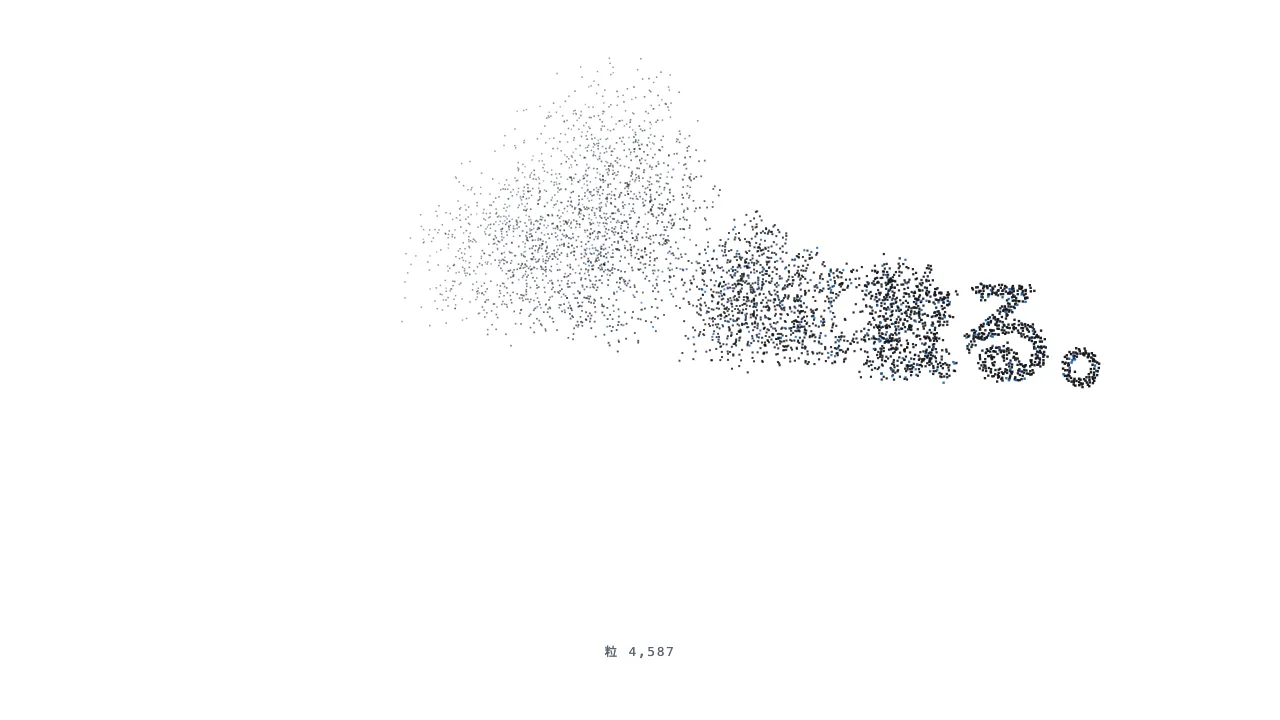
A still — with scripts on, it runs right here The demo itself — scroll inside the frame
A still — with scripts on, it runs right here The demo itself — scroll inside the frame
Copy and paste, or save a file and hand it over. For a machine with no network, one “Everything” file is enough.
Everything in this panel, including the contents behind each URL, in one Markdown file — Large, so it goes as a file (copy is for 32 KB and under)
Text shatter — Text disintegration into particles

Break a one-line heading into particles and blow them away as the page scrolls. Draw the heading in bold on an off-screen canvas, read its pixels, and place a particle every 2px, widening the step if there would be more than 9,000. In a 400vh pinned section keep the text intact until 12% progress, then let the wind reach particles from left to right until 90% (each particle is delayed by its x position × 0.45). Give each particle its own drift to the upper right (34–61% of the canvas width), scatter angle and lift, and make its position a pure function of progress. Particles accelerate with an ease-in, fade out and shrink to 40% of their size, and about one in ten is accent-coloured. Use a seeded pseudo-random generator so that scrolling back returns every particle along the same path to the text. Keep the real text visually hidden for screen readers, and with reduced motion stop on the intact text. Implement it with CSS and JavaScript only, without any library.

Do not drop:
- Make particle positions a pure function of progress; integrating over time cannot return to the text on scroll-back
- Seed the random generator so the particles are the same every time
- Sample pixels after the webfont has loaded, or you will shatter the wrong glyph shapes
- Keep the real text for screen readers, and stop on intact text with reduced motion

A working example (one self-contained HTML file): https://design-vault.pages.dev/designs/motion-text-shatter/demo.html
/designs/motion-text-shatter/demo.html — One self-contained HTML file. CSS and plain JavaScript only; it fetches nothing.
<!doctype html>
<html lang="ja">
<head>
<meta charset="utf-8">
<meta name="viewport" content="width=device-width, initial-scale=1">
<title>46 粒子ばらけ — Text disintegration into particles</title>
<style>
/* dv-motion-base:start */
:root {
  --ground: #FFFFFF;
  --surface: #F3F5F8;
  --ink: #14181F;
  --muted: #5A6472;
  --accent: #1F5FA8;
  --rule: #D8DDE4;
  --accent-soft: color-mix(in srgb, var(--accent) 12%, var(--ground));
  --accent-mid: color-mix(in srgb, var(--accent) 45%, var(--ground));
  --shade: color-mix(in srgb, var(--ink) 14%, transparent);

  --font: "Zen Kaku Gothic New", "Hiragino Sans", "Noto Sans JP", "Yu Gothic", system-ui, sans-serif;
  --mono: ui-monospace, "SF Mono", Menlo, Consolas, monospace;

  --t-label: 13px;
  --t-body: 16px;
  --t-lead: 20px;
  --t-h2: 32px;
  --t-h1: clamp(40px, 7vw, 72px);

  --s1: 4px;
  --s2: 8px;
  --s3: 16px;
  --s4: 24px;
  --s5: 40px;
  --s6: 64px;
  --s7: 104px;

  --radius: 12px;
  --ease: cubic-bezier(.2, .7, .2, 1);
  --dur: .7s;
  --measure: 1080px;
}
*, *::before, *::after { box-sizing: border-box; }
html { -webkit-text-size-adjust: 100%; }
body {
  margin: 0;
  background: var(--ground);
  color: var(--ink);
  font-family: var(--font);
  font-size: var(--t-body);
  line-height: 1.7;
  font-feature-settings: "palt";
  overflow-x: hidden;
}
h1, h2, h3, p, ul, ol, figure { margin: 0; padding: 0; }
ul, ol { list-style: none; }
.dv-wrap { width: min(100% - 2 * var(--s4), var(--measure)); margin-inline: auto; }
.dv-label {
  min-height: 72vh;
  display: grid;
  align-content: center;
  gap: var(--s3);
  padding-block: var(--s6);
  border-bottom: 1px solid var(--rule);
}
.dv-num { font-family: var(--mono); font-size: var(--t-lead); font-weight: 700; color: var(--accent); letter-spacing: .04em; }
.dv-name { font-size: var(--t-h1); font-weight: 700; line-height: 1.15; letter-spacing: .01em; }
.dv-ai { font-family: var(--mono); font-size: var(--t-lead); color: var(--muted); }
.dv-desc { font-size: var(--t-lead); color: var(--ink); }
.dv-hint { font-size: var(--t-label); color: var(--muted); letter-spacing: .12em; margin-top: var(--s4); }
.dv-stage { padding-block: var(--s7); }
.dv-h2 { font-size: var(--t-h2); font-weight: 700; line-height: 1.3; }
.dv-lead { font-size: var(--t-lead); color: var(--muted); }
.dv-eyebrow { font-family: var(--mono); font-size: var(--t-label); color: var(--accent); letter-spacing: .12em; text-transform: uppercase; }
.dv-card { background: var(--surface); border: 1px solid var(--rule); border-radius: var(--radius); padding: var(--s4); }
.dv-ph {
  border-radius: var(--radius);
  background: linear-gradient(135deg, var(--accent-soft), var(--accent-mid) 60%, var(--accent));
  aspect-ratio: 16 / 9;
}
.dv-ph--alt { background: linear-gradient(200deg, var(--surface), var(--accent-soft) 55%, var(--accent-mid)); }
.dv-ph--ink { background: linear-gradient(160deg, var(--ink), color-mix(in srgb, var(--ink) 55%, var(--accent))); }
.dv-end {
  min-height: 60vh;
  display: grid;
  place-items: center;
  border-top: 1px solid var(--rule);
  color: var(--muted);
  font-family: var(--mono);
  font-size: var(--t-label);
  letter-spacing: .12em;
}
/* dv-motion-base:end */

/* ---- この演出だけの CSS。色は var(--…) か color-mix() のみ ---- */
.stack { display: grid; gap: var(--s6); }
.pt-zone { height: 400vh; }
.pt-stick {
  position: sticky; top: 0; height: 100vh;
  display: grid; place-content: center; justify-items: center; gap: var(--s4);
}
/* 幅は画面から決める。中央寄せの grid の中で % を使うと箱が点まで縮む。 */
.pt-canvas { display: block; width: 100vw; aspect-ratio: 16 / 7; }
@media (max-width: 640px) { .pt-canvas { aspect-ratio: 1 / 1; } }
.pt-text { font-size: var(--t-h2); font-weight: 700; line-height: 1.3; text-align: center; }
/* JS が動くあいだは文字を粒で描くので、本物の文は読み上げ用に残して見えなくする。 */
.js .pt-text {
  position: absolute; width: 1px; height: 1px; overflow: hidden;
  clip-path: inset(50%); white-space: nowrap;
}
.pt-count { font-family: var(--mono); font-size: var(--t-label); color: var(--muted); letter-spacing: .12em; }

@media (prefers-reduced-motion: reduce) {
  .pt-zone { height: auto; }
  .pt-stick { position: static; height: auto; padding-block: var(--s6); }
}
</style>
</head>
<body data-motion-number="46">
<header class="dv-label">
  <div class="dv-wrap">
    <p class="dv-num">46</p>
    <h1 class="dv-name">粒子ばらけ</h1>
    <p class="dv-ai">Text disintegration into particles</p>
    <p class="dv-desc">文字が粒になって風に散っていく</p>
    <p class="dv-hint">SCROLL ↓</p>
  </div>
</header>

<main class="dv-stage">
<div class="dv-wrap stack">
    <section class="dv-card">
      <p class="dv-eyebrow">Section 1</p>
      <h2 class="dv-h2">見出しが入ります</h2>
      <p class="dv-lead">本文のダミーです。スクロールすると、下の文字が粒になって左から順に風へ散っていきます。</p>
    </section>
  </div>

  <section class="pt-zone" data-progress="pin">
    <div class="pt-stick">
      <h2 class="pt-text">言葉は、風に散る。</h2>
      <canvas class="pt-canvas" aria-hidden="true"></canvas>
      <p class="pt-count">粒 0</p>
    </div>
  </section>

  <div class="dv-wrap stack">
    <section class="dv-card">
      <p class="dv-eyebrow">Section 2</p>
      <h2 class="dv-h2">見出しが入ります</h2>
      <p class="dv-lead">本文のダミーです。戻すと粒は元の文字に集まります。</p>
    </section>
  </div>
</main>

<footer class="dv-end">END — 46 粒子ばらけ</footer>

<script>
/* dv-motion-helpers:start */
const dvReduce = matchMedia('(prefers-reduced-motion: reduce)').matches;
document.documentElement.classList.add('js');

/**
 * 画面に入った要素へ .is-in を付ける。
 * data-reveal="repeat" の要素は画面を出たら外す(何度でも再生)。
 */
function dvReveal(selector = '[data-reveal]', { threshold = 0.2, rootMargin = '0px 0px -8% 0px' } = {}) {
  const els = [...document.querySelectorAll(selector)];
  if (dvReduce || !('IntersectionObserver' in window)) {
    els.forEach((el) => el.classList.add('is-in'));
    return;
  }
  const io = new IntersectionObserver((entries) => {
    for (const e of entries) {
      if (e.isIntersecting) {
        e.target.classList.add('is-in');
        if (e.target.dataset.reveal !== 'repeat') io.unobserve(e.target);
      } else if (e.target.dataset.reveal === 'repeat') {
        e.target.classList.remove('is-in');
      }
    }
  }, { threshold, rootMargin });
  els.forEach((el) => io.observe(el));
}

/**
 * スクロール量を 0〜1 にして、各 [data-progress] 要素の CSS 変数 --p に書く。
 *   data-progress="through" : 要素の上端が画面の下端に来たとき 0、下端が画面の上端を抜けたとき 1
 *   data-progress="pin"     : 要素の上端が画面の上端に来たとき 0、下端が画面の下端に来たとき 1
 *                             (中に position: sticky の箱を持つ、背の高い区画用)
 *   data-progress="page"    : ページ全体のスクロール量
 * onUpdate(el, p) を渡すと、値が変わるたびに呼ばれる。
 */
function dvProgress(onUpdate) {
  const els = [...document.querySelectorAll('[data-progress]')];
  const clamp = (n) => Math.min(1, Math.max(0, n));
  let queued = false;
  const measure = () => {
    queued = false;
    const vh = window.innerHeight;
    for (const el of els) {
      const r = el.getBoundingClientRect();
      let p;
      if (el.dataset.progress === 'pin') p = r.height > vh ? -r.top / (r.height - vh) : 0;
      else if (el.dataset.progress === 'page') {
        const max = document.documentElement.scrollHeight - vh;
        p = max > 0 ? window.scrollY / max : 0;
      } else p = (vh - r.top) / (vh + r.height);
      p = clamp(p);
      el.style.setProperty('--p', p.toFixed(4));
      if (onUpdate) onUpdate(el, p);
    }
  };
  const request = () => {
    if (!queued) { queued = true; requestAnimationFrame(measure); }
  };
  addEventListener('scroll', request, { passive: true });
  addEventListener('resize', request);
  measure();
}
/* dv-motion-helpers:end */

/* ---- この演出だけの JS ---- */
const canvas = document.querySelector('.pt-canvas');
const countEl = document.querySelector('.pt-count');
const text = document.querySelector('.pt-text').textContent.trim();
const ctx = canvas.getContext('2d');
const role = (name) => getComputedStyle(document.documentElement).getPropertyValue(name).trim();

// 毎回同じ並びになる乱数。スクロールを戻したとき、粒が同じ道を帰るために使う。
function seeded(seed) {
  return () => {
    seed = (seed + 0x6d2b79f5) | 0;
    let t = Math.imul(seed ^ (seed >>> 15), 1 | seed);
    t = (t + Math.imul(t ^ (t >>> 7), 61 | t)) ^ t;
    return ((t ^ (t >>> 14)) >>> 0) / 4294967296;
  };
}

let W = 0, H = 0, parts = [], progress = 0, queued = false;

/** 文字を描いて画素を拾い、粒の「もとの位置」を決める。 */
function sample() {
  W = canvas.clientWidth; H = canvas.clientHeight;
  const dpr = Math.min(2, window.devicePixelRatio || 1);
  canvas.width = Math.round(W * dpr); canvas.height = Math.round(H * dpr);
  const off = document.createElement('canvas');
  off.width = W; off.height = H;
  const o = off.getContext('2d', { willReadFrequently: true });
  o.fillStyle = role('--ink');
  // 狭い画面では読点で 2 行に割り、文字を大きく保つ。
  const lines = W < 640 ? text.split(/(?<=、)/) : [text];
  const longest = Math.max(...lines.map((l) => l.length));
  const size = Math.round(Math.min((W * 0.86) / (longest + 0.4), H * 0.7 / lines.length));
  o.font = `700 ${size}px ${getComputedStyle(document.body).fontFamily}`;
  o.textAlign = 'center'; o.textBaseline = 'middle';
  lines.forEach((l, i) => o.fillText(l, W / 2, H / 2 + (i - (lines.length - 1) / 2) * size * 1.25));
  const data = o.getImageData(0, 0, W, H).data;
  const rnd = seeded(7);
  for (let step = 2; ; step++) {
    parts = [];
    for (let y = 0; y < H; y += step) {
      for (let x = 0; x < W; x += step) {
        if (data[(y * W + x) * 4 + 3] > 128) {
          parts.push({
            x, y, s: step,
            a: rnd() * Math.PI * 2,   // 飛ぶ向きのばらつき
            r: 0.4 + rnd() * 0.9,     // 飛ぶ距離の倍率
            k: rnd(),                 // 散り方・色分け用
          });
        }
      }
    }
    if (parts.length <= 9000 || step > 12) break;
  }
  countEl.textContent = `粒 ${parts.length.toLocaleString('en-US')}`;
}

const clamp01 = (n) => Math.min(1, Math.max(0, n));
const easeIn = (t) => t * t * (3 - 2 * t) * t;   // 出だしはゆっくり、風に乗ると加速

function render() {
  queued = false;
  const dpr = canvas.width / W;
  ctx.setTransform(dpr, 0, 0, dpr, 0, 0);
  ctx.clearRect(0, 0, W, H);
  const ink = role('--ink'), accent = role('--accent');
  // 最初の 12% は文字のまま見せ、そこから左の粒に風が当たっていく。
  const e = clamp01((progress - 0.12) / 0.78);
  for (const q of parts) {
    const delay = (q.x / W) * 0.45;
    const t = clamp01((e - delay) / 0.55);
    if (t <= 0) {
      ctx.fillStyle = q.k > 0.9 ? accent : ink;
      ctx.fillRect(q.x, q.y, q.s * 0.9, q.s * 0.9);
      continue;
    }
    const m = easeIn(t);
    const dx = m * W * (0.22 + q.r * 0.3) + Math.cos(q.a) * m * 60 * q.r;   // 風下(右)へ
    const dy = -m * H * 0.55 * q.r + Math.sin(q.a) * m * 50 * q.r + m * m * 40;  // 上へ昇り、少し落ちる
    const alpha = 1 - t * t;
    if (alpha <= 0.01) continue;
    const size = q.s * 0.9 * (1 - 0.6 * t);
    ctx.globalAlpha = alpha;
    ctx.fillStyle = q.k > 0.9 ? accent : ink;
    ctx.fillRect(q.x + dx, q.y + dy, size, size);
  }
  ctx.globalAlpha = 1;
}

const request = () => { if (!queued) { queued = true; requestAnimationFrame(render); } };
// 画面の大きさが変わったときだけ、間引いて拾い直す。モバイルでは URL バーの出入りでも
// resize が何度も飛ぶ。
let lastSize = '';
let resampling = false;
function resample() {
  const size = canvas.clientWidth + 'x' + canvas.clientHeight;
  if (size === lastSize || resampling) return;
  resampling = true;
  requestAnimationFrame(() => { resampling = false; lastSize = canvas.clientWidth + 'x' + canvas.clientHeight; sample(); request(); });
}
function start() {
  sample();
  lastSize = canvas.clientWidth + 'x' + canvas.clientHeight;
  addEventListener('resize', resample);
  if (dvReduce) { progress = 0; request(); return; }   // 動きを減らす設定では、文字のまま止める
  dvProgress((el, p) => { progress = p; request(); });
}
// 書体が読み込まれる前に画素を拾うと、別の書体の形を粒にしてしまう。
(document.fonts && document.fonts.ready ? document.fonts.ready : Promise.resolve()).then(start);
</script>
</body>
</html>