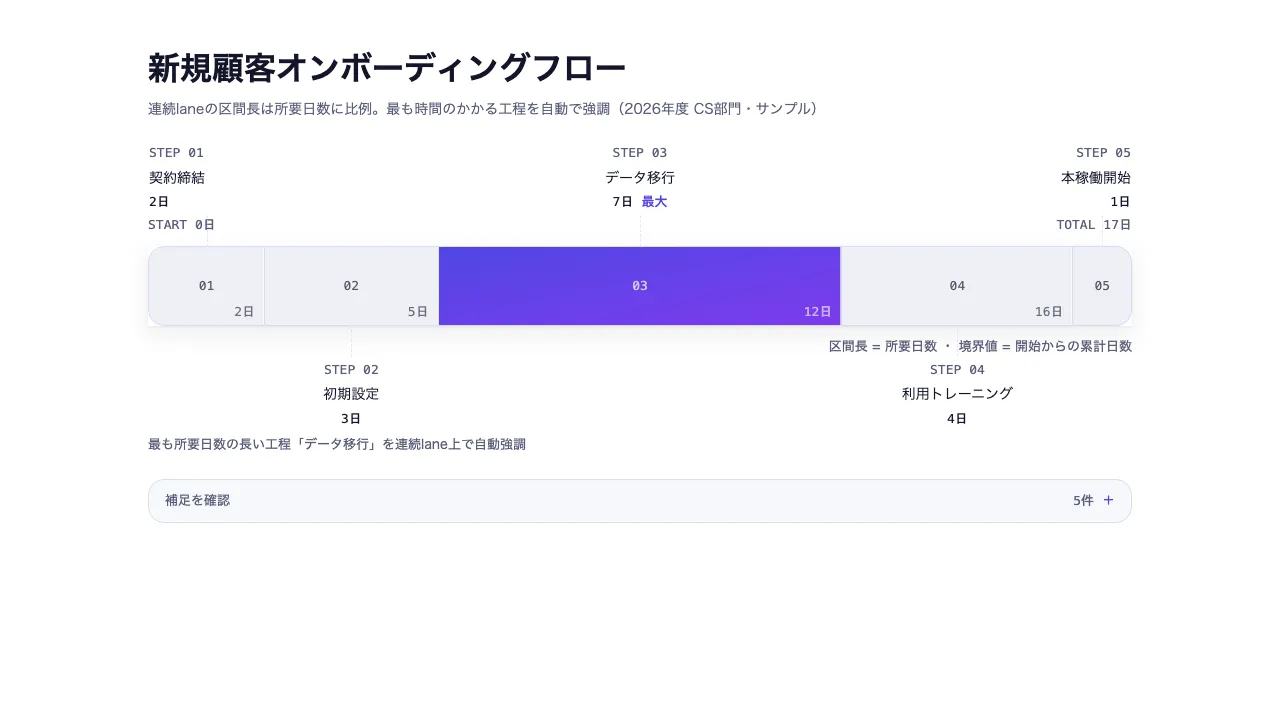
作品として見る 生成された文書そのもの — 切り替えも開閉もそのまま動きます
作品として見る 生成された文書そのもの — 切り替えも開閉もそのまま動きます
コピーして貼るか、ファイルに保存して渡す。ネットにつながらない環境には「全部入り」を 1 つ渡せば足りる。
このパネルの中身を、URL の先にあるファイルの中身まで含めて 1 つにまとめた Markdown — 大きいのでファイルで渡す(コピーは 32KB まで)
「プロセスフロー(業務手順)」でHTML資料を作ってください。この型は実行できるので、版面を組み直す必要はありません — 必要なのは中身です。

## この型がすること
所要時間の比率で連続 lane の区間長を自動計算し、最も時間を食う工程を lane 上で強調する。どこが詰まっているかが長さで分かる

## 渡す必要があるもの
- 工程名
- 各工程の所要時間
- 担当者または補足

## 入力の形
- `title` — string — スライドタイトル。結論を書くメッセージラインを推奨
- `subtitle` — string(任意)— 補足・出典など
- `steps` — { label, weight, owner?, note? } の配列。weight(所要日数等)の比率で連続 lane の区間長を自動計算し、最大の工程を lane 上で強調表示。owner/note は図の下の補足欄で展開

入力の機械可読な検証は schema.ts が持ちます。足りない入力は推測せず質問してください。

## 向かない場合
- 分岐と合流を含む多対多の流量を示したい場合
- 並行タスクと依存関係から完了日への影響を説明したい場合

## 作り方
入力を JSON にまとめ、次を実行します。

```bash
node scripts/render.mjs process-flow <入力.json> --theme ink -o out.html
```

出力は 1 ファイルで完結し、外部から何も読み込みません。

## 原本
- https://design-vault.pages.dev/designs/process-flow/source/template.tsx
- https://design-vault.pages.dev/designs/process-flow/source/schema.ts
- https://design-vault.pages.dev/designs/process-flow/source/sample-data.json
- https://design-vault.pages.dev/designs/process-flow/sample.html テンプレート・入力スキーマ・サンプルデータ・メタ情報。この文書はこの 4 つから生成されています。 生成された文書
/designs/process-flow/source/template.tsx
import { useId } from "react";
import type { ProcessFlowProps } from "./schema";

/** weight に比例した区間幅。0以下は可視性を保つ最小値へクランプする。 */
export const stepWidths = (steps: { weight: number }[]): number[] =>
  steps.map((step) => Math.max(0.1, step.weight));

/** 最も weight が大きい工程のindex。同値は先頭を採用する。 */
export const bottleneckIndex = (steps: { weight: number }[]): number => {
  let maxIndex = 0;
  for (let index = 1; index < steps.length; index++) {
    if (steps[index].weight > steps[maxIndex].weight) maxIndex = index;
  }
  return maxIndex;
};

/**
 * 各工程の中央位置(%)。クランプ済み区間幅の累積から求める。
 * ラベル、connector、操作対象を同じ工程断面へ揃えるために使う。
 */
export const stepCenters = (steps: { weight: number }[]): number[] => {
  const widths = stepWidths(steps);
  const total = widths.reduce((sum, width) => sum + width, 0);
  let elapsed = 0;
  return widths.map((width) => {
    const start = elapsed;
    elapsed += width;
    return ((start + elapsed) / 2 / total) * 100;
  });
};

/**
 * 各hand-off時点の生weight累計。クランプ値は描画だけに使い、
 * 表示する日数へ混ぜない。
 */
export const cumulativeDays = (steps: { weight: number }[]): number[] => {
  const result: number[] = [];
  let elapsed = 0;
  for (let index = 0; index < steps.length - 1; index++) {
    elapsed += steps[index].weight;
    result.push(elapsed);
  }
  return result;
};

export type ProcessLaneSegment = {
  originalIndex: number;
  startPct: number;
  endPct: number;
  widthPct: number;
  centerPct: number;
  cumulativeDays: number;
};

/**
 * 独立カードの幅ではなく、一本のprocess lane上の連続区間へ工程を写す。
 * endPctは必ず次工程のstartPctになり、最終工程は100%で終わる。
 */
export function processLaneGeometry(
  steps: readonly { weight: number }[],
): ProcessLaneSegment[] {
  const widths = stepWidths([...steps]);
  const totalWidth = widths.reduce((sum, width) => sum + width, 0);
  let widthElapsed = 0;
  let daysElapsed = 0;

  return widths.map((width, originalIndex) => {
    const startPct = (widthElapsed / totalWidth) * 100;
    widthElapsed += width;
    daysElapsed += steps[originalIndex].weight;
    const endPct = (widthElapsed / totalWidth) * 100;
    return {
      originalIndex,
      startPct,
      endPct,
      widthPct: endPct - startPct,
      centerPct: (startPct + endPct) / 2,
      cumulativeDays: daysElapsed,
    };
  });
}

const HIGHLIGHT_GRADIENT = "bg-linear-to-br from-tertiary to-accent-violet";
const stagger = (index: number) =>
  `calc(var(--stagger-step) * ${index})`;

const formatDays = (value: number) =>
  new Intl.NumberFormat("ja-JP", { maximumFractionDigits: 1 }).format(value);

export default function ProcessFlow({
  title,
  subtitle,
  steps,
}: ProcessFlowProps) {
  const autoId = useId();
  const uid = autoId.replace(
      // 捨てる操作は単射でないので、schema を通る別々の値が同じ id になる
      // (`sales:a` と `sales/a` がどちらも `salesa`)。同じ文書へ 2 つ置くと
      // id と radio の name が衝突して、片方の操作がもう片方に効く。
      // 逃がし文字(`_`)自身も逃がすので、この変換は単射。
      /[^a-zA-Z0-9-]/g,
      (c) => `_${c.charCodeAt(0).toString(16)}_`,
    ) || "process";
  const geometry = processLaneGeometry(steps);
  const bottleneck = steps.length > 0 ? bottleneckIndex(steps) : -1;
  const totalDays = steps.reduce((sum, step) => sum + step.weight, 0);
  const notes = steps.filter((step) => step.note);

  const interactionStyles = `
[data-process-instance="${uid}"] [data-process-segment] {
  transition: background-color 140ms ease-out, color 140ms ease-out;
}
[data-process-instance="${uid}"] [data-process-record],
[data-process-instance="${uid}"] [data-process-connector],
[data-process-instance="${uid}"] [data-process-boundary] {
  transition: color 140ms ease-out, border-color 140ms ease-out, opacity 140ms ease-out;
}
[data-process-instance="${uid}"] [data-process-hotspot]:focus-visible {
  outline: none;
}
${geometry
  .map(
    (segment) => `
[data-process-instance="${uid}"]:has([data-process-hotspot~="${segment.originalIndex}"]:is(:hover, :focus)) [data-process-segment][data-step-index="${segment.originalIndex}"]:not([data-priority]) {
  background-color: var(--color-tertiary-container);
  color: var(--color-on-tertiary-container);
}
[data-process-instance="${uid}"]:has([data-process-hotspot~="${segment.originalIndex}"]:is(:hover, :focus)) [data-process-record][data-step-index="${segment.originalIndex}"] {
  color: var(--color-tertiary);
}
[data-process-instance="${uid}"]:has([data-process-hotspot~="${segment.originalIndex}"]:is(:hover, :focus)) [data-process-connector][data-step-index="${segment.originalIndex}"],
[data-process-instance="${uid}"]:has([data-process-hotspot~="${segment.originalIndex}"]:is(:hover, :focus)) [data-process-boundary][data-step-index="${segment.originalIndex}"] {
  border-color: var(--color-tertiary);
  opacity: 1;
}`,
  )
  .join("")}
`;

  return (
    <section
      data-process-instance={uid}
      className="mx-auto max-w-slide bg-surface p-6 font-sans text-on-surface sm:p-12"
    >
      <style>{interactionStyles}</style>
      <header className="mb-8">
        <h1 className="text-h1">{title}</h1>
        {subtitle && (
          <p className="mt-2 text-body-sm text-secondary">{subtitle}</p>
        )}
      </header>

      {steps.length === 0 ? (
        <p className="text-body-sm text-secondary">工程が未設定</p>
      ) : (
        <>
          {/* desktop: 所要日数を横軸にした一本の連続lane */}
          <div
            data-process-lane="desktop"
            className="relative hidden pt-16 pb-16 sm:block"
          >
            <div className="mb-3 flex items-center justify-between font-mono text-label text-secondary">
              <span>START 0日</span>
              <span>TOTAL {formatDays(totalDays)}日</span>
            </div>

            <div className="relative flex h-20 shadow-card">
              {steps.map((step, index) => {
                const segment = geometry[index];
                const isBottleneck = index === bottleneck;
                const labelAbove = index % 2 === 0;
                const edgeLabel =
                  index === 0
                    ? "left-0 text-left"
                    : index === steps.length - 1
                      ? "right-0 text-right"
                      : "left-1/2 -translate-x-1/2 text-center";
                const round =
                  index === 0
                    ? "rounded-l-lg border-l"
                    : index === steps.length - 1
                      ? "rounded-r-lg"
                      : "";

                return (
                  <div
                    key={index}
                    data-process-segment="true"
                    data-process-hotspot={index}
                    data-step-index={index}
                    data-priority={isBottleneck ? "true" : undefined}
                    tabIndex={0}
                    role="group"
                    aria-label={`STEP ${index + 1} ${step.label}、${formatDays(step.weight)}日、累計${formatDays(segment.cumulativeDays)}日${isBottleneck ? "、最も所要日数が長い工程" : ""}`}
                    className={`relative min-w-0 animate-rise cursor-default border-y border-r border-outline ${
                      isBottleneck
                        ? `${HIGHLIGHT_GRADIENT} text-on-tertiary`
                        : "bg-neutral text-on-neutral"
                    } ${round}`}
                    style={{
                      flexGrow: segment.widthPct,
                      flexBasis: 0,
                      animationDelay: stagger(index),
                    }}
                  >
                    <div className="pointer-events-none absolute inset-0 flex items-center justify-center overflow-hidden px-1">
                      <span className="font-mono text-label opacity-70">
                        {String(index + 1).padStart(2, "0")}
                      </span>
                    </div>

                    <span
                      data-process-connector="true"
                      data-step-index={index}
                      aria-hidden="true"
                      className={`absolute left-1/2 h-8 border-l border-dashed border-outline opacity-70 ${
                        labelAbove ? "bottom-full" : "top-full"
                      }`}
                    />
                    <div
                      data-process-record="true"
                      data-step-index={index}
                      className={`absolute w-36 text-on-surface ${edgeLabel} ${
                        labelAbove ? "bottom-full mb-9" : "top-full mt-9"
                      }`}
                    >
                      <p className="font-mono text-label text-secondary">
                        STEP {String(index + 1).padStart(2, "0")}
                      </p>
                      <p className="mt-1 text-body-sm">{step.label}</p>
                      <p className="mt-1 font-mono text-label">
                        {formatDays(step.weight)}日
                        {isBottleneck && (
                          <span className="ml-2 text-tertiary">最大</span>
                        )}
                      </p>
                    </div>

                    {index < steps.length - 1 && (
                      <span
                        data-process-boundary="true"
                        data-step-index={index}
                        data-cumulative-days={segment.cumulativeDays}
                        aria-label={`累計${formatDays(segment.cumulativeDays)}日`}
                        className="absolute inset-y-0 right-0 border-r border-surface/80 opacity-80"
                      >
                        <span className="absolute right-2 bottom-1 whitespace-nowrap font-mono text-label opacity-75">
                          {formatDays(segment.cumulativeDays)}日
                        </span>
                      </span>
                    )}
                  </div>
                );
              })}
            </div>
            <p className="mt-3 text-right text-label text-secondary">
              区間長 = 所要日数 ・ 境界値 = 開始からの累計日数
            </p>
          </div>

          {/* mobile: 同じ連続区間を縦軸へ回し、横overflowを避ける */}
          <div data-process-lane="mobile" className="relative h-128 sm:hidden">
            <div className="absolute inset-y-0 left-0 w-14 shadow-card">
              {steps.map((step, index) => {
                const segment = geometry[index];
                const isBottleneck = index === bottleneck;
                const round =
                  index === 0
                    ? "rounded-t-lg border-t"
                    : index === steps.length - 1
                      ? "rounded-b-lg"
                      : "";
                return (
                  <div
                    key={index}
                    data-process-segment="true"
                    data-process-hotspot={index}
                    data-step-index={index}
                    data-priority={isBottleneck ? "true" : undefined}
                    tabIndex={0}
                    role="group"
                    aria-label={`STEP ${index + 1} ${step.label}、${formatDays(step.weight)}日、累計${formatDays(segment.cumulativeDays)}日${isBottleneck ? "、最も所要日数が長い工程" : ""}`}
                    className={`absolute inset-x-0 animate-rise cursor-default border-x border-b border-outline ${
                      isBottleneck
                        ? `${HIGHLIGHT_GRADIENT} text-on-tertiary`
                        : "bg-neutral text-on-neutral"
                    } ${round}`}
                    style={{
                      top: `${segment.startPct}%`,
                      height: `${segment.widthPct}%`,
                      animationDelay: stagger(index),
                    }}
                  >
                    <span className="pointer-events-none absolute inset-0 flex items-center justify-center overflow-hidden font-mono text-label opacity-70">
                      {String(index + 1).padStart(2, "0")}
                    </span>
                    <span
                      data-process-connector="true"
                      data-step-index={index}
                      aria-hidden="true"
                      className="absolute top-1/2 left-full w-4 border-t border-dashed border-outline opacity-70"
                    />
                    <div
                      data-process-record="true"
                      data-step-index={index}
                      className="absolute top-1/2 left-full ml-5 w-64 -translate-y-1/2 text-on-surface"
                    >
                      <p className="font-mono text-label text-secondary">
                        STEP {String(index + 1).padStart(2, "0")}
                      </p>
                      <p className="text-body-sm">{step.label}</p>
                      <p className="font-mono text-label">
                        {formatDays(step.weight)}日 ・ 累計
                        {formatDays(segment.cumulativeDays)}日
                        {isBottleneck && (
                          <span className="ml-2 text-tertiary">最大</span>
                        )}
                      </p>
                    </div>

                    {index < steps.length - 1 && (
                      <span
                        data-process-boundary="true"
                        data-step-index={index}
                        data-cumulative-days={segment.cumulativeDays}
                        aria-label={`累計${formatDays(segment.cumulativeDays)}日`}
                        className="absolute inset-x-0 bottom-0 border-b border-surface/80 opacity-80"
                      />
                    )}
                  </div>
                );
              })}
            </div>
          </div>

          <p className="mt-4 text-label text-secondary">
            最も所要日数の長い工程「{steps[bottleneck].label}
            」を連続lane上で自動強調
          </p>
        </>
      )}

      {notes.length > 0 && (
        <details
          data-inline-disclosure="true"
          className="group mt-6 rounded-lg border border-outline bg-surface-subtle"
        >
          <summary className="flex cursor-pointer list-none items-center px-4 py-3 text-label text-secondary focus-visible:outline focus-visible:outline-2 focus-visible:outline-offset-2 focus-visible:outline-tertiary">
            <span>補足を確認</span>
            <span className="ml-auto font-mono">{notes.length}件</span>
            <span
              aria-hidden="true"
              className="ml-2 text-tertiary transition-transform group-open:rotate-45"
            >
              +
            </span>
          </summary>
          <div className="grid gap-3 border-t border-outline p-4 sm:grid-cols-2">
            {notes.map((step, index) => (
              <article
                key={index}
                data-note-item="true"
                className="rounded-md bg-surface p-4"
              >
                <h3 className="text-label">{step.label}</h3>
                <p className="mt-1 font-mono text-label text-secondary">
                  {formatDays(step.weight)}日
                  {step.owner ? ` ・ 担当 ${step.owner}` : ""}
                </p>
                <p className="mt-2 text-body-sm">{step.note}</p>
              </article>
            ))}
          </div>
        </details>
      )}
    </section>
  );
}
/designs/process-flow/source/schema.ts
import { z } from "zod";

export const processStepSchema = z
  .object({
    label: z.string(),
    weight: z
      .number()
      .positive()
      .describe(
        "所要日数などの相対量。連続process laneの区間長に使う。" +
          "正の数のみ —— 負値は区間長が 0.1 にクランプされる一方、累計と合計には" +
          "そのまま加算されるため、前へ進む lane と減っていく日数という食い違いになる",
      ),
    owner: z.string().optional(),
    note: z.string().optional().describe("図の下の補足欄で明示的に展開される詳細"),
  })
  .strict();

export const schema = z
  .object({
    title: z.string().describe("スライドタイトル。結論を書くメッセージラインを推奨"),
    subtitle: z.string().optional().describe("補足・出典など"),
    steps: z.array(processStepSchema),
  })
  .strict();

export type ProcessStep = z.infer<typeof processStepSchema>;
export type ProcessFlowProps = z.infer<typeof schema>;
/designs/process-flow/source/meta.yaml
id: process-flow
name:
  ja: "プロセスフロー(業務手順)"
  en: "Process Flow"
purpose:
  ja: "所要時間の比率で連続 lane の区間長を自動計算し、最も時間を食う工程を lane 上で強調する。どこが詰まっているかが長さで分かる"
  en: "One continuous lane divided in proportion to how long each step takes, with the slowest marked. Where the work piles up is legible as length"
status: published
# 索引カードの図版。pnpm layout:render が原本から描く。
still: ./still.png
category: workflow
catalogOrder: 50
jobs:
  - plan-sequence
  - trace-flow
useCases:
  - process
layoutKinds:
  - flow
tags: [process, workflow, sequence, data-driven, interactive, semantic-geometry, linked-emphasis]
whenToUse:
  - ja: "オンボーディング・導入手順など業務フローの可視化"
    en: "Making an onboarding or rollout procedure visible"
  - ja: "承認・発注ワークフローの整理"
    en: "Setting out an approval or ordering workflow"
  - ja: "どの工程がボトルネックかを一目で示したい場合"
    en: "Showing at a glance which step is the bottleneck"
avoidWhen:
  - ja: "分岐と合流を含む多対多の流量を示したい場合"
    en: "Showing many-to-many volume with branching and merging"
  - ja: "並行タスクと依存関係から完了日への影響を説明したい場合"
    en: "Explaining how parallel tasks and dependencies move a finish date"
requiredInputs:
  - ja: "工程名"
    en: "What each step is"
  - ja: "各工程の所要時間"
    en: "How long each takes"
  - ja: "担当者または補足"
    en: "Who owns it, or a note"
relatedLayouts: [timeline, critical-path-gantt, sankey-flow]
dataSchema:
  title: "string — スライドタイトル。結論を書くメッセージラインを推奨"
  subtitle: "string(任意)— 補足・出典など"
  steps: "{ label, weight, owner?, note? } の配列。weight(所要日数等)の比率で連続 lane の区間長を自動計算し、最大の工程を lane 上で強調表示。owner/note は図の下の補足欄で展開"
sources: []
/designs/process-flow/source/sample-data.json
{
  "title": "新規顧客オンボーディングフロー",
  "subtitle": "連続laneの区間長は所要日数に比例。最も時間のかかる工程を自動で強調(2026年度 CS部門・サンプル)",
  "steps": [
    {
      "label": "契約締結",
      "weight": 2,
      "owner": "営業",
      "note": "電子契約で完結。締結後すぐにCS部門へ引き継ぐ"
    },
    {
      "label": "初期設定",
      "weight": 3,
      "owner": "CS",
      "note": "アカウント発行・権限設定・SSO連携の初期設定を実施"
    },
    {
      "label": "データ移行",
      "weight": 7,
      "owner": "CS / 情報システム",
      "note": "既存システムからのデータ移行が最も時間を要する。移行元の形式次第で追加工数が発生しやすい"
    },
    {
      "label": "利用トレーニング",
      "weight": 4,
      "owner": "CS",
      "note": "管理者向け・利用者向けの2回に分けて実施"
    },
    {
      "label": "本稼働開始",
      "weight": 1,
      "owner": "CS",
      "note": "初月は週次で利用状況をフォローアップ"
    }
  ]
}