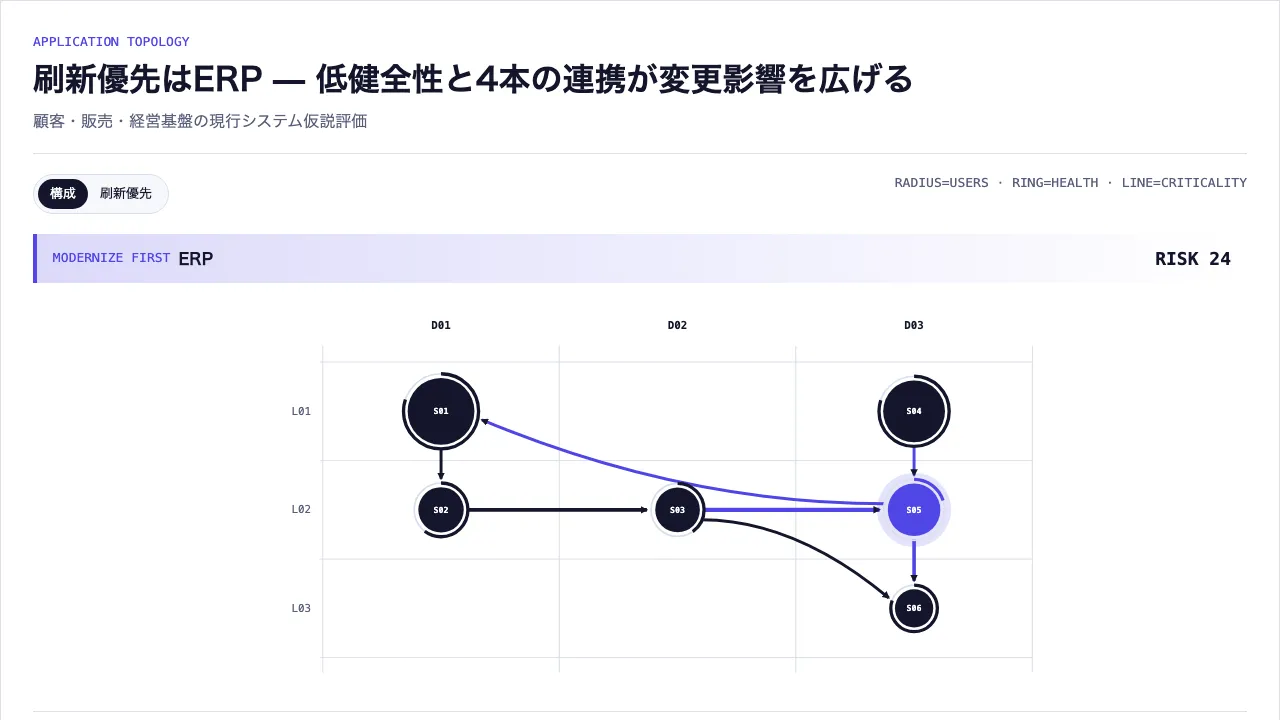
作品として見る 生成された文書そのもの — 切り替えも開閉もそのまま動きます
作品として見る 生成された文書そのもの — 切り替えも開閉もそのまま動きます
コピーして貼るか、ファイルに保存して渡す。ネットにつながらない環境には「全部入り」を 1 つ渡せば足りる。
このパネルの中身を、URL の先にあるファイルの中身まで含めて 1 つにまとめた Markdown — 大きいのでファイルで渡す(コピーは 32KB まで)
「システムランドスケープ(刷新影響)」でHTML資料を作ってください。この型は実行できるので、版面を組み直す必要はありません — 必要なのは中身です。

## この型がすること
業務ドメインとアーキテクチャ層へシステムを配置し、規模・健全性・重要度・連携から刷新優先度を導出する

## 渡す必要があるもの
- 業務ドメインと層
- システムの規模・健全性・重要度
- システム間interface

## 入力の形
- `systems` — { id, name, domainId, layerId, userCount, health, criticality, note? }[] — 4〜12件
- `interfaces` — { sourceId, targetId, criticality, label? }[] — 1〜20件

入力の機械可読な検証は schema.ts が持ちます。足りない入力は推測せず質問してください。

## 向かない場合
- 流量の大きさを多対多の帯幅で示したい場合
- 業務能力の成熟度と投資配分を示したい場合

## 作り方
入力を JSON にまとめ、次を実行します。

```bash
node scripts/render.mjs system-landscape-map <入力.json> --theme ink -o out.html
```

出力は 1 ファイルで完結し、外部から何も読み込みません。

## 原本
- https://design-vault.pages.dev/designs/system-landscape-map/source/template.tsx
- https://design-vault.pages.dev/designs/system-landscape-map/source/schema.ts
- https://design-vault.pages.dev/designs/system-landscape-map/source/sample-data.json
- https://design-vault.pages.dev/designs/system-landscape-map/sample.html テンプレート・入力スキーマ・サンプルデータ・メタ情報。この文書はこの 4 つから生成されています。 生成された文書
/designs/system-landscape-map/source/template.tsx
import { useId } from "react";
import type {
  LandscapeSystem,
  SystemInterface,
  SystemLandscapeMapProps,
} from "./schema";

type Axis = SystemLandscapeMapProps["domains"][number];

const round = (value: number) => Number(value.toFixed(2));

/**
 * 図の中に置くラベルの縁取り。`stroke-surface` と組で使う。
 *
 * 塗りの前に地の色で縁を引くので、連携線はラベルの手前で途切れて見え、線の上にラベルが
 * 来ても字が残る。背後に何も無いところでは地と同じ色なので見えない。
 *
 * 線を避けて置き場を解き直す道は取らない。この型の連携線はレイヤの間を縦横に走っていて、
 * 丸だけを避ける求解ですら 43 万本の総当たりを要した(45d736b)。そこへ線を足すと、解が
 * 無い入力が必ず残る。縁取りは入力に依らず効く。
 */
const HALO = { paintOrder: "stroke", strokeWidth: 4, strokeLinejoin: "round" } as const;

export function rankSystemRisks(
  systems: LandscapeSystem[],
  interfaces: SystemInterface[],
) {
  return systems
    .map((system, index) => {
      const connectionCount = interfaces.filter(
        (item) => item.sourceId === system.id || item.targetId === system.id,
      ).length;
      return {
        ...system,
        connectionCount,
        risk: system.criticality * (5 - system.health) + connectionCount,
        inputIndex: index,
      };
    })
    .sort((a, b) => b.risk - a.risk || a.inputIndex - b.inputIndex);
}

/**
 * 連携線のラベルをどこに置くか。
 *
 * 中点の真上(`textAnchor="middle"`)に置くと、縦向きの線ではラベルが行き先の丸と
 * 同じ x に来る。丸のラベルは枠に 1 つしか無いとき丸の真上か真下へ 2 行で置くので、
 * 線のラベルとぶつかる。レイヤ 3 段の行間は 118px で、両端の丸の半径と丸のラベル
 * 2 行がその大半を使うため、縦の線に残る隙間は元から 20px も無い。
 *
 * 実測(1280px・`svg text` の外接矩形): 直す前は「顧客情報」と「CRM」が 0.7px、
 * 「経費・購買申請」と「ERP」が 0.1px しか離れておらず、上下が接して 1 つの塊に
 * 見えていた。丸のラベル 2 行の意図した行間が 4px なので、そこと区別が付かない。
 *
 * 縦に近い線ではラベルを線の脇へ逃がす。右寄りの線を右へ逃がすと軸の外へ出るので、
 * その場合は左へ倒す。横に近い線は従来どおり中点の上に置く —— 横の線では行き先の
 * 丸のラベルと x が揃わないので、ぶつかる理由が無い。
 */
/**
 * 線のラベルを線から持ち上げる量。
 *
 * 横へ逃がすだけでは足りなかった。逃がしたあとも「顧客情報」と「CRM」は横に 3.1px、
 * 「経費・購買申請」と「ERP」は 5.2px しか空いておらず、ラベル衝突の下限 3px を
 * かろうじて超えているだけだった(1200px で実測)。行き先の名前の幅は入力で変わるので、
 * 横の逃げは入力に依らない余裕を作れない。縦へ持ち上げるほうは作れる。
 *
 * 11 がこの図の天井で、12 にすると上のレイヤの健全性の輪へ字が乗る(`layout:browser` が
 * 「顧客情報」と「経費・購買申請」の 2 件で落ちる)。輪は丸より後に描かれるので縁取りが
 * 効かない。11 で最小の隙間は 4.03px —— 下限に対する余裕は 1px しかないが、これは図の
 * 骨格が決めている限界で、これ以上は横の逃げか丸の配置を解き直すしかない。
 */
const LIFT = 11;

export const edgeLabelPlacement = (
  middleX: number,
  middleY: number,
  dx: number,
  dy: number,
) => {
  // 縦横比 2:1 より急なら「縦の線」。真横に近い線を巻き込まない角度。
  if (Math.abs(dy) <= Math.abs(dx) * 2) {
    return { x: middleX, y: middleY - LIFT, anchor: "middle" as const };
  }
  // 逃がす量は丸のラベル 1 行目の半幅を超えている必要がある。10 では足りず
  // (実測で横の重なりが 23px → 3px に減るだけだった)、システム名の半幅は
  // サンプル最長の「顧客ポータル」で 33 なので 20 を取る。縦は動かさない ——
  // 下げると丸のラベルへ寄ってしまう。
  // 描画領域は viewBox の 0-1000。右端に寄った線は左へ逃がす。
  const toLeft = middleX > 700;
  return {
    x: round(middleX + (toLeft ? -20 : 20)),
    y: round(middleY - LIFT),
    anchor: toLeft ? ("end" as const) : ("start" as const),
  };
};

export function systemLandscapeGeometry(
  domains: Axis[],
  layers: Axis[],
  systems: LandscapeSystem[],
  interfaces: SystemInterface[],
) {
  const maxUsers = Math.max(...systems.map((system) => system.userCount));
  const nodes = systems.map((system) => {
    const domainIndex = domains.findIndex((item) => item.id === system.domainId);
    const layerIndex = layers.findIndex((item) => item.id === system.layerId);
    const peers = systems.filter(
      (item) =>
        item.domainId === system.domainId && item.layerId === system.layerId,
    );
    const peerIndex = peers.findIndex((item) => item.id === system.id);
    const peerOffset = peerIndex - (peers.length - 1) / 2;
    return {
      ...system,
      x: round(
        120 + ((domainIndex + 0.5) / domains.length) * 850 + peerOffset * 62,
      ),
      y: round(
        66 + ((layerIndex + 0.5) / layers.length) * 354 + peerOffset * 18,
      ),
      radius: round(18 + Math.sqrt(system.userCount / maxUsers) * 22),
      domainIndex,
      peerCount: peers.length,
      labelSide:
        peers.length > 1 ? (peerIndex % 2 === 0 ? "left" : "right") : "right",
    };
  });
  const positions = new Map(nodes.map((node) => [node.id, node]));
  const edges = interfaces.map((item, index) => ({
    ...item,
    id: `${item.sourceId}-${item.targetId}-${index}`,
    source: positions.get(item.sourceId)!,
    target: positions.get(item.targetId)!,
    strokeWidth: round(1 + item.criticality * 0.65),
  }));
  return { nodes, edges };
}

export default function SystemLandscapeMap({
  title,
  subtitle,
  domains,
  layers,
  systems,
  interfaces,
  instanceId,
}: SystemLandscapeMapProps) {
  // 既定を固定文字列にすると、id を指定せず 2 つ置いたときに radio の name と
  // SVG marker の id を共有してしまう。他の型と同じく useId() に寄せる。
  const autoId = useId();
  const uid = (instanceId ?? autoId).replace(
      // 逃がし文字(`_`)自身も逃がすので単射。捨てる形にすると `a:b` と `a/b` が
      // 同じ id になる。
      /[^a-zA-Z0-9-]/g,
      (c: string) => `_${c.charCodeAt(0).toString(16)}_`,
    ) || "system-landscape";
  const ranked = rankSystemRisks(systems, interfaces);
  const priority = ranked[0];
  const notes = systems.filter((item) => item.note);
  const geometry = systemLandscapeGeometry(
    domains,
    layers,
    systems,
    interfaces,
  );
  const markerId = `${uid}-interface-arrow`;
  const drawnEdges = geometry.edges.map((edge) => {
    const dx = edge.target.x - edge.source.x;
    const dy = edge.target.y - edge.source.y;
    // この値は middleX を通ってラベルの置き場の分岐に入るので、実装依存の近似である
    // Math.hypot ではなく、正しい丸めが保証される Math.sqrt を使う。
    const distance = Math.sqrt(dx ** 2 + dy ** 2) || 1;
    const ux = dx / distance;
    const uy = dy / distance;
    const startX = edge.source.x + ux * (edge.source.radius + 4);
    const startY = edge.source.y + uy * (edge.source.radius + 4);
    const endX = edge.target.x - ux * (edge.target.radius + 10);
    const endY = edge.target.y - uy * (edge.target.radius + 10);
    const middleX = (startX + endX) / 2;
    const middleY = (startY + endY) / 2;
    return {
      edge,
      path: `M ${startX} ${startY} Q ${middleX} ${startY} ${endX} ${endY}`,
      label: edgeLabelPlacement(middleX, middleY, dx, dy),
      touchesPriority:
        edge.sourceId === priority.id || edge.targetId === priority.id,
    };
  });

  return (
    <section
      className="asset group/system overflow-hidden rounded-xl border border-outline bg-surface p-5 text-primary shadow-card sm:p-8"
      data-layout="system-landscape-map"
    >
      <header className="border-b border-outline pb-5">
        <p className="font-mono text-label text-tertiary">APPLICATION TOPOLOGY</p>
        <h1 className="mt-2 text-h1 text-balance">{title}</h1>
        {subtitle && <p className="mt-2 text-body text-secondary">{subtitle}</p>}
      </header>

      <div className="mt-5 flex flex-wrap justify-between gap-3">
        <div className="inline-flex rounded-full border border-outline bg-surface-subtle p-1 text-label">
          <label className="rounded-full px-3 py-1.5 has-[:checked]:bg-primary has-[:checked]:text-on-primary">
            <input className="system-view-map sr-only" type="radio" name={`${uid}-view`} defaultChecked />構成
          </label>
          <label className="rounded-full px-3 py-1.5 has-[:checked]:bg-primary has-[:checked]:text-on-primary">
            <input className="system-view-risk sr-only" type="radio" name={`${uid}-view`} />刷新優先
          </label>
        </div>
        <span className="font-mono text-label text-secondary">RADIUS=USERS · RING=HEALTH · LINE=CRITICALITY</span>
      </div>

      <div
        className="mt-5 grid gap-2 border-l-4 border-tertiary bg-gradient-to-r from-tertiary/20 to-transparent px-4 py-3 sm:grid-cols-[auto_1fr_auto] sm:items-center"
        data-system-default-priority="true"
      >
        <span className="font-mono text-label text-tertiary">MODERNIZE FIRST</span>
        <strong>{priority.name}</strong>
        <span className="font-mono text-h3">RISK {priority.risk}</span>
      </div>

      <div data-system-view="landscape" className="mt-6 group-has-[.system-view-risk:checked]/system:hidden">
        <svg
          className="hidden h-96 w-full sm:block"
          viewBox="0 0 1000 460"
          role="img"
          aria-label="業務ドメインとシステム層に配置したアプリケーション連携図"
          data-primary-geometry="system-landscape-map"
          data-geometry-channels="domain layer user-radius health-ring interface-width"
        >
          <defs>
            <marker id={markerId} viewBox="0 0 10 10" refX="8" refY="5" markerWidth="9" markerHeight="9" markerUnits="userSpaceOnUse" orient="auto">
              <path d="M 0 0 L 10 5 L 0 10 z" className="fill-primary" />
            </marker>
          </defs>

          {domains.map((domain, index) => {
            const startX = 120 + (index / domains.length) * 850;
            const centerX = 120 + ((index + 0.5) / domains.length) * 850;
            return (
              <g key={domain.id}>
                <line x1={startX} x2={startX} y1="46" y2="438" className="stroke-outline" vectorEffect="non-scaling-stroke" />
                <title>{domain.name}</title>
                <text x={centerX} y="26" textAnchor="middle" className="fill-primary font-mono text-label font-semibold">D{String(index + 1).padStart(2, "0")}</text>
              </g>
            );
          })}
          <line x1="970" x2="970" y1="46" y2="438" className="stroke-outline" vectorEffect="non-scaling-stroke" />
          {layers.map((layer, index) => {
            const y = 66 + ((index + 0.5) / layers.length) * 354;
            const boundaryY = 66 + (index / layers.length) * 354;
            return (
              <g key={layer.id}>
                <line x1="116" x2="970" y1={boundaryY} y2={boundaryY} className="stroke-outline" vectorEffect="non-scaling-stroke" />
                <title>{layer.name}</title>
                <text x="106" y={y + 4} textAnchor="end" className="fill-secondary font-mono text-label">L{String(index + 1).padStart(2, "0")}</text>
              </g>
            );
          })}
          <line x1="116" x2="970" y1="420" y2="420" className="stroke-outline" vectorEffect="non-scaling-stroke" />

          {/*
            線を全部描いてから、ラベルを全部描く。1 本ずつ「線・ラベル」で並べると、後の線が
            前のラベルの上に来る —— SVG は文書の順に描くので、縁取りは自分より前に描かれた
            ものしか止められない。実測で「受注・売上」が 2 本あとの線に切られていた。
          */}
          {drawnEdges.map(({ edge, path, touchesPriority }) => (
            <path
              key={edge.id}
              d={path}
              fill="none"
              className={touchesPriority ? "stroke-tertiary" : "stroke-primary"}
              strokeWidth={edge.strokeWidth}
              vectorEffect="non-scaling-stroke"
              markerEnd={`url(#${markerId})`}
              data-primary-edge={edge.id}
            />
          ))}
          {geometry.nodes.map((node) => {
            const circumference = 2 * Math.PI * (node.radius + 5);
            const share = node.health / 5;
            const isPriority = node.id === priority.id;
            const nodeNumber = geometry.nodes.indexOf(node) + 1;
            return (
              <g
                key={node.id}
                tabIndex={0}
                data-system-record={node.id}
                data-primary-record={node.id}
                data-geometry-a={node.radius}
                data-geometry-b={node.health}
                data-primary-emphasis={isPriority ? "true" : undefined}
              >
                <title>{`${node.name} · ${domains[node.domainIndex]?.name} · ${layers.find((item) => item.id === node.layerId)?.name} · ${node.userCount}人 · 健全性${node.health} · 重要度${node.criticality}`}</title>
                {isPriority && <circle cx={node.x} cy={node.y} r={node.radius + 13} className="fill-tertiary/15" />}
                <circle cx={node.x} cy={node.y} r={node.radius + 5} fill="none" className="stroke-outline" strokeWidth="2" />
                <circle
                  cx={node.x}
                  cy={node.y}
                  r={node.radius + 5}
                  fill="none"
                  className={isPriority ? "stroke-tertiary" : "stroke-primary"}
                  strokeWidth="4"
                  strokeDasharray={`${round(circumference * share)} ${round(circumference * (1 - share))}`}
                  transform={`rotate(-90 ${node.x} ${node.y})`}
                />
                <circle cx={node.x} cy={node.y} r={node.radius} className={isPriority ? "fill-tertiary" : "fill-primary"} />
                {/* 図が運ぶのは名前だけ。数値は「刷新優先」の台帳と携帯のリストが持つ。
                    2 行だと丸のまわりに 31px 要り、レイヤ 3 段の行間 118px では
                    両端の丸と線のラベルを引いた残りに収まらない —— 実測で統計行が
                    健全性の輪を 8px、優先の丸では 13.4px 横切って H1 が読めなかった。 */}
                <text data-primary-label={node.id} x={node.x} y={node.y + 3.5} textAnchor="middle" className="fill-on-primary font-mono font-semibold" fontSize="10">S{String(nodeNumber).padStart(2, "0")}</text>
              </g>
            );
          })}
        </svg>

        <div className="relative space-y-4 pl-7 sm:hidden">
          <span className="absolute bottom-2 left-2 top-2 w-px bg-outline" aria-hidden="true" />
          {systems.map((system) => {
            const isPriority = system.id === priority.id;
            return (
              <article key={system.id} data-system-record={system.id} data-system-mobile-record={system.id} className="relative border-b border-outline py-3 pl-3">
                <span className={`absolute -left-6 top-4 h-3 w-3 rounded-full ${isPriority ? "bg-tertiary ring-4 ring-tertiary/20" : "bg-primary"}`} aria-hidden="true" />
                <div className="flex justify-between gap-3"><strong>{system.name}</strong><span className="font-mono text-label">H{system.health} · C{system.criticality}</span></div>
                <p className="text-label text-secondary">{domains.find((item) => item.id === system.domainId)?.name} / {layers.find((item) => item.id === system.layerId)?.name} · {system.userCount}人</p>
              </article>
            );
          })}
          <div className="space-y-2 border-t border-outline pt-4" aria-label="連携一覧">
            {interfaces.map((item, index) => {
              const source = systems.find((system) => system.id === item.sourceId)!;
              const target = systems.find((system) => system.id === item.targetId)!;
              return <p key={`${item.sourceId}-${item.targetId}-${index}`} className="break-words text-label text-secondary"><strong className="font-mono text-primary">I{String(index + 1).padStart(2, "0")}</strong> · {source.name} → {target.name} · {item.label ?? "連携"} · 重要度{item.criticality}</p>;
            })}
          </div>
        </div>
      </div>

      <div className="system-landscape-key mt-5 hidden border-t border-outline pt-4 sm:block" aria-label="領域・層・システム・連携の一覧">
        <div className="grid gap-5 xl:grid-cols-2">
          <section><h2 className="mb-3 text-h3">業務領域</h2><ul className="grid gap-2 sm:grid-cols-2">{domains.map((item, index) => <li key={item.id} className="break-words border-b border-outline/60 py-2 text-label"><strong className="font-mono">D{String(index + 1).padStart(2, "0")}</strong> · {item.name}</li>)}</ul></section>
          <section><h2 className="mb-3 text-h3">システム層</h2><ul className="grid gap-2 sm:grid-cols-2">{layers.map((item, index) => <li key={item.id} className="break-words border-b border-outline/60 py-2 text-label"><strong className="font-mono">L{String(index + 1).padStart(2, "0")}</strong> · {item.name}</li>)}</ul></section>
        </div>
        <h2 className="mb-3 mt-5 text-h3">システム</h2>
        <div className="grid gap-x-6 gap-y-2 sm:grid-cols-2 xl:grid-cols-3">{systems.map((system, index) => <article key={system.id} data-system-key={system.id} className="min-w-0 break-words border-b border-outline/60 py-2 text-label"><strong className="font-mono">S{String(index + 1).padStart(2, "0")} · {system.name}</strong><p className="text-secondary">D{domains.findIndex((item) => item.id === system.domainId) + 1} / L{layers.findIndex((item) => item.id === system.layerId) + 1} · {system.userCount}人 · H{system.health} · C{system.criticality}</p></article>)}</div>
        <h2 className="mb-3 mt-5 text-h3">連携</h2>
        <div className="grid gap-x-6 gap-y-2 sm:grid-cols-2 xl:grid-cols-3">{interfaces.map((item, index) => { const source = systems.find((system) => system.id === item.sourceId)!; const target = systems.find((system) => system.id === item.targetId)!; return <article key={`${item.sourceId}-${item.targetId}-${index}`} className="min-w-0 break-words border-b border-outline/60 py-2 text-label"><strong className="font-mono">I{String(index + 1).padStart(2, "0")} · {item.label ?? "連携"}</strong><p className="text-secondary">S{systems.indexOf(source) + 1} {source.name} → S{systems.indexOf(target) + 1} {target.name} · 重要度{item.criticality}</p></article>; })}</div>
      </div>

      <div data-system-view="risk-ledger" className="mt-6 hidden group-has-[.system-view-risk:checked]/system:block">
        <div className="divide-y divide-outline border-y border-outline">
          {ranked.map((system, index) => (
            <article key={system.id} data-system-record={system.id} className={`grid grid-cols-[3rem_1fr_auto] items-center gap-3 py-3 ${index === 0 ? "border-l-4 border-tertiary pl-3" : "pl-4"}`}>
              <span className="font-mono text-label text-secondary">{String(index + 1).padStart(2, "0")}</span>
              {/* 規模は図から降ろしたので、卓上で数字として読めるのはここだけになる。
                  risk の式には入らない値なので、式とは中黒で分ける。 */}
              <div><strong>{system.name}</strong><p className="text-label text-secondary">{system.userCount}人 ・ 重要度{system.criticality} × 健全性不足{5 - system.health} + 接続{system.connectionCount}</p></div>
              <span className="font-mono text-h3">{system.risk}</span>
            </article>
          ))}
        </div>
      </div>

      {notes.length > 0 && (
        <details data-inline-disclosure className="mt-6 rounded-lg border border-outline bg-surface-subtle p-4">
          <summary className="cursor-pointer font-semibold">補足を確認({notes.length}件)</summary>
          {notes.map((item) => <p key={item.id} data-note-item="true" className="mt-3 text-body text-secondary"><strong className="text-primary">{item.name}:</strong> {item.note}</p>)}
        </details>
      )}
    </section>
  );
}
/designs/system-landscape-map/source/schema.ts
import { z } from "zod";

const axisSchema = z.object({ id: z.string().min(1), name: z.string().min(1) }).strict();
export const systemSchema = z.object({ id: z.string().min(1), name: z.string().min(1), domainId: z.string().min(1), layerId: z.string().min(1), userCount: z.number().positive(), health: z.number().int().min(1).max(5), criticality: z.number().int().min(1).max(5), note: z.string().optional() }).strict();
export const interfaceSchema = z.object({ sourceId: z.string().min(1), targetId: z.string().min(1), criticality: z.number().int().min(1).max(5), label: z.string().optional() }).strict();
export const schema = z.object({ title: z.string().min(1), subtitle: z.string().optional(), domains: z.array(axisSchema).min(2).max(4), layers: z.array(axisSchema).min(2).max(4), systems: z.array(systemSchema).min(4).max(12), interfaces: z.array(interfaceSchema).min(1).max(20), instanceId: z.string().optional() }).strict().superRefine((value, ctx) => {
  // id は identity として使う(React の key、data 属性、対応強調の突き合わせ)。
  // 重複すると別物どうしが同じ要素を指し、操作が意図しない相手に効く。
  {
    const ids = value.domains.map((item) => item.id);
    if (new Set(ids).size !== ids.length) {
      ctx.addIssue({ code: "custom", path: ["domains"], message: "domains ids must be unique" });
    }
  }
  {
    const ids = value.layers.map((item) => item.id);
    if (new Set(ids).size !== ids.length) {
      ctx.addIssue({ code: "custom", path: ["layers"], message: "layers ids must be unique" });
    }
  }
  {
    const ids = value.systems.map((item) => item.id);
    if (new Set(ids).size !== ids.length) {
      ctx.addIssue({ code: "custom", path: ["systems"], message: "systems ids must be unique" });
    }
  }
  const domains = new Set(value.domains.map((item) => item.id));
  const layers = new Set(value.layers.map((item) => item.id));
  const ids = new Set(value.systems.map((item) => item.id));
  value.systems.forEach((item, index) => {
    if (!domains.has(item.domainId)) ctx.addIssue({ code: "custom", path: ["systems", index, "domainId"], message: "unknown domain" });
    if (!layers.has(item.layerId)) ctx.addIssue({ code: "custom", path: ["systems", index, "layerId"], message: "unknown layer" });
  });
  value.interfaces.forEach((item, index) => {
    if (!ids.has(item.sourceId) || !ids.has(item.targetId) || item.sourceId === item.targetId) ctx.addIssue({ code: "custom", path: ["interfaces", index], message: "interface must reference different systems" });
  });
});
export type LandscapeSystem = z.infer<typeof systemSchema>;
export type SystemInterface = z.infer<typeof interfaceSchema>;
export type SystemLandscapeMapProps = z.infer<typeof schema>;
/designs/system-landscape-map/source/meta.yaml
id: system-landscape-map
name:
  ja: "システムランドスケープ(刷新影響)"
  en: "System Landscape (Modernization Impact)"
purpose:
  ja: "業務ドメインとアーキテクチャ層へシステムを配置し、規模・健全性・重要度・連携から刷新優先度を導出する"
  en: "Systems placed by business domain and architecture layer, with the order to modernize following from size, health, criticality and how they interconnect"
# A5 の裁定で draft として移設し、2026-09-04 に型ごとの承認を取って公開した。
status: published
# 索引カードの図版。pnpm layout:render が原本から描く。
still: ./still.png
category: architecture
catalogOrder: 160
jobs:
  - explain-structure
  - prioritize-diagnose
useCases:
  - org
layoutKinds:
  - network
tags: [system-landscape, enterprise-architecture, interface, modernization]
whenToUse:
  - ja: "現行システム構成と刷新順を一画面で議論したい場合"
    en: "Discussing the current estate and the order to replace it, on one screen"
  - ja: "変更影響の大きい連携集中点を説明したい場合"
    en: "Explaining where interfaces concentrate and change hurts most"
avoidWhen:
  - ja: "流量の大きさを多対多の帯幅で示したい場合"
    en: "Showing volume as the width of many-to-many bands"
  - ja: "業務能力の成熟度と投資配分を示したい場合"
    en: "Showing capability maturity and how investment is split"
requiredInputs:
  - ja: "業務ドメインと層"
    en: "The business domains and layers"
  - ja: "システムの規模・健全性・重要度"
    en: "Each system's size, health and criticality"
  - ja: "システム間interface"
    en: "The interfaces between them"
relatedLayouts: [business-capability-map, sankey-flow, heatmap]
dataSchema:
  systems: "{ id, name, domainId, layerId, userCount, health, criticality, note? }[] — 4〜12件"
  interfaces: "{ sourceId, targetId, criticality, label? }[] — 1〜20件"
sources: []
/designs/system-landscape-map/source/sample-data.json
{
  "title": "刷新優先はERP — 低健全性と4本の連携が変更影響を広げる",
  "subtitle": "顧客・販売・経営基盤の現行システム仮説評価",
  "domains": [{"id":"customer","name":"顧客接点"},{"id":"sales","name":"販売・提供"},{"id":"corp","name":"経営基盤"}],
  "layers": [{"id":"experience","name":"接点"},{"id":"application","name":"業務アプリ"},{"id":"data","name":"データ"}],
  "systems": [
    {"id":"portal","name":"顧客ポータル","domainId":"customer","layerId":"experience","userCount":2400,"health":4,"criticality":4},
    {"id":"crm","name":"CRM","domainId":"customer","layerId":"application","userCount":420,"health":3,"criticality":4},
    {"id":"order","name":"受注管理","domainId":"sales","layerId":"application","userCount":380,"health":2,"criticality":5},
    {"id":"intra","name":"社内ポータル","domainId":"corp","layerId":"experience","userCount":1800,"health":4,"criticality":3},
    {"id":"erp","name":"ERP","domainId":"corp","layerId":"application","userCount":900,"health":1,"criticality":5,"note":"保守期限と個別改修の集中により変更リードタイムが長期化している想定"},
    {"id":"dwh","name":"統合DWH","domainId":"corp","layerId":"data","userCount":120,"health":4,"criticality":3}
  ],
  "interfaces": [
    {"sourceId":"portal","targetId":"crm","criticality":3,"label":"顧客情報"},
    {"sourceId":"crm","targetId":"order","criticality":4,"label":"商談・見積"},
    {"sourceId":"order","targetId":"erp","criticality":5,"label":"受注・売上"},
    {"sourceId":"intra","targetId":"erp","criticality":3,"label":"経費・購買申請"},
    {"sourceId":"erp","targetId":"dwh","criticality":4,"label":"会計実績"},
    {"sourceId":"erp","targetId":"portal","criticality":3,"label":"請求明細"},
    {"sourceId":"order","targetId":"dwh","criticality":3,"label":"販売実績"}
  ],
  "instanceId": "core-landscape"
}