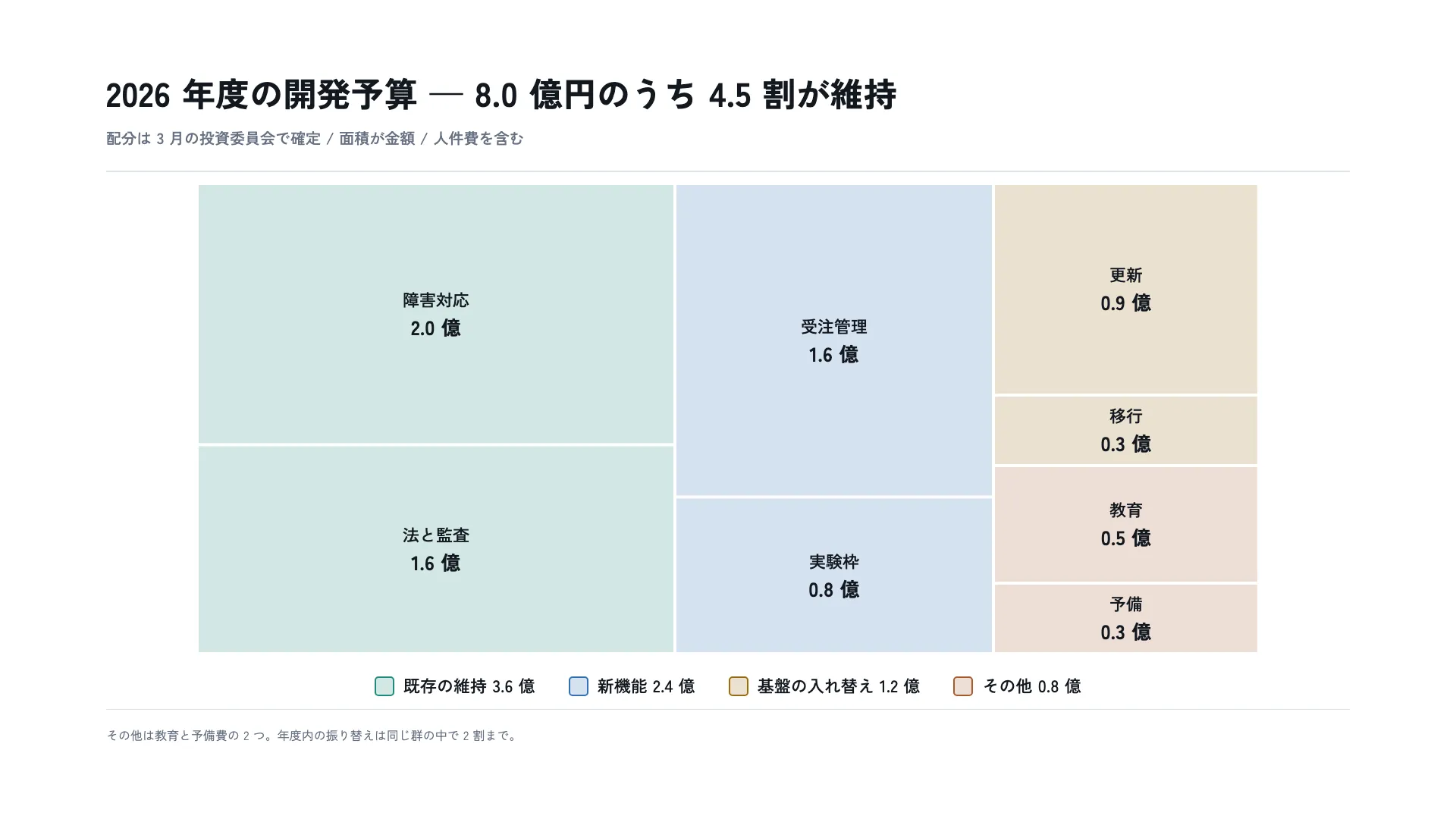
版の配色
1920 × 1080 作品として見る 版そのものを描画 — どの倍率でも字は潰れません 骨格・余白・カラムを重ねた状態
1920 × 1080 作品として見る 版そのものを描画 — どの倍率でも字は潰れません 骨格・余白・カラムを重ねた状態
コピーして貼るか、ファイルに保存して渡す。ネットにつながらない環境には「全部入り」を 1 つ渡せば足りる。
このパネルの中身を、URL の先にあるファイルの中身まで含めて 1 つにまとめた Markdown — 大きいのでファイルで渡す(コピーは 32KB まで)
以下の仕様でスライドを 1 枚作ってください。

- 版面 1920 × 1080
- 余白 上 96 右 140 下 96 左 140

## 文字(版面 1920px に対する px)
title  44px / 700 / 字間 0.01em / 行送り 1.3
window  20px / 500 / 行送り 1.5
cellName  22px / 500 / 行送り 1.4
cellAmount  26px / 700 / 行送り 1.2 / 等幅数字
legendLabel  22px / 500 / 行送り 1.4 / 等幅数字
note  16px / 400 / 行送り 1.6

## 配色
地 #FFFFFF / 面 #F4F6F9 / 文字 #131820 / 補助 #667183 / 強調 #1F5FA8 / 罫 #DBE1E9 / #1C8C79 / #2F6FB5 / #9A6B12 / #A85A2E

## 外すと崩れる点
- 面積を金額に厳密に比例させる。1 つでも合っていないと、読み手は全部の区画を数字で確かめ直すことになり、図の意味が消える
- 区画に枠線を持たせない。線の太さは面積に含まれないのに、目には面積の一部として入る
- 色は上位の群にだけ使い、子は親の色を継ぐ。子ごとに色を変えると、階層ではなく並列の区分に見える
- 群は 5 つまで。6 つ目からは色の見分けが付かなくなり、色が階層を示す役を果たせなくなる
- 細長い区画を作らない。縦横比が 4 を超えると、同じ面積でも小さく見える —— 比べさせたい量が、形の錯覚に負ける

内容は[ここに自分の内容を書く]に置き換えてください。寸法と配色はそのまま守ってください。
正確に再現する場合は、この HTML をそのまま使ってください: https://design-vault.pages.dev/designs/treemap-budget-allocation/pattern.html
/ai/designs/treemap-budget-allocation.json
format: slide-16x9
density: medium
layout:
  kind: area
  canvas:
    w: 1920
    h: 1080
  margin:
    top: 96
    right: 140
    bottom: 96
    left: 140
type:
  title:
    size: 44
    weight: 700
    tracking: 0.01em
    leading: 1.3
  window:
    size: 20
    weight: 500
    leading: 1.5
  cellName:
    size: 22
    weight: 500
    leading: 1.4
  cellAmount:
    size: 26
    weight: 700
    leading: 1.2
    numeric: tabular
  legendLabel:
    size: 22
    weight: 500
    leading: 1.4
    numeric: tabular
  note:
    size: 16
    weight: 400
    leading: 1.6
colors:
  ground: "#FFFFFF"
  surface: "#F4F6F9"
  ink: "#131820"
  muted: "#667183"
  accent: "#1F5FA8"
  rule: "#DBE1E9"
  series:
    - "#1C8C79"
    - "#2F6FB5"
    - "#9A6B12"
    - "#A85A2E"
rules:
  - 面積を金額に厳密に比例させる。1 つでも合っていないと、読み手は全部の区画を数字で確かめ直すことになり、図の意味が消える
  - 区画に枠線を持たせない。線の太さは面積に含まれないのに、目には面積の一部として入る
  - 色は上位の群にだけ使い、子は親の色を継ぐ。子ごとに色を変えると、階層ではなく並列の区分に見える
  - 群は 5 つまで。6 つ目からは色の見分けが付かなくなり、色が階層を示す役を果たせなくなる
  - 細長い区画を作らない。縦横比が 4 を超えると、同じ面積でも小さく見える —— 比べさせたい量が、形の錯覚に負ける
{
"format": "slide-16x9",
"density": "medium",
"layout": {
"kind": "area",
"canvas": {
"w": 1920,
"h": 1080
},
"margin": {
"top": 96,
"right": 140,
"bottom": 96,
"left": 140
}
},
"type": {
"title": {
"size": 44,
"weight": 700,
"tracking": "0.01em",
"leading": 1.3
},
"window": {
"size": 20,
"weight": 500,
"leading": 1.5
},
"cellName": {
"size": 22,
"weight": 500,
"leading": 1.4
},
"cellAmount": {
"size": 26,
"weight": 700,
"leading": 1.2,
"numeric": "tabular"
},
"legendLabel": {
"size": 22,
"weight": 500,
"leading": 1.4,
"numeric": "tabular"
},
"note": {
"size": 16,
"weight": 400,
"leading": 1.6
}
},
"colors": {
"ground": "#FFFFFF",
"surface": "#F4F6F9",
"ink": "#131820",
"muted": "#667183",
"accent": "#1F5FA8",
"rule": "#DBE1E9",
"series": [
"#1C8C79",
"#2F6FB5",
"#9A6B12",
"#A85A2E"
]
},
"rules": [
"面積を金額に厳密に比例させる。1 つでも合っていないと、読み手は全部の区画を数字で確かめ直すことになり、図の意味が消える",
"区画に枠線を持たせない。線の太さは面積に含まれないのに、目には面積の一部として入る",
"色は上位の群にだけ使い、子は親の色を継ぐ。子ごとに色を変えると、階層ではなく並列の区分に見える",
"群は 5 つまで。6 つ目からは色の見分けが付かなくなり、色が階層を示す役を果たせなくなる",
"細長い区画を作らない。縦横比が 4 を超えると、同じ面積でも小さく見える —— 比べさせたい量が、形の錯覚に負ける"
]
} /designs/treemap-budget-allocation/pattern.html — 版そのものの HTML。書体の部分集合ごと同梱で、開けばこの絵がそのまま出ます。
<!doctype html>
<meta charset="utf-8">
<title>2026 年度の開発予算 — 8.0 億円のうち 4.5 割が維持</title>
<meta name="dv-font" content="Zen Kaku Gothic New:400;500;700">
<link rel="stylesheet" href="./font.css">
<style>
  /* 色のリテラルはこの :root にだけ置く。以下の規則は var() か color-mix() で名指す。
     区分色は上位 4 群にだけ使う。子は親の色を薄めずそのまま継ぎ、地の色の隙間で
     分ける —— 子ごとに色を変えると、階層ではなく 7 種類の並列に見える。 */
  :root {
    --ground: #FFFFFF;
    --surface: #F4F6F9;
    --ink: #131820;
    --muted: #667183;
    --accent: #1F5FA8;
    --rule: #DBE1E9;
    --series-1: #1C8C79;
    --series-2: #2F6FB5;
    --series-3: #9A6B12;
    --series-4: #A85A2E;
  }

  * { box-sizing: border-box; margin: 0; }
  html, body { width: 1920px; height: 1080px; }
  body { font-family: "Zen Kaku Gothic New", "IPAGothic", sans-serif; }

  .artboard {
    width: 1920px;
    height: 1080px;
    background: var(--ground);
    color: var(--ink);
    padding: 96px 140px;
  }

  .content {
    height: 100%;
    display: grid;
    grid-template-rows: auto minmax(0, 1fr) auto;
  }

  .head { border-bottom: 2px solid var(--rule); padding-bottom: 28px; }
  .title { font-size: 44px; font-weight: 700; letter-spacing: 0.01em; line-height: 1.3; }
  .window { margin-top: 14px; font-size: 20px; font-weight: 500; line-height: 1.5; color: var(--muted); }

  /* 図 620 + 凡例で中身の段(約 708px)に収まる。増やすときは一緒に見直すこと。 */
  .body {
    display: grid;
    grid-template-rows: auto auto;
    align-content: center;
    justify-items: center;
    row-gap: 28px;
  }

  .figure { display: block; }
  /* 面積が金額なので、区画は塗りだけで表し、枠線を持たせない。
     枠線の太さは面積に含まれないのに、目には面積の一部として入る。 */
  .g1 { fill: color-mix(in srgb, var(--series-1) 20%, var(--ground)); }
  .g2 { fill: color-mix(in srgb, var(--series-2) 20%, var(--ground)); }
  .g3 { fill: color-mix(in srgb, var(--series-3) 20%, var(--ground)); }
  .g4 { fill: color-mix(in srgb, var(--series-4) 20%, var(--ground)); }
  .cell-name { fill: var(--ink); font-size: 22px; font-weight: 500; line-height: 1.4; }
  .cell-amount { fill: var(--ink); font-size: 26px; font-weight: 700; line-height: 1.2; font-variant-numeric: tabular-nums; }

  .legend { display: flex; gap: 44px; align-items: center; }
  .legend-item { display: flex; gap: 12px; align-items: center; }
  /* 凡例の四角は区画と同じ薄さにする。原色のままだと、凡例と区画で別の色を
     見ることになり、どの区画がどの群かを色で辿れない。薄いままでは 26px 角が
     地に沈むので、縁だけを原色にして位置を示す。 */
  .chip { width: 26px; height: 26px; border-radius: 5px; border-width: 2px; border-style: solid; }
  .chip-1 { background: color-mix(in srgb, var(--series-1) 20%, var(--ground)); border-color: var(--series-1); }
  .chip-2 { background: color-mix(in srgb, var(--series-2) 20%, var(--ground)); border-color: var(--series-2); }
  .chip-3 { background: color-mix(in srgb, var(--series-3) 20%, var(--ground)); border-color: var(--series-3); }
  .chip-4 { background: color-mix(in srgb, var(--series-4) 20%, var(--ground)); border-color: var(--series-4); }
  .legend-label { font-size: 22px; font-weight: 500; line-height: 1.4; font-variant-numeric: tabular-nums; }

  .foot { border-top: 1px solid var(--rule); padding-top: 22px; font-size: 16px; font-weight: 400; line-height: 1.6; color: var(--muted); }
</style>

<div class="artboard" data-artboard>
  <div class="content" data-content>
    <div class="head">
      <h1 class="title" data-type="title">2026 年度の開発予算 — 8.0 億円のうち 4.5 割が維持</h1>
      <p class="window" data-type="window">配分は 3 月の投資委員会で確定 / 面積が金額 / 人件費を含む</p>
    </div>

    <div class="body">
      <!-- 等倍で描く。viewBox と width/height を一致させてあるので、
           SVG の中の文字の級数は版面の px とそのまま同じ数字になる。

           区画の割り当ては 1400×620 = 8.0 億円、1 億円あたり 108,500px²。
           割り当ての矩形はどれもその整数倍で、群ごとに列を持たせてある
           (3.6 : 2.4 : 2.0 = 630 : 420 : 350 px)。
           **描いている矩形は、その割り当てを四辺 2px ずつ内側へ寄せたもの**で、
           隙間のぶんだけ実際の面積は 95〜98% に縮む。縮み方は区画の大きさで
           違うので、面積が厳密に比例しているのは割り当てのほうである。

           縦横比はどの区画も 4 を下回る(最大は移行と予備の 3.76)——
           この版自身の規則「細長い区画を作らない」を、版が破らないため。 -->
      <svg class="figure" width="1400" height="620" viewBox="0 0 1400 620">
        <rect class="g1" x="2" y="2" width="626" height="340.4"/>
        <rect class="g1" x="2" y="346.4" width="626" height="271.6"/>
        <rect class="g2" x="632" y="2" width="416" height="409.3"/>
        <rect class="g2" x="632" y="415.3" width="416" height="202.7"/>
        <rect class="g3" x="1052" y="2" width="346" height="275"/>
        <rect class="g3" x="1052" y="281" width="346" height="89"/>
        <rect class="g4" x="1052" y="374" width="346" height="151"/>
        <rect class="g4" x="1052" y="529" width="346" height="89"/>

        <text class="cell-name" data-type="cellName" x="315" y="154" text-anchor="middle" dominant-baseline="central">障害対応</text>
        <text class="cell-amount" data-type="cellAmount" x="315" y="190" text-anchor="middle" dominant-baseline="central">2.0 億</text>

        <text class="cell-name" x="315" y="464" text-anchor="middle" dominant-baseline="central">法と監査</text>
        <text class="cell-amount" x="315" y="500" text-anchor="middle" dominant-baseline="central">1.6 億</text>

        <text class="cell-name" x="840" y="189" text-anchor="middle" dominant-baseline="central">受注管理</text>
        <text class="cell-amount" x="840" y="225" text-anchor="middle" dominant-baseline="central">1.6 億</text>

        <text class="cell-name" x="840" y="499" text-anchor="middle" dominant-baseline="central">実験枠</text>
        <text class="cell-amount" x="840" y="535" text-anchor="middle" dominant-baseline="central">0.8 億</text>

        <text class="cell-name" x="1225" y="121" text-anchor="middle" dominant-baseline="central">更新</text>
        <text class="cell-amount" x="1225" y="157" text-anchor="middle" dominant-baseline="central">0.9 億</text>

        <text class="cell-name" x="1225" y="307" text-anchor="middle" dominant-baseline="central">移行</text>
        <text class="cell-amount" x="1225" y="343" text-anchor="middle" dominant-baseline="central">0.3 億</text>

        <text class="cell-name" x="1225" y="431" text-anchor="middle" dominant-baseline="central">教育</text>
        <text class="cell-amount" x="1225" y="467" text-anchor="middle" dominant-baseline="central">0.5 億</text>

        <text class="cell-name" x="1225" y="555" text-anchor="middle" dominant-baseline="central">予備</text>
        <text class="cell-amount" x="1225" y="591" text-anchor="middle" dominant-baseline="central">0.3 億</text>
      </svg>

      <div class="legend">
        <span class="legend-item"><span class="chip chip-1"></span><span class="legend-label" data-type="legendLabel">既存の維持 3.6 億</span></span>
        <span class="legend-item"><span class="chip chip-2"></span><span class="legend-label">新機能 2.4 億</span></span>
        <span class="legend-item"><span class="chip chip-3"></span><span class="legend-label">基盤の入れ替え 1.2 億</span></span>
        <span class="legend-item"><span class="chip chip-4"></span><span class="legend-label">その他 0.8 億</span></span>
      </div>
    </div>

    <div class="foot" data-type="note">その他は教育と予備費の 2 つ。年度内の振り替えは同じ群の中で 2 割まで。</div>
  </div>
</div>
/designs/treemap-budget-allocation/font.css — 全部入りには入れていない
/* dv-subset v2 — generated by scripts/subset-font.mjs. Do not edit.
 * font    Zen Kaku Gothic New 400;500;700
 * chars   93 (59f23a5f0c32f5a0)
 *
 * pattern.html の文字だけを含む部分集合。描画時に外部へ取りに行かないよう同梱する。
 * 版の文字を変えたら取り直すこと — 忘れると足りない字が豆腐になる。
 * その取り忘れは pattern-entries.test.ts が上の指紋で検出する。
 */

@font-face {
  font-family: 'Zen Kaku Gothic New';
  font-style: normal;
  font-weight: 400;
  font-display: block;
  src: url(./font-0.woff2) format('woff2');
  unicode-range: U+2e-36, U+38-39, U+2014, U+3002, U+3046, U+3048, U+304b-304c, U+3057-3058, U+305d-305e, U+3061-3062, U+3064-3069, U+306e-3070, U+307e, U+3080, U+308a, U+308c, U+3092, U+3094, U+3099, U+4e2d, U+4e88, U+4eba, U+4ed6, U+4ef6, U+4f1a, U+5099, U+5104, U+5165, U+5185-5186, U+5206, U+5272, U+53d7, U+540c, U+542b, U+54e1, U+57fa, U+59d4, U+5b58, U+5b9a, U+5b9f, U+5bb3, U+5bfe, U+5e74, U+5ea6, U+5fdc, U+6295, U+6301, U+632f, U+6559, U+65b0, U+65e2, U+66f4, U+66ff, U+6708, U+67a0, U+67fb, U+6a5f, U+6cd5, U+6ce8, U+7406, U+767a, U+76e3-76e4, U+78ba, U+79fb, U+7a4d, U+7b97, U+7ba1, U+7dad, U+7fa4, U+80b2, U+80fd, U+884c, U+8cbb, U+8cc7, U+914d, U+91d1, U+958b, U+969c, U+9762, U+984d, U+9a13;
}
@font-face {
  font-family: 'Zen Kaku Gothic New';
  font-style: normal;
  font-weight: 500;
  font-display: block;
  src: url(./font-1.woff2) format('woff2');
  unicode-range: U+2e-36, U+38-39, U+2014, U+3002, U+3046, U+3048, U+304b-304c, U+3057-3058, U+305d-305e, U+3061-3062, U+3064-3069, U+306e-3070, U+307e, U+3080, U+308a, U+308c, U+3092, U+3094, U+3099, U+4e2d, U+4e88, U+4eba, U+4ed6, U+4ef6, U+4f1a, U+5099, U+5104, U+5165, U+5185-5186, U+5206, U+5272, U+53d7, U+540c, U+542b, U+54e1, U+57fa, U+59d4, U+5b58, U+5b9a, U+5b9f, U+5bb3, U+5bfe, U+5e74, U+5ea6, U+5fdc, U+6295, U+6301, U+632f, U+6559, U+65b0, U+65e2, U+66f4, U+66ff, U+6708, U+67a0, U+67fb, U+6a5f, U+6cd5, U+6ce8, U+7406, U+767a, U+76e3-76e4, U+78ba, U+79fb, U+7a4d, U+7b97, U+7ba1, U+7dad, U+7fa4, U+80b2, U+80fd, U+884c, U+8cbb, U+8cc7, U+914d, U+91d1, U+958b, U+969c, U+9762, U+984d, U+9a13;
}
@font-face {
  font-family: 'Zen Kaku Gothic New';
  font-style: normal;
  font-weight: 700;
  font-display: block;
  src: url(./font-2.woff2) format('woff2');
  unicode-range: U+2e-36, U+38-39, U+2014, U+3002, U+3046, U+3048, U+304b-304c, U+3057-3058, U+305d-305e, U+3061-3062, U+3064-3069, U+306e-3070, U+307e, U+3080, U+308a, U+308c, U+3092, U+3094, U+3099, U+4e2d, U+4e88, U+4eba, U+4ed6, U+4ef6, U+4f1a, U+5099, U+5104, U+5165, U+5185-5186, U+5206, U+5272, U+53d7, U+540c, U+542b, U+54e1, U+57fa, U+59d4, U+5b58, U+5b9a, U+5b9f, U+5bb3, U+5bfe, U+5e74, U+5ea6, U+5fdc, U+6295, U+6301, U+632f, U+6559, U+65b0, U+65e2, U+66f4, U+66ff, U+6708, U+67a0, U+67fb, U+6a5f, U+6cd5, U+6ce8, U+7406, U+767a, U+76e3-76e4, U+78ba, U+79fb, U+7a4d, U+7b97, U+7ba1, U+7dad, U+7fa4, U+80b2, U+80fd, U+884c, U+8cbb, U+8cc7, U+914d, U+91d1, U+958b, U+969c, U+9762, U+984d, U+9a13;
}
ツリーマップは「面積=量」を信じてもらえるかどうかで成否が決まる。1 つでも 合っていない区画があると、読み手は残り全部を数字で確かめ直し、そのときこの図は ただの色分けされた四角に戻る。
区画に枠線を引かないのもそのためである。線は面積に数えられないのに、目には 面積の一部として入る。小さい区画ほどその影響が大きく、いちばん見誤ってほしくない ところで狂う。