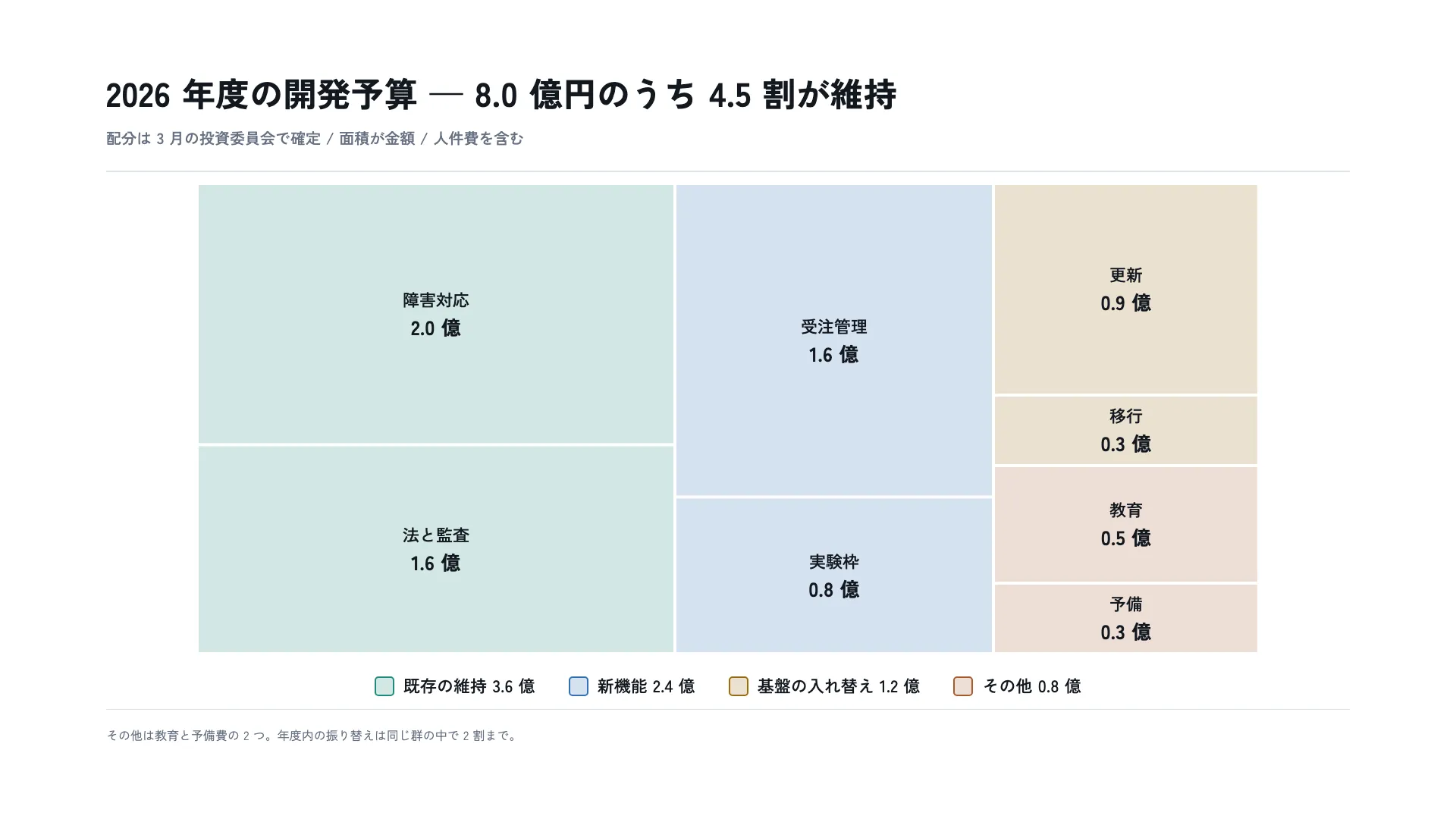
As measured
1920 × 1080 Seen as a design The artboard itself, drawn live — sharp at any zoom Structure, margins and columns overlaid
1920 × 1080 Seen as a design The artboard itself, drawn live — sharp at any zoom Structure, margins and columns overlaid
Copy and paste, or save a file and hand it over. For a machine with no network, one “Everything” file is enough.
Everything in this panel, including the contents behind each URL, in one Markdown file — Large, so it goes as a file (copy is for 32 KB and under)
Produce one slide to the following specification.

- Canvas 1920 × 1080
- Margin top 96 right 140 bottom 96 left 140

## Type (px against a 1920px canvas)
title  44px / 700 / tracking 0.01em / leading 1.3
window  20px / 500 / leading 1.5
cellName  22px / 500 / leading 1.4
cellAmount  26px / 700 / leading 1.2 / tabular numerals
legendLabel  22px / 500 / leading 1.4 / tabular numerals
note  16px / 400 / leading 1.6

## Colour
Ground #FFFFFF / Surface #F4F6F9 / Ink #131820 / Muted #667183 / Accent #1F5FA8 / Rule #DBE1E9 / #1C8C79 / #2F6FB5 / #9A6B12 / #A85A2E

## Constraints — dropping these breaks it
- Make every area exactly proportional to its amount. One cell that does not match sends the reader back to check all of them by number, which is the end of the figure
- Give the cells no stroke. A border's thickness is not part of the area but the eye counts it as area
- Colour the top-level groups only and let children inherit. Colouring children makes the hierarchy read as a flat list
- Five groups at most. From the sixth the hues stop being distinguishable and colour can no longer carry the hierarchy
- Avoid slivers. Past an aspect ratio of about four a cell looks smaller than its area, and the quantity you meant to compare loses to the illusion

Replace the content with [your content]. Keep the measurements and colours as given.
For an exact reproduction, use the verbatim HTML at https://design-vault.pages.dev/designs/treemap-budget-allocation/pattern.html.
/ai/designs/treemap-budget-allocation.json
format: slide-16x9
density: medium
layout:
  kind: area
  canvas:
    w: 1920
    h: 1080
  margin:
    top: 96
    right: 140
    bottom: 96
    left: 140
type:
  title:
    size: 44
    weight: 700
    tracking: 0.01em
    leading: 1.3
  window:
    size: 20
    weight: 500
    leading: 1.5
  cellName:
    size: 22
    weight: 500
    leading: 1.4
  cellAmount:
    size: 26
    weight: 700
    leading: 1.2
    numeric: tabular
  legendLabel:
    size: 22
    weight: 500
    leading: 1.4
    numeric: tabular
  note:
    size: 16
    weight: 400
    leading: 1.6
colors:
  ground: "#FFFFFF"
  surface: "#F4F6F9"
  ink: "#131820"
  muted: "#667183"
  accent: "#1F5FA8"
  rule: "#DBE1E9"
  series:
    - "#1C8C79"
    - "#2F6FB5"
    - "#9A6B12"
    - "#A85A2E"
rules:
  - Make every area exactly proportional to its amount. One cell that does not match sends the reader back to check all of them by number, which is the end of the figure
  - Give the cells no stroke. A border's thickness is not part of the area but the eye counts it as area
  - Colour the top-level groups only and let children inherit. Colouring children makes the hierarchy read as a flat list
  - Five groups at most. From the sixth the hues stop being distinguishable and colour can no longer carry the hierarchy
  - Avoid slivers. Past an aspect ratio of about four a cell looks smaller than its area, and the quantity you meant to compare loses to the illusion
{
"format": "slide-16x9",
"density": "medium",
"layout": {
"kind": "area",
"canvas": {
"w": 1920,
"h": 1080
},
"margin": {
"top": 96,
"right": 140,
"bottom": 96,
"left": 140
}
},
"type": {
"title": {
"size": 44,
"weight": 700,
"tracking": "0.01em",
"leading": 1.3
},
"window": {
"size": 20,
"weight": 500,
"leading": 1.5
},
"cellName": {
"size": 22,
"weight": 500,
"leading": 1.4
},
"cellAmount": {
"size": 26,
"weight": 700,
"leading": 1.2,
"numeric": "tabular"
},
"legendLabel": {
"size": 22,
"weight": 500,
"leading": 1.4,
"numeric": "tabular"
},
"note": {
"size": 16,
"weight": 400,
"leading": 1.6
}
},
"colors": {
"ground": "#FFFFFF",
"surface": "#F4F6F9",
"ink": "#131820",
"muted": "#667183",
"accent": "#1F5FA8",
"rule": "#DBE1E9",
"series": [
"#1C8C79",
"#2F6FB5",
"#9A6B12",
"#A85A2E"
]
},
"rules": [
"Make every area exactly proportional to its amount. One cell that does not match sends the reader back to check all of them by number, which is the end of the figure",
"Give the cells no stroke. A border's thickness is not part of the area but the eye counts it as area",
"Colour the top-level groups only and let children inherit. Colouring children makes the hierarchy read as a flat list",
"Five groups at most. From the sixth the hues stop being distinguishable and colour can no longer carry the hierarchy",
"Avoid slivers. Past an aspect ratio of about four a cell looks smaller than its area, and the quantity you meant to compare loses to the illusion"
]
} /designs/treemap-budget-allocation/pattern.html — The artboard itself, font subset included — open it and this picture draws.
<!doctype html>
<meta charset="utf-8">
<title>2026 年度の開発予算 — 8.0 億円のうち 4.5 割が維持</title>
<meta name="dv-font" content="Zen Kaku Gothic New:400;500;700">
<link rel="stylesheet" href="./font.css">
<style>
  /* 色のリテラルはこの :root にだけ置く。以下の規則は var() か color-mix() で名指す。
     区分色は上位 4 群にだけ使う。子は親の色を薄めずそのまま継ぎ、地の色の隙間で
     分ける —— 子ごとに色を変えると、階層ではなく 7 種類の並列に見える。 */
  :root {
    --ground: #FFFFFF;
    --surface: #F4F6F9;
    --ink: #131820;
    --muted: #667183;
    --accent: #1F5FA8;
    --rule: #DBE1E9;
    --series-1: #1C8C79;
    --series-2: #2F6FB5;
    --series-3: #9A6B12;
    --series-4: #A85A2E;
  }

  * { box-sizing: border-box; margin: 0; }
  html, body { width: 1920px; height: 1080px; }
  body { font-family: "Zen Kaku Gothic New", "IPAGothic", sans-serif; }

  .artboard {
    width: 1920px;
    height: 1080px;
    background: var(--ground);
    color: var(--ink);
    padding: 96px 140px;
  }

  .content {
    height: 100%;
    display: grid;
    grid-template-rows: auto minmax(0, 1fr) auto;
  }

  .head { border-bottom: 2px solid var(--rule); padding-bottom: 28px; }
  .title { font-size: 44px; font-weight: 700; letter-spacing: 0.01em; line-height: 1.3; }
  .window { margin-top: 14px; font-size: 20px; font-weight: 500; line-height: 1.5; color: var(--muted); }

  /* 図 620 + 凡例で中身の段(約 708px)に収まる。増やすときは一緒に見直すこと。 */
  .body {
    display: grid;
    grid-template-rows: auto auto;
    align-content: center;
    justify-items: center;
    row-gap: 28px;
  }

  .figure { display: block; }
  /* 面積が金額なので、区画は塗りだけで表し、枠線を持たせない。
     枠線の太さは面積に含まれないのに、目には面積の一部として入る。 */
  .g1 { fill: color-mix(in srgb, var(--series-1) 20%, var(--ground)); }
  .g2 { fill: color-mix(in srgb, var(--series-2) 20%, var(--ground)); }
  .g3 { fill: color-mix(in srgb, var(--series-3) 20%, var(--ground)); }
  .g4 { fill: color-mix(in srgb, var(--series-4) 20%, var(--ground)); }
  .cell-name { fill: var(--ink); font-size: 22px; font-weight: 500; line-height: 1.4; }
  .cell-amount { fill: var(--ink); font-size: 26px; font-weight: 700; line-height: 1.2; font-variant-numeric: tabular-nums; }

  .legend { display: flex; gap: 44px; align-items: center; }
  .legend-item { display: flex; gap: 12px; align-items: center; }
  /* 凡例の四角は区画と同じ薄さにする。原色のままだと、凡例と区画で別の色を
     見ることになり、どの区画がどの群かを色で辿れない。薄いままでは 26px 角が
     地に沈むので、縁だけを原色にして位置を示す。 */
  .chip { width: 26px; height: 26px; border-radius: 5px; border-width: 2px; border-style: solid; }
  .chip-1 { background: color-mix(in srgb, var(--series-1) 20%, var(--ground)); border-color: var(--series-1); }
  .chip-2 { background: color-mix(in srgb, var(--series-2) 20%, var(--ground)); border-color: var(--series-2); }
  .chip-3 { background: color-mix(in srgb, var(--series-3) 20%, var(--ground)); border-color: var(--series-3); }
  .chip-4 { background: color-mix(in srgb, var(--series-4) 20%, var(--ground)); border-color: var(--series-4); }
  .legend-label { font-size: 22px; font-weight: 500; line-height: 1.4; font-variant-numeric: tabular-nums; }

  .foot { border-top: 1px solid var(--rule); padding-top: 22px; font-size: 16px; font-weight: 400; line-height: 1.6; color: var(--muted); }
</style>

<div class="artboard" data-artboard>
  <div class="content" data-content>
    <div class="head">
      <h1 class="title" data-type="title">2026 年度の開発予算 — 8.0 億円のうち 4.5 割が維持</h1>
      <p class="window" data-type="window">配分は 3 月の投資委員会で確定 / 面積が金額 / 人件費を含む</p>
    </div>

    <div class="body">
      <!-- 等倍で描く。viewBox と width/height を一致させてあるので、
           SVG の中の文字の級数は版面の px とそのまま同じ数字になる。

           区画の割り当ては 1400×620 = 8.0 億円、1 億円あたり 108,500px²。
           割り当ての矩形はどれもその整数倍で、群ごとに列を持たせてある
           (3.6 : 2.4 : 2.0 = 630 : 420 : 350 px)。
           **描いている矩形は、その割り当てを四辺 2px ずつ内側へ寄せたもの**で、
           隙間のぶんだけ実際の面積は 95〜98% に縮む。縮み方は区画の大きさで
           違うので、面積が厳密に比例しているのは割り当てのほうである。

           縦横比はどの区画も 4 を下回る(最大は移行と予備の 3.76)——
           この版自身の規則「細長い区画を作らない」を、版が破らないため。 -->
      <svg class="figure" width="1400" height="620" viewBox="0 0 1400 620">
        <rect class="g1" x="2" y="2" width="626" height="340.4"/>
        <rect class="g1" x="2" y="346.4" width="626" height="271.6"/>
        <rect class="g2" x="632" y="2" width="416" height="409.3"/>
        <rect class="g2" x="632" y="415.3" width="416" height="202.7"/>
        <rect class="g3" x="1052" y="2" width="346" height="275"/>
        <rect class="g3" x="1052" y="281" width="346" height="89"/>
        <rect class="g4" x="1052" y="374" width="346" height="151"/>
        <rect class="g4" x="1052" y="529" width="346" height="89"/>

        <text class="cell-name" data-type="cellName" x="315" y="154" text-anchor="middle" dominant-baseline="central">障害対応</text>
        <text class="cell-amount" data-type="cellAmount" x="315" y="190" text-anchor="middle" dominant-baseline="central">2.0 億</text>

        <text class="cell-name" x="315" y="464" text-anchor="middle" dominant-baseline="central">法と監査</text>
        <text class="cell-amount" x="315" y="500" text-anchor="middle" dominant-baseline="central">1.6 億</text>

        <text class="cell-name" x="840" y="189" text-anchor="middle" dominant-baseline="central">受注管理</text>
        <text class="cell-amount" x="840" y="225" text-anchor="middle" dominant-baseline="central">1.6 億</text>

        <text class="cell-name" x="840" y="499" text-anchor="middle" dominant-baseline="central">実験枠</text>
        <text class="cell-amount" x="840" y="535" text-anchor="middle" dominant-baseline="central">0.8 億</text>

        <text class="cell-name" x="1225" y="121" text-anchor="middle" dominant-baseline="central">更新</text>
        <text class="cell-amount" x="1225" y="157" text-anchor="middle" dominant-baseline="central">0.9 億</text>

        <text class="cell-name" x="1225" y="307" text-anchor="middle" dominant-baseline="central">移行</text>
        <text class="cell-amount" x="1225" y="343" text-anchor="middle" dominant-baseline="central">0.3 億</text>

        <text class="cell-name" x="1225" y="431" text-anchor="middle" dominant-baseline="central">教育</text>
        <text class="cell-amount" x="1225" y="467" text-anchor="middle" dominant-baseline="central">0.5 億</text>

        <text class="cell-name" x="1225" y="555" text-anchor="middle" dominant-baseline="central">予備</text>
        <text class="cell-amount" x="1225" y="591" text-anchor="middle" dominant-baseline="central">0.3 億</text>
      </svg>

      <div class="legend">
        <span class="legend-item"><span class="chip chip-1"></span><span class="legend-label" data-type="legendLabel">既存の維持 3.6 億</span></span>
        <span class="legend-item"><span class="chip chip-2"></span><span class="legend-label">新機能 2.4 億</span></span>
        <span class="legend-item"><span class="chip chip-3"></span><span class="legend-label">基盤の入れ替え 1.2 億</span></span>
        <span class="legend-item"><span class="chip chip-4"></span><span class="legend-label">その他 0.8 億</span></span>
      </div>
    </div>

    <div class="foot" data-type="note">その他は教育と予備費の 2 つ。年度内の振り替えは同じ群の中で 2 割まで。</div>
  </div>
</div>
/designs/treemap-budget-allocation/font.css — Not in Everything
/* dv-subset v2 — generated by scripts/subset-font.mjs. Do not edit.
 * font    Zen Kaku Gothic New 400;500;700
 * chars   93 (59f23a5f0c32f5a0)
 *
 * pattern.html の文字だけを含む部分集合。描画時に外部へ取りに行かないよう同梱する。
 * 版の文字を変えたら取り直すこと — 忘れると足りない字が豆腐になる。
 * その取り忘れは pattern-entries.test.ts が上の指紋で検出する。
 */

@font-face {
  font-family: 'Zen Kaku Gothic New';
  font-style: normal;
  font-weight: 400;
  font-display: block;
  src: url(./font-0.woff2) format('woff2');
  unicode-range: U+2e-36, U+38-39, U+2014, U+3002, U+3046, U+3048, U+304b-304c, U+3057-3058, U+305d-305e, U+3061-3062, U+3064-3069, U+306e-3070, U+307e, U+3080, U+308a, U+308c, U+3092, U+3094, U+3099, U+4e2d, U+4e88, U+4eba, U+4ed6, U+4ef6, U+4f1a, U+5099, U+5104, U+5165, U+5185-5186, U+5206, U+5272, U+53d7, U+540c, U+542b, U+54e1, U+57fa, U+59d4, U+5b58, U+5b9a, U+5b9f, U+5bb3, U+5bfe, U+5e74, U+5ea6, U+5fdc, U+6295, U+6301, U+632f, U+6559, U+65b0, U+65e2, U+66f4, U+66ff, U+6708, U+67a0, U+67fb, U+6a5f, U+6cd5, U+6ce8, U+7406, U+767a, U+76e3-76e4, U+78ba, U+79fb, U+7a4d, U+7b97, U+7ba1, U+7dad, U+7fa4, U+80b2, U+80fd, U+884c, U+8cbb, U+8cc7, U+914d, U+91d1, U+958b, U+969c, U+9762, U+984d, U+9a13;
}
@font-face {
  font-family: 'Zen Kaku Gothic New';
  font-style: normal;
  font-weight: 500;
  font-display: block;
  src: url(./font-1.woff2) format('woff2');
  unicode-range: U+2e-36, U+38-39, U+2014, U+3002, U+3046, U+3048, U+304b-304c, U+3057-3058, U+305d-305e, U+3061-3062, U+3064-3069, U+306e-3070, U+307e, U+3080, U+308a, U+308c, U+3092, U+3094, U+3099, U+4e2d, U+4e88, U+4eba, U+4ed6, U+4ef6, U+4f1a, U+5099, U+5104, U+5165, U+5185-5186, U+5206, U+5272, U+53d7, U+540c, U+542b, U+54e1, U+57fa, U+59d4, U+5b58, U+5b9a, U+5b9f, U+5bb3, U+5bfe, U+5e74, U+5ea6, U+5fdc, U+6295, U+6301, U+632f, U+6559, U+65b0, U+65e2, U+66f4, U+66ff, U+6708, U+67a0, U+67fb, U+6a5f, U+6cd5, U+6ce8, U+7406, U+767a, U+76e3-76e4, U+78ba, U+79fb, U+7a4d, U+7b97, U+7ba1, U+7dad, U+7fa4, U+80b2, U+80fd, U+884c, U+8cbb, U+8cc7, U+914d, U+91d1, U+958b, U+969c, U+9762, U+984d, U+9a13;
}
@font-face {
  font-family: 'Zen Kaku Gothic New';
  font-style: normal;
  font-weight: 700;
  font-display: block;
  src: url(./font-2.woff2) format('woff2');
  unicode-range: U+2e-36, U+38-39, U+2014, U+3002, U+3046, U+3048, U+304b-304c, U+3057-3058, U+305d-305e, U+3061-3062, U+3064-3069, U+306e-3070, U+307e, U+3080, U+308a, U+308c, U+3092, U+3094, U+3099, U+4e2d, U+4e88, U+4eba, U+4ed6, U+4ef6, U+4f1a, U+5099, U+5104, U+5165, U+5185-5186, U+5206, U+5272, U+53d7, U+540c, U+542b, U+54e1, U+57fa, U+59d4, U+5b58, U+5b9a, U+5b9f, U+5bb3, U+5bfe, U+5e74, U+5ea6, U+5fdc, U+6295, U+6301, U+632f, U+6559, U+65b0, U+65e2, U+66f4, U+66ff, U+6708, U+67a0, U+67fb, U+6a5f, U+6cd5, U+6ce8, U+7406, U+767a, U+76e3-76e4, U+78ba, U+79fb, U+7a4d, U+7b97, U+7ba1, U+7dad, U+7fa4, U+80b2, U+80fd, U+884c, U+8cbb, U+8cc7, U+914d, U+91d1, U+958b, U+969c, U+9762, U+984d, U+9a13;
}
ツリーマップは「面積=量」を信じてもらえるかどうかで成否が決まる。1 つでも 合っていない区画があると、読み手は残り全部を数字で確かめ直し、そのときこの図は ただの色分けされた四角に戻る。
区画に枠線を引かないのもそのためである。線は面積に数えられないのに、目には 面積の一部として入る。小さい区画ほどその影響が大きく、いちばん見誤ってほしくない ところで狂う。