Seen as a design The generated document itself — its toggles and disclosures work here
Seen as a design The generated document itself — its toggles and disclosures work here
Copy and paste, or save a file and hand it over. For a machine with no network, one “Everything” file is enough.
Everything in this panel, including the contents behind each URL, in one Markdown file — Large, so it goes as a file (copy is for 32 KB and under)
Build an HTML document with "Calendar Activity". This layout runs, so there is no composition to rebuild — what it needs is content.

## What this layout does
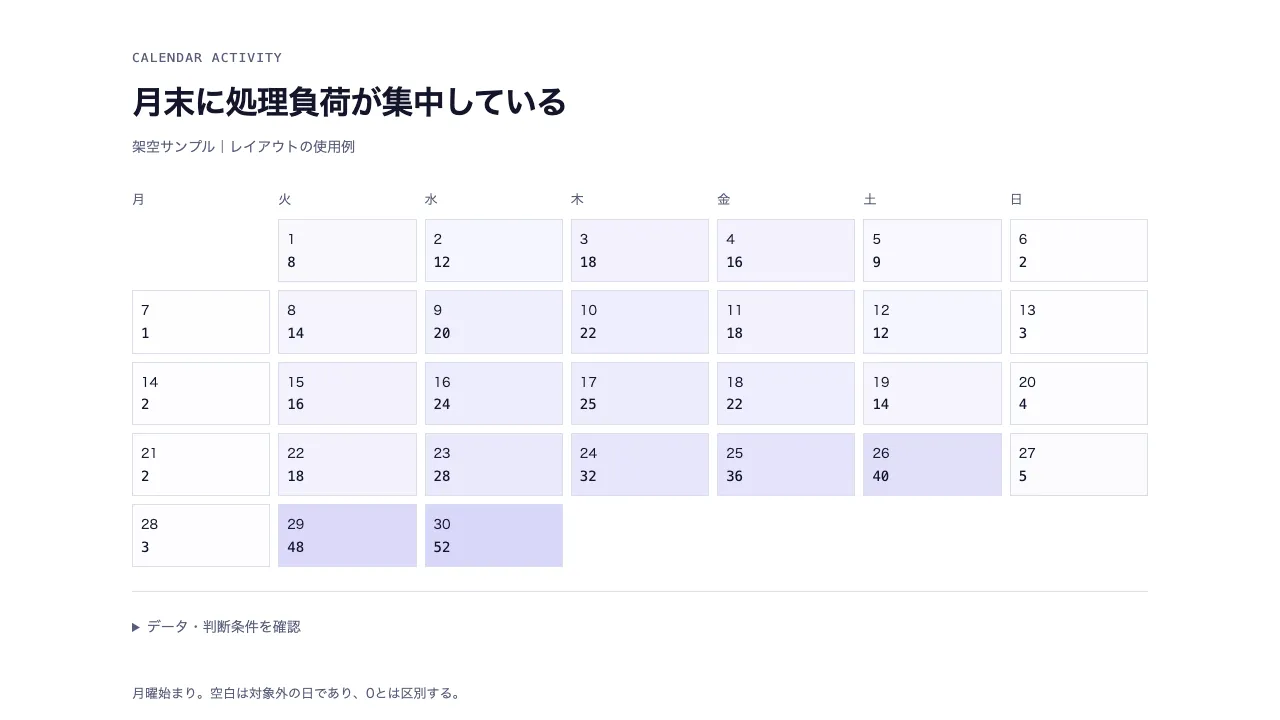
Calendar Activity with explicit source values and reading conditions.

## What you have to supply
- Provide the source values, labels and decision conditions described by the schema.

## The shape of the input
- `title` — string — 結論を伝える見出し
- `subtitle` — string? — 出典・時点・母集団や仮定
- `unit` — string — 日次値の単位
- `days` — array (date, value) — 同一月の連続する日付と観測値

schema.ts holds the machine-checkable validation. Ask rather than guess when an input is missing.

## When not to use it
- Do not compare values with incompatible units, populations, or assumptions.

## How to build it
Put the input in a JSON file and run:

```bash
node scripts/render.mjs calendar-activity <input.json> --theme ink -o out.html
```

The output is one self-contained file and fetches nothing at render time.

## The source
- https://design-vault.pages.dev/designs/calendar-activity/source/template.tsx
- https://design-vault.pages.dev/designs/calendar-activity/source/schema.ts
- https://design-vault.pages.dev/designs/calendar-activity/source/sample-data.json
- https://design-vault.pages.dev/designs/calendar-activity/sample.html
Template, input schema, sample data and metadata. This document was generated from those four. The generated document
/designs/calendar-activity/source/template.tsx
import type { ReactNode } from "react";
import type { Props } from "./schema";
function Ledger({heads,rows,caption}:{heads:string[];rows:ReactNode[][];caption?:string}) { return <table className="ledger">{caption && <caption>{caption}</caption>}<thead><tr>{heads.map((h,i)=><th key={i} scope="col">{h}</th>)}</tr></thead><tbody>{rows.map((r,i)=><tr key={i}>{r.map((v,j)=><td key={j} data-label={heads[j]}>{v}</td>)}</tr>)}</tbody></table>; }
function Notes({children}:{children:ReactNode}) { return <details><summary>データ・判断条件を確認</summary>{children}</details>; }

const CSS = String.raw`
.asset{font-family:var(--font-sans);color:var(--color-primary);background:var(--color-surface);max-width:var(--container-slide);margin:auto;padding:3rem 2rem;line-height:1.6;font-size:var(--text-body-sm)}
.asset *{box-sizing:border-box}.asset header{margin-bottom:2rem}.asset .eyebrow{font-family:var(--font-mono);font-size:var(--text-label);letter-spacing:.08em;color:var(--color-secondary);margin-bottom:.75rem}.asset h1{font-size:var(--text-h1);font-weight:700;line-height:1.35;letter-spacing:-.025em;max-width:32em}.asset h2{font-size:var(--text-h3);font-weight:600;margin-bottom:.75rem}.asset h3{font-size:var(--text-body-md);font-weight:600}.asset .subtitle,.asset .muted{color:var(--color-secondary)}.asset .subtitle{margin-top:.75rem}.asset .number{font-variant-numeric:tabular-nums;font-family:var(--font-mono)}.asset .hero-number{font-size:var(--text-display);line-height:1.2;font-weight:700;letter-spacing:-.04em}.asset .callout{border-left:.25rem solid var(--color-tertiary);padding:1rem 1.5rem;background:var(--color-surface-subtle);margin-bottom:1.5rem}.asset .grid2{display:grid;grid-template-columns:1fr 1fr;gap:1.5rem}.asset .grid3{display:grid;grid-template-columns:repeat(3,minmax(0,1fr));gap:1.5rem}.asset .panel{padding:1.5rem;background:var(--color-surface-subtle);border-radius:var(--radius-md);min-width:0}.asset .rule{border-top:1px solid var(--color-outline);padding-top:1rem;margin-top:1rem}.asset .pill{display:inline-block;padding:.25rem .75rem;border:1px solid var(--color-outline);border-radius:var(--radius-full);font-size:var(--text-label)}.asset .focus{background:var(--color-tertiary-container);color:var(--color-on-tertiary-container)}.asset .dark{background:var(--color-primary);color:var(--color-on-primary)}.asset .dark .muted{color:var(--color-on-primary-container)}.asset .row{display:grid;grid-template-columns:12rem minmax(0,1fr) 6rem;gap:1rem;align-items:center;padding:.75rem 0;border-bottom:1px solid var(--color-outline)}.asset .row>*{min-width:0}.asset .track{height:1rem;position:relative;background:var(--color-neutral);border-radius:var(--radius-sm)}.asset .bar{height:100%;background:var(--color-tertiary);border-radius:var(--radius-sm)}.asset .track.tall{height:2rem}.asset .flex{display:flex;gap:1rem;align-items:center;justify-content:space-between;flex-wrap:wrap}.asset .stack>*+*{margin-top:1rem}.asset ul{list-style:disc;padding-left:1.25rem}.asset li+li{margin-top:.5rem}.asset .plot{display:block;width:100%;height:auto;overflow:visible}.asset .plot text{font-family:var(--font-sans);font-size:14px;fill:var(--color-secondary)}.asset .plot .ink{fill:var(--color-primary)}.asset .plot .axis{stroke:var(--color-outline);stroke-width:1}.asset .plot .accent{stroke:var(--color-tertiary);fill:none;stroke-width:3}.asset .legend{display:flex;gap:1.5rem;flex-wrap:wrap;font-size:var(--text-label);margin-bottom:1rem}.asset .legend b{display:inline-block;width:.75rem;height:.75rem;margin-right:.5rem}.asset .ledger{border-collapse:collapse;width:100%;font-variant-numeric:tabular-nums}.asset .ledger caption{text-align:left;font-weight:600;margin:1rem 0}.asset .ledger th{font-weight:600;color:var(--color-secondary);text-align:left}.asset .ledger th,.asset .ledger td{padding:.75rem 1rem;border-bottom:1px solid var(--color-outline);vertical-align:top;overflow-wrap:anywhere}.asset .ledger th:first-child,.asset .ledger td:first-child{padding-left:0}.asset .ledger th:last-child,.asset .ledger td:last-child{padding-right:0}.asset .ledger tbody tr:hover{background:var(--color-surface-subtle)}.asset details{border-top:1px solid var(--color-outline);margin-top:1.5rem;padding-top:1rem}.asset summary{cursor:pointer;color:var(--color-secondary);padding:.5rem 0;min-height:2.75rem}.asset summary:focus-visible{outline:2px solid var(--color-tertiary);outline-offset:.25rem}.asset .small{font-size:var(--text-label)}.asset .mobile-only{display:none}.asset .horizontal-list{display:grid;grid-template-columns:repeat(3,minmax(0,1fr));gap:1rem}.asset .board-column{border-top:.25rem solid var(--color-primary);padding-top:1rem;min-width:0}.asset .board-item{padding:1rem 0;border-bottom:1px solid var(--color-outline)}.asset .board-item p{margin-top:.5rem}.asset .statement{font-size:var(--text-h2);line-height:1.5;font-weight:600}.asset .meta-line{margin-top:.75rem;font-size:var(--text-label);color:var(--color-secondary)}.asset pre{white-space:pre-wrap;overflow-wrap:anywhere}.asset footer{margin-top:2rem;font-size:var(--text-label);color:var(--color-secondary)}
@media(max-width:640px){.asset{padding:1.5rem 1rem}.asset h1{font-size:var(--text-h2)}.asset header{margin-bottom:1.5rem}.asset .grid2,.asset .grid3,.asset .horizontal-list{grid-template-columns:1fr}.asset .row{grid-template-columns:minmax(0,1fr) 5rem;gap:.5rem}.asset .row>:first-child{grid-column:1/-1}.asset .desktop-only{display:none!important}.asset .mobile-only{display:block}.asset .panel{padding:1rem}.asset .ledger,.asset .ledger tbody,.asset .ledger tr,.asset .ledger td{display:block}.asset .ledger thead{display:none}.asset .ledger tr{padding:.75rem 0;border-bottom:1px solid var(--color-outline)}.asset .ledger td{display:grid;grid-template-columns:7rem minmax(0,1fr);gap:.75rem;border:0;padding:.25rem 0!important}.asset .ledger td:before{content:attr(data-label);color:var(--color-secondary);font-size:var(--text-label)}.asset .hero-number{font-size:var(--text-h1)}}
@media print{.asset{max-width:none;padding:1rem}.asset details>*{display:block}.asset summary{display:none}}
`;

export default function Template(d: Props) {
const offset=(new Date(d.days[0].date+"T00:00:00Z").getUTCDay()+6)%7,max=Math.max(...d.days.map(r=>r.value),1);
return <section className="asset asset-calendar-activity"><style>{CSS}</style><header><p className="eyebrow">CALENDAR ACTIVITY</p><h1>{d.title}</h1>{d.subtitle && <p className="subtitle">{d.subtitle}</p>}</header>
<div style={{display:"grid",gridTemplateColumns:"repeat(7,minmax(0,1fr))",gap:".5rem"}}>{["月","火","水","木","金","土","日"].map(w=><div key={w} className="small muted">{w}</div>)}{Array.from({length:offset},(_,i)=><div key={"blank"+i}/>)}{d.days.map(r=><div key={r.date} style={{padding:".5rem",border:"1px solid var(--color-outline)",background:"color-mix(in srgb, var(--color-tertiary) "+(r.value/max*22)+"%, var(--color-surface))"}}><span className="small">{Number(r.date.slice(-2))}</span><p className="number">{r.value}</p></div>)}</div><Notes><Ledger heads={["日付",d.unit]} rows={d.days.map(r=>[r.date,r.value])}/></Notes>
<footer>月曜始まり。空白は対象外の日であり、0とは区別する。</footer></section>;
}
/designs/calendar-activity/source/schema.ts
import { z } from "zod";
const text = z.string().trim().min(1).max(160);
const short = z.string().trim().min(1).max(48);
const value = z.number().finite();
const nonneg = value.nonnegative();
const positive = value.positive();
const date = z.string().regex(/^\d{4}-\d{2}-\d{2}$/).refine(s => Number.isFinite(Date.parse(s)) && new Date(s).toISOString().slice(0,10) === s, "実在する日付を YYYY-MM-DD で指定する");

export const schema = z.object({
  title: text.describe("結論を伝える見出し"),
  subtitle: text.optional().describe("出典・時点・母集団や仮定"),
  unit:short.describe("日次値の単位"),
  days:z.array(z.object({date:date,value:nonneg}).strict()).min(7).max(31).describe("同一月の連続する日付と観測値"),
}).strict().refine(d=>d.days.every((r,i)=>r.date.slice(0,7)===d.days[0].date.slice(0,7)&&(i===0||Date.parse(r.date)-Date.parse(d.days[i-1].date)===86400000)),"同一月の連続した日付を入力");
export type Props = z.infer<typeof schema>;
/designs/calendar-activity/source/meta.yaml
id: calendar-activity
name:
  ja: 日次アクティビティカレンダー
  en: Calendar Activity
purpose:
  ja: 日付に対応する強度を月間の曜日配置で表示する。
  en: Calendar Activity with explicit source values and reading conditions.
status: published
still: ./still.png
category: analysis
catalogOrder: 400
jobs:
  - measure-change
useCases:
  - kpi
layoutKinds:
  - grid
tags:
  - calendar-activity
  - analysis
  - offline
  - responsive
whenToUse:
  - ja: 日付に対応する強度を月間の曜日配置で表示する。
    en: Use to communicate calendar activity.
avoidWhen:
  - ja: 同じ条件・単位で比較できないデータには使わない
    en: Do not compare values with incompatible units, populations, or assumptions.
requiredInputs:
  - ja: 月曜始まり。空白は対象外の日であり、0とは区別する。
    en: Provide the source values, labels and decision conditions described by the schema.
relatedLayouts:
  - heatmap
  - line-trend
dataSchema:
  title: string — 結論を伝える見出し
  subtitle: string? — 出典・時点・母集団や仮定
  unit: string — 日次値の単位
  days: array (date, value) — 同一月の連続する日付と観測値
sources: []
/designs/calendar-activity/source/sample-data.json
{
  "title": "月末に処理負荷が集中している",
  "subtitle": "架空サンプル|レイアウトの使用例",
  "unit": "件",
  "days": [
    {
      "date": "2026-09-01",
      "value": 8
    },
    {
      "date": "2026-09-02",
      "value": 12
    },
    {
      "date": "2026-09-03",
      "value": 18
    },
    {
      "date": "2026-09-04",
      "value": 16
    },
    {
      "date": "2026-09-05",
      "value": 9
    },
    {
      "date": "2026-09-06",
      "value": 2
    },
    {
      "date": "2026-09-07",
      "value": 1
    },
    {
      "date": "2026-09-08",
      "value": 14
    },
    {
      "date": "2026-09-09",
      "value": 20
    },
    {
      "date": "2026-09-10",
      "value": 22
    },
    {
      "date": "2026-09-11",
      "value": 18
    },
    {
      "date": "2026-09-12",
      "value": 12
    },
    {
      "date": "2026-09-13",
      "value": 3
    },
    {
      "date": "2026-09-14",
      "value": 2
    },
    {
      "date": "2026-09-15",
      "value": 16
    },
    {
      "date": "2026-09-16",
      "value": 24
    },
    {
      "date": "2026-09-17",
      "value": 25
    },
    {
      "date": "2026-09-18",
      "value": 22
    },
    {
      "date": "2026-09-19",
      "value": 14
    },
    {
      "date": "2026-09-20",
      "value": 4
    },
    {
      "date": "2026-09-21",
      "value": 2
    },
    {
      "date": "2026-09-22",
      "value": 18
    },
    {
      "date": "2026-09-23",
      "value": 28
    },
    {
      "date": "2026-09-24",
      "value": 32
    },
    {
      "date": "2026-09-25",
      "value": 36
    },
    {
      "date": "2026-09-26",
      "value": 40
    },
    {
      "date": "2026-09-27",
      "value": 5
    },
    {
      "date": "2026-09-28",
      "value": 3
    },
    {
      "date": "2026-09-29",
      "value": 48
    },
    {
      "date": "2026-09-30",
      "value": 52
    }
  ]
}