Seen as a design The generated document itself — its toggles and disclosures work here
Seen as a design The generated document itself — its toggles and disclosures work here
Copy and paste, or save a file and hand it over. For a machine with no network, one “Everything” file is enough.
Everything in this panel, including the contents behind each URL, in one Markdown file — Large, so it goes as a file (copy is for 32 KB and under)
Build an HTML document with "Heatmap (Operational Assessment)". This layout runs, so there is no composition to rebuild — what it needs is content.

## What this layout does
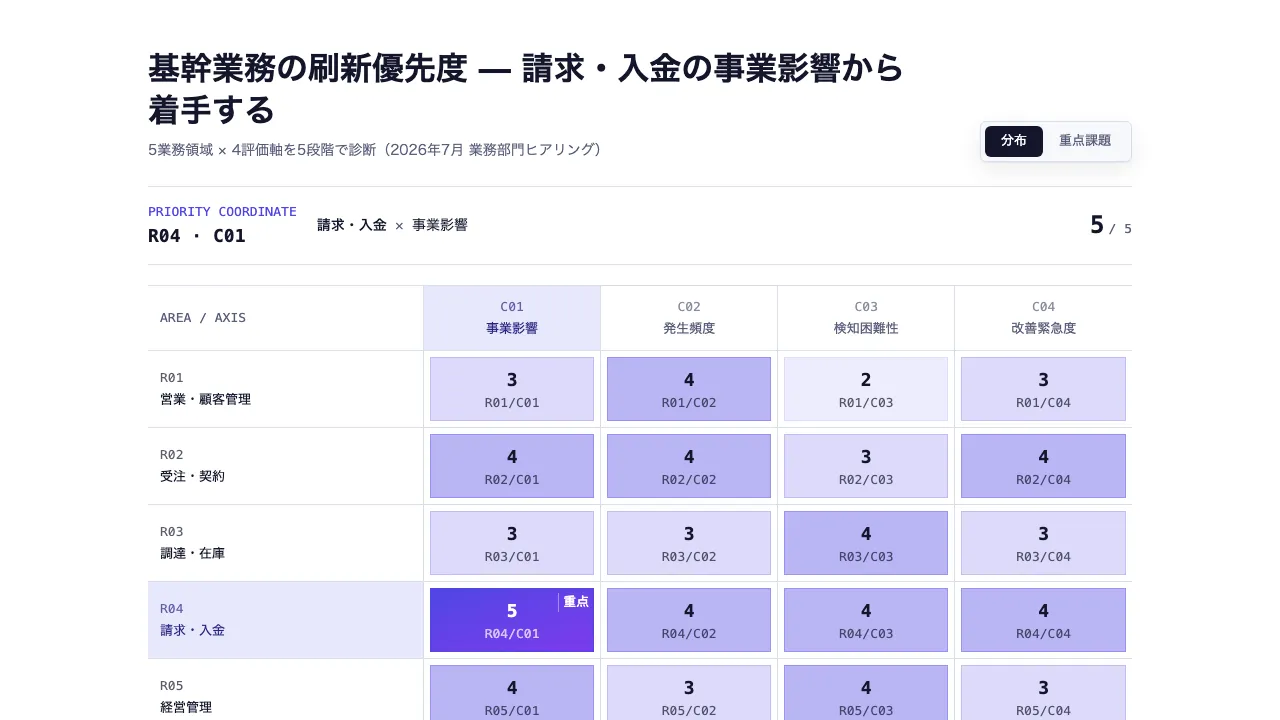
Every intersection of an area and a criterion, shaded by score, with the highest picked out by its row and column coordinates. The whole distribution and the top five switch without losing cell identity

## What you have to supply
- The areas that form the rows
- The criteria that form the columns
- A score on one scale for every intersection

## The shape of the input
- `title` — string — スライドタイトル。最高スコアの交点を結論として書く
- `subtitle` — string(任意)— 評価時点・評価方法・対象範囲・出典など
- `scale` — { min, max, lowLabel, highLabel } — スコア範囲と凡例ラベル。max は min より大きくする
- `columns` — string[] — 評価軸(2〜6件)
- `rows` — { label, cells }[] — 業務領域(2〜6件)。cells は columns と同じ順・同じ件数
- `rows[].cells` — { score, note? }[] — score は scale の範囲内。色濃度・最高点・重点課題ランキングの唯一の出典。note は図の下の補足欄で展開

schema.ts holds the machine-checkable validation. Ask rather than guess when an input is missing.

## When not to use it
- Placing individual items on two axes
- Comparing options mainly by yes/no or free text

## How to build it
Put the input in a JSON file and run:

```bash
node scripts/render.mjs heatmap <input.json> --theme ink -o out.html
```

The output is one self-contained file and fetches nothing at render time.

## The source
- https://design-vault.pages.dev/designs/heatmap/source/template.tsx
- https://design-vault.pages.dev/designs/heatmap/source/schema.ts
- https://design-vault.pages.dev/designs/heatmap/source/sample-data.json
- https://design-vault.pages.dev/designs/heatmap/sample.html Template, input schema, sample data and metadata. This document was generated from those four. The generated document
/designs/heatmap/source/template.tsx
import { useId } from "react";
import type {
HeatmapCell,
HeatmapProps,
HeatmapRow,
} from "./schema";
export type FlatHeatmapCell = HeatmapCell & {
rowLabel: string;
columnLabel: string;
rowIndex: number;
columnIndex: number;
originalIndex: number;
identity: string;
coordinate: string;
};
export function cellIdentity(rowIndex: number, columnIndex: number) {
return `r${rowIndex}-c${columnIndex}`;
}
export function cellCoordinate(rowIndex: number, columnIndex: number) {
return `R${String(rowIndex + 1).padStart(2, "0")} · C${String(
columnIndex + 1,
).padStart(2, "0")}`;
}
/** スコアを0〜1へ写す。描画関数として範囲外入力にも防御的に対応する。 */
export function normalizeScore(score: number, min: number, max: number) {
if (max === min) return 0.5;
return Math.max(0, Math.min(1, (score - min) / (max - min)));
}
/** 正規化した値を0〜4の5段階へ写す。最大値だけは必ず最濃色になる。 */
export function intensityBand(score: number, min: number, max: number) {
return Math.min(4, Math.floor(normalizeScore(score, min, max) * 5));
}
/** 行列を入力順つきの一次元セルへ変換する。 */
export function flattenCells(
rows: readonly HeatmapRow[],
columns: readonly string[],
): FlatHeatmapCell[] {
return rows.flatMap((row, rowIndex) =>
row.cells.map((cell, columnIndex) => ({
...cell,
rowLabel: row.label,
columnLabel: columns[columnIndex] ?? "",
rowIndex,
columnIndex,
originalIndex: rowIndex * columns.length + columnIndex,
identity: cellIdentity(rowIndex, columnIndex),
coordinate: cellCoordinate(rowIndex, columnIndex),
})),
);
}
/** スコア降順。同点は元の行列順を保ち、入力が同じなら常に同じ結果になる。 */
export function rankedCells(
rows: readonly HeatmapRow[],
columns: readonly string[],
) {
return flattenCells(rows, columns).sort(
(a, b) => b.score - a.score || a.originalIndex - b.originalIndex,
);
}
/**
* 重点課題として並べる上限。schema は 2×2 から 6×6 まで許すので、交点は 4 件
* から 36 件まで幅がある。上限であって件数ではない。
*/
export const PRIORITY_LIMIT = 5;
/**
* 重点課題の見出し。並べた件数から作る。
*
* 「上位5件」と決め打つと、2×2 の行列で 4 件しか無いのに 5 件あると名乗る。
* 見出しが自分の中身と食い違うと、読み手は落ちた 1 件を探すことになる。
* 全部並んでいるときは抜粋ではないので「上位」とも呼ばない。
*/
export const priorityHeading = (shown: number, total: number) =>
`優先着手 ${shown >= total ? "全" : "上位"}${shown}件`;
/** 最高スコア1件を返す。空の行列はnull。 */
export function priorityCell(
rows: readonly HeatmapRow[],
columns: readonly string[],
) {
return rankedCells(rows, columns)[0] ?? null;
}
const BAND_CLASSES = [
"border-outline bg-surface-subtle text-secondary",
"border-tertiary/10 bg-tertiary/10 text-on-surface",
"border-tertiary/20 bg-tertiary/20 text-on-surface",
"border-tertiary/30 bg-tertiary/40 text-on-surface",
"border-primary-container bg-primary-container text-on-primary",
] as const;
function stagger(index: number) {
return `calc(var(--stagger-step) * ${index})`;
}
function scoreLabel(score: number) {
return new Intl.NumberFormat("ja-JP", { maximumFractionDigits: 2 }).format(
score,
);
}
function CellLocator({
rows,
columns,
cell,
priority,
}: {
rows: readonly HeatmapRow[];
columns: readonly string[];
cell: FlatHeatmapCell;
priority: boolean;
}) {
return (
<span
aria-hidden="true"
className="grid size-10 shrink-0 gap-px border border-outline bg-outline"
style={{
gridTemplateColumns: `repeat(${columns.length}, minmax(0, 1fr))`,
}}
>
{rows.flatMap((_, rowIndex) =>
columns.map((__, columnIndex) => {
const active =
rowIndex === cell.rowIndex && columnIndex === cell.columnIndex;
return (
<span
key={cellIdentity(rowIndex, columnIndex)}
data-heatmap-locator-active={active ? "true" : undefined}
data-row-index={active ? rowIndex : undefined}
data-column-index={active ? columnIndex : undefined}
className={
active
? priority
? "bg-gradient-to-br from-tertiary to-accent-violet"
: "bg-primary"
: "bg-surface"
}
/>
);
}),
)}
</span>
);
}
export default function Heatmap({
title,
subtitle,
scale,
columns,
rows,
instanceId,
}: HeatmapProps) {
const autoId = useId();
const uid = (instanceId ?? autoId).replace(
// 捨てる操作は単射でないので、schema を通る別々の値が同じ id になる
// (`sales:a` と `sales/a` がどちらも `salesa`)。同じ文書へ 2 つ置くと
// id と radio の name が衝突して、片方の操作がもう片方に効く。
// 逃がし文字(`_`)自身も逃がすので、この変換は単射。
/[^a-zA-Z0-9-]/g,
(c) => `_${c.charCodeAt(0).toString(16)}_`,
) || "heatmap";
const radioName = `heatmap-view-${uid}`;
const cells = flattenCells(rows, columns);
const top = priorityCell(rows, columns);
const topCells = rankedCells(rows, columns).slice(0, PRIORITY_LIMIT);
const notes = cells.filter((cell) => cell.note);
const interactionCss = cells
.map(
(cell) => `
[data-heatmap-root="${uid}"]:has([data-heatmap-hotspot="${cell.identity}"]:is(:hover,:focus-visible)) [data-heatmap-row-header="${cell.rowIndex}"] {
background-color: color-mix(in srgb, var(--color-primary) 9%, var(--color-surface));
box-shadow: inset 3px 0 0 var(--color-primary);
color: var(--color-on-surface);
}
[data-heatmap-root="${uid}"]:has([data-heatmap-hotspot="${cell.identity}"]:is(:hover,:focus-visible)) [data-heatmap-column-header="${cell.columnIndex}"] {
background-color: color-mix(in srgb, var(--color-primary) 9%, var(--color-surface));
box-shadow: inset 0 -3px 0 var(--color-primary);
color: var(--color-on-surface);
}
[data-heatmap-root="${uid}"]:has([data-heatmap-hotspot="${cell.identity}"]:is(:hover,:focus-visible)) [data-heatmap-surface="${cell.identity}"] {
border-color: var(--color-primary);
box-shadow: inset 0 0 0 2px var(--color-primary);
color: var(--color-on-surface);
}
[data-heatmap-root="${uid}"]:has([data-heatmap-hotspot="${cell.identity}"]:is(:hover,:focus-visible)) [data-heatmap-default-priority="true"]:not([data-heatmap-surface="${cell.identity}"]) {
filter: saturate(.28) brightness(1.08);
}`,
)
.join("\n");
return (
<section
data-heatmap-root={uid}
className="group/heatmap mx-auto max-w-slide bg-surface p-12 font-sans text-on-surface"
>
<style>{interactionCss}</style>
<header className="mb-6 flex flex-wrap items-end justify-between gap-4">
<div className="max-w-3xl">
<h1 className="text-h1">{title}</h1>
{subtitle && (
<p className="mt-2 text-body-sm text-secondary">{subtitle}</p>
)}
</div>
<div className="flex shrink-0 rounded-sm border border-outline bg-surface-subtle p-1 shadow-card">
<input
id={`${uid}-overview`}
type="radio"
name={radioName}
defaultChecked
className="heatmap-view-overview sr-only"
/>
<label
htmlFor={`${uid}-overview`}
className="cursor-pointer rounded-sm px-4 py-1.5 text-label text-secondary group-has-[.heatmap-view-overview:checked]/heatmap:bg-primary group-has-[.heatmap-view-overview:checked]/heatmap:text-on-primary group-has-[.heatmap-view-overview:focus-visible]/heatmap:ring-2 group-has-[.heatmap-view-overview:focus-visible]/heatmap:ring-tertiary"
>
分布
</label>
<input
id={`${uid}-priorities`}
type="radio"
name={radioName}
className="heatmap-view-priorities sr-only"
/>
<label
htmlFor={`${uid}-priorities`}
className="cursor-pointer rounded-sm px-4 py-1.5 text-label text-secondary group-has-[.heatmap-view-priorities:checked]/heatmap:bg-primary group-has-[.heatmap-view-priorities:checked]/heatmap:text-on-primary group-has-[.heatmap-view-priorities:focus-visible]/heatmap:ring-2 group-has-[.heatmap-view-priorities:focus-visible]/heatmap:ring-tertiary"
>
重点課題
</label>
</div>
</header>
<div
data-testid="heatmap-overview"
className="block group-has-[.heatmap-view-priorities:checked]/heatmap:hidden"
>
{top && (
<div className="mb-5 grid gap-2 border-y border-outline py-4 sm:grid-cols-[auto_minmax(0,1fr)_auto] sm:items-center sm:gap-5">
<div>
<p className="font-mono text-label text-tertiary">
PRIORITY COORDINATE
</p>
<p className="mt-0.5 font-mono text-h3">{top.coordinate}</p>
</div>
<p className="min-w-0 text-body-sm">
<span className="font-semibold">{top.rowLabel}</span>
<span className="mx-2 text-secondary">×</span>
<span>{top.columnLabel}</span>
</p>
<p className="font-mono text-h2 sm:text-right">
{scoreLabel(top.score)}
<span className="ml-1 text-label text-secondary">
/ {scoreLabel(scale.max)}
</span>
</p>
</div>
)}
<div data-heatmap-view="matrix-desktop" className="hidden sm:block">
<table className="w-full table-fixed border-collapse">
<colgroup>
<col className="w-[28%]" />
{columns.map((_, columnIndex) => (
<col key={columnIndex} />
))}
</colgroup>
<thead>
<tr className="border-y border-outline">
<th className="px-3 py-3 text-left font-mono text-label text-secondary">
AREA / AXIS
</th>
{columns.map((column, columnIndex) => (
<th
key={columnIndex}
scope="col"
data-heatmap-column-header={columnIndex}
data-heatmap-default-axis={
columnIndex === top?.columnIndex ? "column" : undefined
}
className={`border-l border-outline px-2 py-3 text-center text-label transition-[background-color,box-shadow,color] ${
columnIndex === top?.columnIndex
? "bg-tertiary-container text-on-tertiary-container"
: "text-secondary"
}`}
>
<span className="mb-1 block font-mono text-label opacity-70">
C{String(columnIndex + 1).padStart(2, "0")}
</span>
{column}
</th>
))}
</tr>
</thead>
<tbody>
{rows.map((row, rowIndex) => (
<tr key={rowIndex}>
<th
scope="row"
data-heatmap-row-header={rowIndex}
data-heatmap-default-axis={
rowIndex === top?.rowIndex ? "row" : undefined
}
className={`border-b border-outline px-3 py-3 text-left text-label transition-[background-color,box-shadow,color] ${
rowIndex === top?.rowIndex
? "bg-tertiary-container text-on-tertiary-container"
: "text-on-surface"
}`}
>
<span className="mb-1 block font-mono text-label opacity-70">
R{String(rowIndex + 1).padStart(2, "0")}
</span>
{row.label}
</th>
{row.cells.map((cell, columnIndex) => {
const flat = cells.find(
(candidate) =>
candidate.rowIndex === rowIndex &&
candidate.columnIndex === columnIndex,
) as FlatHeatmapCell;
const isPriority = flat.originalIndex === top?.originalIndex;
const band = intensityBand(cell.score, scale.min, scale.max);
return (
<td
key={columnIndex}
data-testid="heatmap-cell"
className="animate-rise border-b border-l border-outline p-1.5"
style={{ animationDelay: stagger(flat.originalIndex) }}
>
<button
type="button"
data-row-index={rowIndex}
data-column-index={columnIndex}
data-heatmap-cell-id={flat.identity}
data-heatmap-hotspot={flat.identity}
data-heatmap-surface={flat.identity}
data-heatmap-default-priority={
isPriority ? "true" : undefined
}
data-priority={isPriority ? "true" : "false"}
aria-label={`${flat.coordinate} ${row.label} × ${columns[columnIndex]}: ${scoreLabel(cell.score)}`}
className={`relative flex min-h-16 w-full cursor-default flex-col items-center justify-center border p-2 text-center outline-none transition-[border-color,box-shadow,color,filter] focus-visible:ring-2 focus-visible:ring-primary focus-visible:ring-offset-2 ${
isPriority
? "border-tertiary bg-gradient-to-br from-tertiary to-accent-violet text-on-primary"
: BAND_CLASSES[band]
}`}
>
<span className="font-mono text-h3">
{scoreLabel(cell.score)}
</span>
<span className="mt-0.5 font-mono text-label opacity-70">
{flat.coordinate.replace(" · ", "/")}
</span>
{isPriority && (
<span className="absolute top-1 right-1 border-l border-surface/40 pl-1 font-mono text-label text-on-primary">
重点
</span>
)}
</button>
</td>
);
})}
</tr>
))}
</tbody>
</table>
</div>
<div data-heatmap-view="matrix-mobile" className="sm:hidden">
<div className="mb-3 grid grid-cols-2 gap-x-4 gap-y-2 border-y border-outline py-3">
{columns.map((column, columnIndex) => (
<div
key={columnIndex}
data-heatmap-column-header={columnIndex}
data-heatmap-default-axis={
columnIndex === top?.columnIndex ? "column" : undefined
}
className={`flex min-w-0 items-baseline gap-2 px-1 py-1 transition-[background-color,box-shadow,color] ${
columnIndex === top?.columnIndex
? "bg-tertiary-container text-on-tertiary-container"
: "text-secondary"
}`}
>
<span className="font-mono text-label">
C{String(columnIndex + 1).padStart(2, "0")}
</span>
<span className="min-w-0 text-label">{column}</span>
</div>
))}
</div>
<div className="border-t border-outline">
{rows.map((row, rowIndex) => (
<article
key={rowIndex}
data-heatmap-mobile-row={rowIndex}
className="border-b border-outline py-4"
>
<h2
data-heatmap-row-header={rowIndex}
data-heatmap-default-axis={
rowIndex === top?.rowIndex ? "row" : undefined
}
className={`mb-2 flex items-center gap-2 px-1 py-1 text-body-sm transition-[background-color,box-shadow,color] ${
rowIndex === top?.rowIndex
? "bg-tertiary-container text-on-tertiary-container"
: "text-on-surface"
}`}
>
<span className="font-mono text-label opacity-70">
R{String(rowIndex + 1).padStart(2, "0")}
</span>
{row.label}
</h2>
<div
className="grid gap-1"
style={{
gridTemplateColumns: `repeat(${columns.length}, minmax(0, 1fr))`,
}}
>
{row.cells.map((cell, columnIndex) => {
const flat = cells[
rowIndex * columns.length + columnIndex
] as FlatHeatmapCell;
const isPriority =
flat.originalIndex === top?.originalIndex;
const band = intensityBand(
cell.score,
scale.min,
scale.max,
);
return (
<button
type="button"
key={columnIndex}
data-testid="heatmap-cell"
data-row-index={rowIndex}
data-column-index={columnIndex}
data-heatmap-cell-id={flat.identity}
data-heatmap-hotspot={flat.identity}
data-heatmap-surface={flat.identity}
data-heatmap-default-priority={
isPriority ? "true" : undefined
}
data-priority={isPriority ? "true" : "false"}
aria-label={`${flat.coordinate} ${row.label} × ${columns[columnIndex]}: ${scoreLabel(cell.score)}`}
className={`flex min-w-0 cursor-default flex-col items-center border px-1 py-2 outline-none transition-[border-color,box-shadow,color,filter] focus-visible:ring-2 focus-visible:ring-primary ${
isPriority
? "border-tertiary bg-gradient-to-br from-tertiary to-accent-violet text-on-primary"
: BAND_CLASSES[band]
}`}
>
<span className="font-mono text-label opacity-70">
C{String(columnIndex + 1).padStart(2, "0")}
</span>
<span className="font-mono text-h3">
{scoreLabel(cell.score)}
</span>
</button>
);
})}
</div>
</article>
))}
</div>
</div>
<div className="mt-4 flex flex-wrap items-center justify-end gap-3 font-mono text-label text-secondary">
<span>{scale.lowLabel}</span>
<div className="flex gap-1" aria-label={`${scale.lowLabel}から${scale.highLabel}`}>
{BAND_CLASSES.map((className, index) => (
<span
key={index}
aria-hidden="true"
className={`h-2 w-8 rounded-full border ${className}`}
/>
))}
</div>
<span>{scale.highLabel}</span>
</div>
</div>
<div
data-testid="heatmap-priorities"
className="hidden group-has-[.heatmap-view-priorities:checked]/heatmap:block"
>
<div className="mb-4 flex flex-wrap items-baseline justify-between gap-4 border-y border-outline py-4">
<div>
<p className="font-mono text-label text-tertiary">
PRIORITY LOCATOR
</p>
<h2 className="mt-1 text-h2">
{priorityHeading(topCells.length, cells.length)}
</h2>
</div>
<p className="font-mono text-label text-secondary">
score / {scoreLabel(scale.max)}
</p>
</div>
<div className="border-t border-outline">
{topCells.map((cell, index) => {
const isPriority = index === 0;
const width = Math.max(
6,
normalizeScore(cell.score, scale.min, scale.max) * 100,
);
return (
<article
key={cell.originalIndex}
data-testid="heatmap-priority-row"
data-heatmap-cell-id={cell.identity}
data-heatmap-surface={cell.identity}
data-heatmap-default-priority={
isPriority ? "true" : undefined
}
data-row-index={cell.rowIndex}
data-column-index={cell.columnIndex}
data-score={cell.score}
className={`animate-rise border-b transition-[border-color,box-shadow,color,filter] ${
isPriority
? "border-tertiary bg-gradient-to-r from-tertiary/10 via-surface to-surface"
: "border-outline bg-surface"
}`}
style={{ animationDelay: stagger(index) }}
>
<button
type="button"
data-heatmap-hotspot={cell.identity}
aria-label={`${String(index + 1)}位 ${cell.coordinate} ${cell.rowLabel} × ${cell.columnLabel}: ${scoreLabel(cell.score)}`}
className="grid w-full cursor-default grid-cols-[2.5rem_3rem_minmax(0,1fr)_auto] items-center gap-3 px-1 py-4 text-left outline-none focus-visible:ring-2 focus-visible:ring-primary focus-visible:ring-offset-2 sm:gap-4"
>
<span className="font-mono text-label text-secondary">
{String(index + 1).padStart(2, "0")}
</span>
<span>
<CellLocator
rows={rows}
columns={columns}
cell={cell}
priority={isPriority}
/>
</span>
<div className="min-w-0">
<p className="font-mono text-label text-tertiary">
{cell.coordinate}
</p>
<p className="mt-0.5 text-label text-on-surface">
{cell.rowLabel}
<span className="mx-2 text-secondary">×</span>
{cell.columnLabel}
</p>
<div className="mt-2 h-1.5 overflow-hidden bg-surface-subtle">
<span
className={`block h-full ${
isPriority
? "bg-gradient-to-r from-tertiary to-accent-violet"
: "bg-tertiary"
}`}
style={{ width: `${width}%` }}
/>
</div>
</div>
<span className="font-mono text-h3">
{scoreLabel(cell.score)}
</span>
</button>
</article>
);
})}
</div>
</div>
{notes.length > 0 && (
<details data-inline-disclosure="true" className="group mt-6 rounded-lg border border-outline bg-surface-subtle">
<summary className="flex cursor-pointer list-none items-center px-4 py-3 text-label text-secondary focus-visible:outline focus-visible:outline-2 focus-visible:outline-offset-2 focus-visible:outline-tertiary">
<span>補足を確認</span>
<span className="ml-auto font-mono">{notes.length}件</span>
<span aria-hidden="true" className="ml-2 text-tertiary transition-transform group-open:rotate-45">+</span>
</summary>
<div className="grid gap-3 border-t border-outline p-4 sm:grid-cols-2">
{notes.map((cell) => (
<article key={cell.originalIndex} data-note-item="true" className="rounded-md bg-surface p-4">
<h3 className="text-label">{cell.rowLabel} × {cell.columnLabel}</h3>
<p className="mt-1 font-mono text-label text-secondary">score {scoreLabel(cell.score)}</p>
<p className="mt-2 text-body-sm">{cell.note}</p>
</article>
))}
</div>
</details>
)}
</section>
);
}
/designs/heatmap/source/schema.ts
import { z } from "zod";

export const heatmapScaleSchema = z
  .object({
    min: z.number().describe("評価スコアの最小値"),
    max: z.number().describe("評価スコアの最大値。minより大きい値"),
    lowLabel: z.string().describe("凡例の最小側ラベル(例: 低)"),
    highLabel: z.string().describe("凡例の最大側ラベル(例: 高)"),
  })
  .strict()
  .refine((scale) => scale.max > scale.min, {
    message: "scale.max は scale.min より大きくすること",
    path: ["max"],
  });

export const heatmapCellSchema = z
  .object({
    score: z
      .number()
      .describe(
        "行と列の交点の評価スコア。scale.min〜scale.maxの範囲に収める",
      ),
    note: z
      .string()
      .optional()
      .describe("図の下の補足欄で明示的に展開する根拠・観察事実・対策の補足"),
  })
  .strict();

export const heatmapRowSchema = z
  .object({
    label: z.string().describe("行に置く業務領域・部門・対象名"),
    cells: z
      .array(heatmapCellSchema)
      .min(2)
      .max(6)
      .describe("columnsと同じ順・同じ件数の評価セル(2〜6件)"),
  })
  .strict();

export const schema = z
  .object({
    title: z.string().describe("スライドタイトル。最優先の交点を結論として書く"),
    subtitle: z
      .string()
      .optional()
      .describe("評価時点、評価方法、対象範囲、出典など"),
    scale: heatmapScaleSchema,
    columns: z
      .array(z.string())
      .min(2)
      .max(6)
      .describe("列に置く評価軸(2〜6件)"),
    rows: z
      .array(heatmapRowSchema)
      .min(2)
      .max(6)
      .describe("行に置く業務領域とセル(2〜6件)"),
    instanceId: z
      .string()
      .optional()
      .describe("同一ページに複数置く場合のビュー切替radio名の識別子"),
  })
  .strict()
  .superRefine((data, ctx) => {
    data.rows.forEach((row, rowIndex) => {
      if (row.cells.length !== data.columns.length) {
        ctx.addIssue({
          code: "custom",
          message: `cells は columns と同じ${data.columns.length}件にすること`,
          path: ["rows", rowIndex, "cells"],
        });
      }

      row.cells.forEach((cell, columnIndex) => {
        if (cell.score < data.scale.min || cell.score > data.scale.max) {
          ctx.addIssue({
            code: "custom",
            message: `score は ${data.scale.min}〜${data.scale.max} の範囲にすること`,
            path: ["rows", rowIndex, "cells", columnIndex, "score"],
          });
        }
      });
    });
  });

export type HeatmapScale = z.infer<typeof heatmapScaleSchema>;
export type HeatmapCell = z.infer<typeof heatmapCellSchema>;
export type HeatmapRow = z.infer<typeof heatmapRowSchema>;
export type HeatmapProps = z.infer<typeof schema>;
/designs/heatmap/source/meta.yaml
id: heatmap
name:
  ja: "ヒートマップ(業務課題診断)"
  en: "Heatmap (Operational Assessment)"
purpose:
  ja: "業務領域と評価軸の交点をスコアの濃淡で示し、最高スコアを行・列の座標照準として1件強調する。同じcell identityと座標locatorを保ったまま全体分布から重点課題上位5件へ切り替えられ、補足は図を覆わず下で確認できる"
  en: "Every intersection of an area and a criterion, shaded by score, with the highest picked out by its row and column coordinates. The whole distribution and the top five switch without losing cell identity"
status: published
# 索引カードの図版。pnpm layout:render が原本から描く。
still: ./still.png
category: assessment
catalogOrder: 90
jobs:
  - prioritize-diagnose
  - compare-choose
useCases:
  - prioritization
layoutKinds:
  - matrix
tags: [heatmap, assessment, risk, prioritization, data-driven, interactive]
whenToUse:
  - ja: "部門・業務領域を複数のリスク軸や成熟度軸で横断評価する場合"
    en: "Assessing departments or areas across several risk or maturity axes"
  - ja: "システム刷新・統制改善・DX施策の重点着手領域を決めたい場合"
    en: "Deciding where a replacement, a control programme or a transformation should start"
  - ja: "多数の交点からスコアの偏りと上位課題を同時に説明したい場合"
    en: "Showing the skew and the worst offenders from many intersections at once"
  - ja: "2軸へ項目を配置するのではなく、行と列の全組み合わせを評価する場合"
    en: "When every row-column combination is evaluated, not placed on two axes"
avoidWhen:
  - ja: "個々の項目を2軸の座標へ配置したい場合"
    en: "Placing individual items on two axes"
  - ja: "可否や自由記述を中心に選択肢を比較したい場合"
    en: "Comparing options mainly by yes/no or free text"
requiredInputs:
  - ja: "行となる業務領域"
    en: "The areas that form the rows"
  - ja: "列となる評価軸"
    en: "The criteria that form the columns"
  - ja: "全交点の共通尺度スコア"
    en: "A score on one scale for every intersection"
relatedLayouts: [matrix-2x2, comparison-table, raci-matrix]
dataSchema:
  title: "string — スライドタイトル。最高スコアの交点を結論として書く"
  subtitle: "string(任意)— 評価時点・評価方法・対象範囲・出典など"
  scale: "{ min, max, lowLabel, highLabel } — スコア範囲と凡例ラベル。max は min より大きくする"
  columns: "string[] — 評価軸(2〜6件)"
  rows: "{ label, cells }[] — 業務領域(2〜6件)。cells は columns と同じ順・同じ件数"
  rows[].cells: "{ score, note? }[] — score は scale の範囲内。色濃度・最高点・重点課題ランキングの唯一の出典。note は図の下の補足欄で展開"
sources: []
/designs/heatmap/source/sample-data.json
{
  "title": "基幹業務の刷新優先度 — 請求・入金の事業影響から着手する",
  "subtitle": "5業務領域 × 4評価軸を5段階で診断(2026年7月 業務部門ヒアリング)",
  "scale": {
    "min": 1,
    "max": 5,
    "lowLabel": "低",
    "highLabel": "高"
  },
  "columns": ["事業影響", "発生頻度", "検知困難性", "改善緊急度"],
  "rows": [
    {
      "label": "営業・顧客管理",
      "cells": [
        { "score": 3 },
        { "score": 4, "note": "顧客情報の重複登録が月平均38件発生" },
        { "score": 2 },
        { "score": 3 }
      ]
    },
    {
      "label": "受注・契約",
      "cells": [
        { "score": 4, "note": "契約条件の転記確認に1案件あたり約25分を要する" },
        { "score": 4 },
        { "score": 3 },
        { "score": 4 }
      ]
    },
    {
      "label": "調達・在庫",
      "cells": [
        { "score": 3 },
        { "score": 3 },
        { "score": 4, "note": "棚卸差異は月末まで顕在化せず、補充判断が遅れる" },
        { "score": 3 }
      ]
    },
    {
      "label": "請求・入金",
      "cells": [
        { "score": 5, "note": "請求遅延が売上計上と資金繰りの双方へ直結する" },
        { "score": 4 },
        { "score": 4 },
        { "score": 4, "note": "属人化した照合作業を次期更新前に標準化する必要がある" }
      ]
    },
    {
      "label": "経営管理",
      "cells": [
        { "score": 4 },
        { "score": 3 },
        { "score": 4, "note": "部門別採算の確定が翌月第8営業日まで遅れる" },
        { "score": 3 }
      ]
    }
  ],
  "instanceId": "core-business-risk"
}