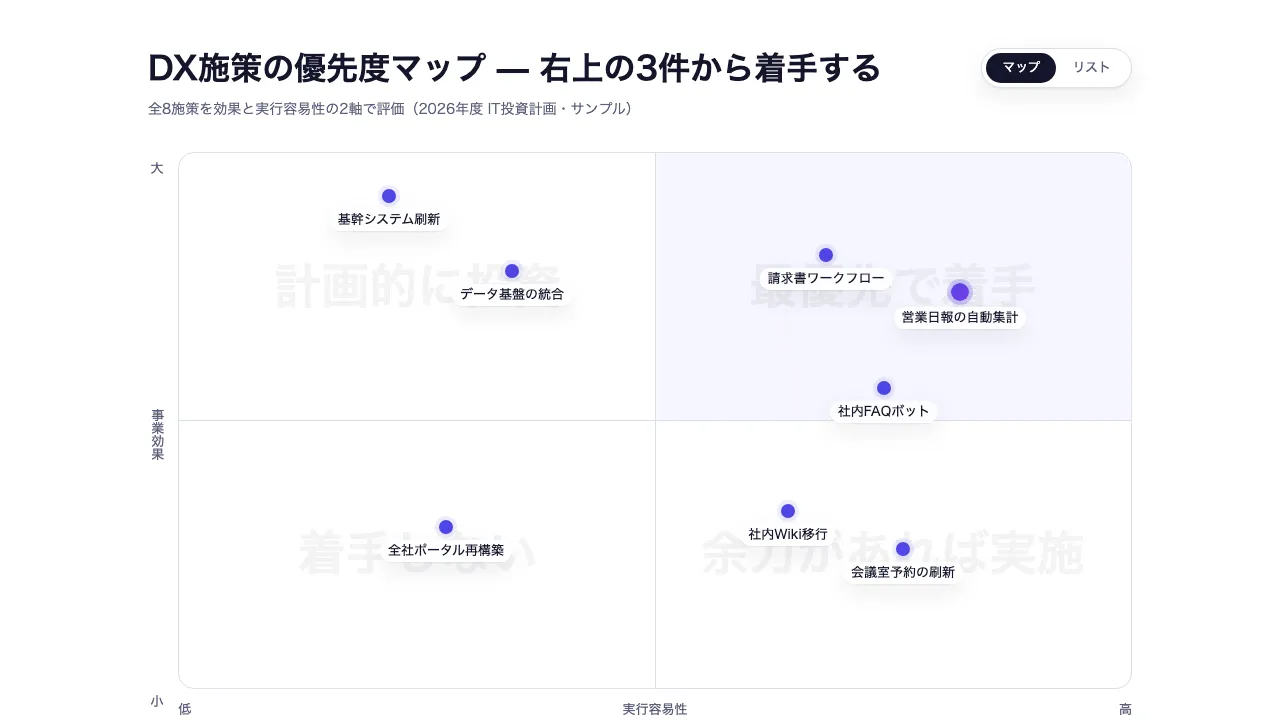
Seen as a design The generated document itself — its toggles and disclosures work here
Seen as a design The generated document itself — its toggles and disclosures work here
Copy and paste, or save a file and hand it over. For a machine with no network, one “Everything” file is enough.
Everything in this panel, including the contents behind each URL, in one Markdown file — Large, so it goes as a file (copy is for 32 KB and under)
Build an HTML document with "2x2 Matrix (Priority Map)". This layout runs, so there is no composition to rebuild — what it needs is content.

## What this layout does
Places items on a plane by two scores, so priority and positioning come from the data

## What you have to supply
- The items being compared
- What each axis measures
- Both scores for every item

## The shape of the input
- `title` — string — スライドタイトル。結論を書くメッセージラインを推奨
- `subtitle` — string(任意)— 補足・出典など
- `xAxis` — { label, low, high } — 横軸の名称と両端ラベル
- `yAxis` — { label, low, high } — 縦軸の名称と両端ラベル
- `zones` — [左上, 右上, 左下, 右下] の象限ラベル 4 つ。リスト表示の見出しにも使われる
- `items` — { label, x: 0-100, y: 0-100, note?, highlight? } の配列。x/y のスコアで座標平面に自動配置

schema.ts holds the machine-checkable validation. Ask rather than guess when an input is missing.

## When not to use it
- Three or more axes, where each intersection needs its own score
- Explaining order in time, or dependencies between steps

## How to build it
Put the input in a JSON file and run:

```bash
node scripts/render.mjs matrix-2x2 <input.json> --theme ink -o out.html
```

The output is one self-contained file and fetches nothing at render time.

## The source
- https://design-vault.pages.dev/designs/matrix-2x2/source/template.tsx
- https://design-vault.pages.dev/designs/matrix-2x2/source/schema.ts
- https://design-vault.pages.dev/designs/matrix-2x2/source/sample-data.json
- https://design-vault.pages.dev/designs/matrix-2x2/sample.html Template, input schema, sample data and metadata. This document was generated from those four. The generated document
/designs/matrix-2x2/source/template.tsx
import { useId } from "react";
import type { Matrix2x2Props, MatrixItem } from "./schema";

/** スコアを 0-100 に収める(範囲外データで点が枠外に出るのを防ぐ) */
export const clampScore = (n: number) => Math.min(100, Math.max(0, n));

/** 象限番号 [左上=0, 右上=1, 左下=2, 右下=3]。境界値 50 は高評価側(右・上)に入る */
export const quadrantIndex = (it: Pick<MatrixItem, "x" | "y">) =>
  (it.y >= 50 ? 0 : 2) + (it.x >= 50 ? 1 : 0);

/** highlight 要素専用グラデーション(DESIGN.md: indigo→violet 限定・1件のみ) */
const HIGHLIGHT_GRADIENT = "bg-linear-to-br from-tertiary to-accent-violet";

/** エントランスの時差。間隔は global.css の --stagger-step で統一 */
const stagger = (i: number, baseMs = 0) =>
  `calc(${baseMs}ms + ${i} * var(--stagger-step))`;

function AxisLabel({
  vertical,
  children,
}: {
  vertical?: boolean;
  children: string;
}) {
  return (
    <span
      className={`text-label text-secondary${vertical ? " [writing-mode:vertical-rl]" : ""}`}
    >
      {children}
    </span>
  );
}

/** 象限のゴーストラベル。半区画の中央に display サイズ・透過5%で敷く */
function Zone({
  corner,
  tinted,
  index,
  children,
}: {
  corner: string;
  tinted?: boolean;
  index: number;
  children: string;
}) {
  return (
    <div
      className={`absolute flex h-1/2 w-1/2 items-center justify-center ${corner}${tinted ? " bg-tertiary/5" : ""}`}
    >
      <span
        className="animate-rise select-none text-h2 text-primary/5 sm:text-display"
        style={{ animationDelay: stagger(index, 100) }}
      >
        {children}
      </span>
    </div>
  );
}

export default function Matrix2x2({
  title,
  subtitle,
  xAxis,
  yAxis,
  zones,
  items,
  instanceId,
}: Matrix2x2Props) {
  const autoId = useId();
  const uid = instanceId ?? autoId;
  const notes = items.filter((item) => item.note);

  // リスト投影は同じ items から導出する(単一データソース・2つの投影)
  const buckets: [string, MatrixItem[]][] = zones.map((z) => [z, []]);
  for (const it of items) buckets[quadrantIndex(it)][1].push(it);

  return (
    <section
      data-matrix-root="true"
      className="group/matrix mx-auto max-w-slide bg-surface p-12 font-sans text-on-surface"
    >
      {/* 表示切替は CSS のみ(radio + :has())。成果物の単一ファイル制約を守る。
          md 未満では切替を出さないので、入力も畳んで焦点から外す —— 見えない
          マップへ移せる操作が残っていると、読者は何も起きない選択肢を触れる */}
      <input
        type="radio"
        name={uid}
        id={`${uid}-map`}
        className="v-map sr-only max-md:hidden"
        defaultChecked
      />
      <input
        type="radio"
        name={uid}
        id={`${uid}-list`}
        className="v-list sr-only max-md:hidden"
      />

      <header className="mb-8 flex flex-wrap items-start justify-between gap-4">
        <div>
          <h1 className="text-h1">{title}</h1>
          {subtitle && (
            <p className="mt-2 text-body-sm text-secondary">{subtitle}</p>
          )}
        </div>
        <div className="hidden rounded-full border border-outline bg-surface p-1 shadow-card md:inline-flex">
          <label
            htmlFor={`${uid}-map`}
            className="cursor-pointer rounded-full px-4 py-1.5 text-label text-secondary group-has-[.v-map:checked]/matrix:bg-primary group-has-[.v-map:checked]/matrix:text-on-primary group-has-[.v-map:focus-visible]/matrix:ring-2 group-has-[.v-map:focus-visible]/matrix:ring-tertiary"
          >
            マップ
          </label>
          <label
            htmlFor={`${uid}-list`}
            className="cursor-pointer rounded-full px-4 py-1.5 text-label text-secondary group-has-[.v-list:checked]/matrix:bg-primary group-has-[.v-list:checked]/matrix:text-on-primary group-has-[.v-list:focus-visible]/matrix:ring-2 group-has-[.v-list:focus-visible]/matrix:ring-tertiary"
          >
            リスト
          </label>
        </div>
      </header>

      {/* ── マップ投影: x/y スコアによるデータ駆動配置 ──
          md 未満では出さない。点は幅に比例して詰まるがラベルの文字幅は詰まらないので、
          狭い幅では隣り合う項目名が重なる(実測: サンプル 8 件で 390px に 8 組、
          660px でも 1 組。消えるのは 700px 以上)。切替点は次の停留所 md に置く。 */}
      <div className="hidden gap-3 md:group-has-[.v-map:checked]/matrix:flex">
        <div className="flex flex-col items-center justify-between py-2">
          <AxisLabel>{yAxis.high}</AxisLabel>
          <AxisLabel vertical>{yAxis.label}</AxisLabel>
          <AxisLabel>{yAxis.low}</AxisLabel>
        </div>

        <div className="flex-1">
          <div className="relative aspect-[16/9] rounded-lg border border-outline bg-surface">
            <Zone corner="left-0 top-0 rounded-tl-lg" index={0}>
              {zones[0]}
            </Zone>
            <Zone corner="right-0 top-0 rounded-tr-lg" tinted index={1}>
              {zones[1]}
            </Zone>
            <Zone corner="bottom-0 left-0 rounded-bl-lg" index={2}>
              {zones[2]}
            </Zone>
            <Zone corner="bottom-0 right-0 rounded-br-lg" index={3}>
              {zones[3]}
            </Zone>
            <div className="absolute inset-y-0 left-1/2 w-px bg-outline" />
            <div className="absolute inset-x-0 top-1/2 h-px bg-outline" />

            {items.map((it, i) => {
              const cx = clampScore(it.x);
              const cy = clampScore(it.y);
              return (
                <div
                  key={i}
                  data-matrix-item={i}
                  data-matrix-record="true"
                  className="group/dot absolute -translate-x-1/2 translate-y-1/2 animate-pop"
                  style={{
                    left: `${cx}%`,
                    bottom: `${cy}%`,
                    animationDelay: stagger(i, 400),
                  }}
                >
                  <span
                    className={`block rounded-full shadow-card ${
                      it.highlight
                        ? `size-4.5 ring-4 ring-tertiary/25 ${HIGHLIGHT_GRADIENT}`
                        : "size-3.5 bg-tertiary ring-4 ring-tertiary/10"
                    }`}
                  />
                  <span className="absolute left-1/2 top-full mt-1.5 -translate-x-1/2 whitespace-nowrap rounded-full bg-surface/90 px-2 py-0.5 text-label shadow-card">
                    {it.label}
                  </span>
                </div>
              );
            })}
          </div>

          <div className="mt-3 flex items-center justify-between">
            <AxisLabel>{xAxis.low}</AxisLabel>
            <AxisLabel>{xAxis.label}</AxisLabel>
            <AxisLabel>{xAxis.high}</AxisLabel>
          </div>
        </div>
      </div>

      {/* ── リスト投影: 同じ items を象限ごとに束ねて表示 ──
          md 未満ではこれが既定。象限という所在は残るので、狭い幅で落ちるのは
          象限の中での位置だけ。comparison-table の卓上⇄携帯と同じ、幅で選ぶ投影。 */}
      <div className="hidden grid-cols-1 gap-3 max-md:grid sm:grid-cols-2 md:group-has-[.v-list:checked]/matrix:grid">
        {buckets.map(([zone, zoneItems], i) => (
          <div
            key={i}
            className={`animate-rise rounded-lg p-6 ${
              i === 1
                ? "bg-tertiary-container text-on-tertiary-container"
                : "border border-outline bg-surface-subtle"
            }`}
            style={{ animationDelay: stagger(i) }}
          >
            <h2 className="text-h3">{zone}</h2>
            <ul className="mt-3 space-y-3">
              {zoneItems.map((it, j) => (
                <li key={j} data-matrix-record="true" className="flex gap-2">
                  <span
                    className={`mt-1.5 size-2 shrink-0 rounded-full ${
                      it.highlight ? HIGHLIGHT_GRADIENT : "bg-tertiary/60"
                    }`}
                  />
                  <div className="flex-1">
                    <p className="text-body-sm">{it.label}</p>
                    {it.note && (
                      <p className="mt-0.5 text-label opacity-70">{it.note}</p>
                    )}
                  </div>
                </li>
              ))}
              {zoneItems.length === 0 && (
                <li className="text-body-sm opacity-70">該当なし</li>
              )}
            </ul>
          </div>
        ))}
      </div>

      {notes.length > 0 && (
        <details
          data-inline-disclosure="true"
          className="group mt-6 rounded-lg border border-outline bg-surface-subtle"
        >
          <summary className="flex cursor-pointer list-none items-center px-4 py-3 text-label text-secondary focus-visible:outline focus-visible:outline-2 focus-visible:outline-offset-2 focus-visible:outline-tertiary">
            <span>補足を確認</span>
            <span className="ml-auto font-mono">{notes.length}件</span>
            <span aria-hidden="true" className="ml-2 text-tertiary transition-transform group-open:rotate-45">+</span>
          </summary>
          <div className="grid gap-3 border-t border-outline p-4 sm:grid-cols-2">
            {notes.map((item, index) => (
              <article key={index} data-note-item="true" className="rounded-md bg-surface p-4">
                <h3 className="text-label">{item.label}</h3>
                <p className="mt-1 font-mono text-label text-secondary">
                  {yAxis.label} {item.y} ・ {xAxis.label} {item.x}
                </p>
                <p className="mt-2 text-body-sm">{item.note}</p>
              </article>
            ))}
          </div>
        </details>
      )}
    </section>
  );
}
/designs/matrix-2x2/source/schema.ts
import { z } from "zod";

export const axisSchema = z
  .object({
    label: z.string().describe("軸の名称(例: 事業効果)"),
    low: z.string().describe("軸の低い側のラベル(例: 小)"),
    high: z.string().describe("軸の高い側のラベル(例: 大)"),
  })
  .strict();

export const matrixItemSchema = z
  .object({
    label: z.string(),
    x: z.number().describe("横軸スコア 0-100。座標平面への配置に使う"),
    y: z.number().describe("縦軸スコア 0-100。座標平面への配置に使う"),
    note: z.string().optional().describe("図の下の補足欄で明示的に展開される詳細"),
    highlight: z
      .boolean()
      .optional()
      .describe(
        "最重要の1件のみ true(グラデーション表示。DESIGN.md: 大胆さは1画面1箇所)",
      ),
  })
  .strict();

export const schema = z
  .object({
    title: z.string().describe("スライドタイトル。結論を書くメッセージラインを推奨"),
    subtitle: z.string().optional().describe("補足・出典など"),
    xAxis: axisSchema,
    yAxis: axisSchema,
    zones: z
      .tuple([z.string(), z.string(), z.string(), z.string()])
      .describe(
        "象限ラベル [左上, 右上, 左下, 右下]。リスト表示の見出しにも使う",
      ),
    items: z.array(matrixItemSchema),
    instanceId: z
      .string()
      .optional()
      .describe("同一ページに複数インスタンスを置くときの radio グループ識別子"),
  })
  .strict()
  .refine(
    (data) => data.items.filter((it) => it.highlight === true).length <= 1,
    {
      message: "highlight は最大1件のみ true にすること(DESIGN.md: 大胆さは1画面1箇所)",
      path: ["items"],
    },
  );

export type Axis = z.infer<typeof axisSchema>;
export type MatrixItem = z.infer<typeof matrixItemSchema>;
export type Matrix2x2Props = z.infer<typeof schema>;
/designs/matrix-2x2/source/meta.yaml
# 移行の fixture(Phase 1)。loader と image() の解決を確かめるために 1 型だけ置く。
# Phase 2 で template.tsx / schema.ts / sample-data.json を伴った本番の版になり、
# そのとき status: published へ上げる。それまでは draft なので索引にも AI 出口にも出ない。
id: matrix-2x2
name:
  ja: "2x2 マトリクス(優先度マップ)"
  en: "2x2 Matrix (Priority Map)"
purpose:
  ja: "項目を 2 軸のスコアで座標平面に自動配置し、優先順位やポジショニングをデータ駆動で示す"
  en: "Places items on a plane by two scores, so priority and positioning come from the data"
status: published
# 索引カードの図版。版の cover と同じ役割で、原本の sample から描く。
still: ./still.png
category: positioning
catalogOrder: 10
jobs:
  - compare-choose
  - prioritize-diagnose
useCases:
  - comparison
  - prioritization
layoutKinds:
  - matrix
tags: [matrix, positioning, prioritization, quadrant, data-driven, interactive]
whenToUse:
  - ja: "施策の優先順位づけ(効果 × 実行容易性)"
    en: "Ranking initiatives by impact against ease of delivery"
  - ja: "製品・競合のポジショニング整理"
    en: "Positioning a product against its competitors"
  - ja: "リスク評価(影響度 × 発生確率)"
    en: "Risk assessment by impact against likelihood"
avoidWhen:
  - ja: "評価軸が 3 つ以上あり、交点ごとのスコアを比較したい場合"
    en: "Three or more axes, where each intersection needs its own score"
  - ja: "時間の前後関係や工程の依存関係を説明したい場合"
    en: "Explaining order in time, or dependencies between steps"
requiredInputs:
  - ja: "比較したい項目"
    en: "The items being compared"
  - ja: "横軸と縦軸の評価基準"
    en: "What each axis measures"
  - ja: "各項目の 2 軸スコア"
    en: "Both scores for every item"
dataSchema:
  title: "string — スライドタイトル。結論を書くメッセージラインを推奨"
  subtitle: "string(任意)— 補足・出典など"
  xAxis: "{ label, low, high } — 横軸の名称と両端ラベル"
  yAxis: "{ label, low, high } — 縦軸の名称と両端ラベル"
  zones: "[左上, 右上, 左下, 右下] の象限ラベル 4 つ。リスト表示の見出しにも使われる"
  items: "{ label, x: 0-100, y: 0-100, note?, highlight? } の配列。x/y のスコアで座標平面に自動配置"
relatedLayouts: [heatmap, comparison-table, kpi-cards]
sources: []
/designs/matrix-2x2/source/sample-data.json
{
  "title": "DX施策の優先度マップ — 右上の3件から着手する",
  "subtitle": "全8施策を効果と実行容易性の2軸で評価(2026年度 IT投資計画・サンプル)",
  "xAxis": { "label": "実行容易性", "low": "低", "high": "高" },
  "yAxis": { "label": "事業効果", "low": "小", "high": "大" },
  "zones": ["計画的に投資", "最優先で着手", "着手しない", "余力があれば実施"],
  "items": [
    {
      "label": "営業日報の自動集計",
      "x": 82,
      "y": 74,
      "note": "既存SaaSの標準機能で実現可能。想定工期2週間、効果は営業部門全体に波及する",
      "highlight": true
    },
    {
      "label": "請求書ワークフロー",
      "x": 68,
      "y": 81,
      "note": "経理の月次残業を約3割削減見込み。ワークフロー製品の導入のみで完結する"
    },
    {
      "label": "社内FAQボット",
      "x": 74,
      "y": 56,
      "note": "問い合わせの6割が定型質問。既存ナレッジの整備が前提条件"
    },
    {
      "label": "基幹システム刷新",
      "x": 22,
      "y": 92,
      "note": "効果は最大だが3年計画・投資規模大。段階移行の計画策定から着手する"
    },
    {
      "label": "データ基盤の統合",
      "x": 35,
      "y": 78,
      "note": "部門横断の合意形成が必要。基幹刷新と並走で計画する"
    },
    {
      "label": "全社ポータル再構築",
      "x": 28,
      "y": 30,
      "note": "効果・容易性ともに低い。今期は見送り"
    },
    {
      "label": "会議室予約の刷新",
      "x": 76,
      "y": 26,
      "note": "実装は容易だが効果は限定的"
    },
    {
      "label": "社内Wiki移行",
      "x": 64,
      "y": 33,
      "note": "移行コストは小さい。ドキュメント整備と合わせて実施の余地あり"
    }
  ]
}