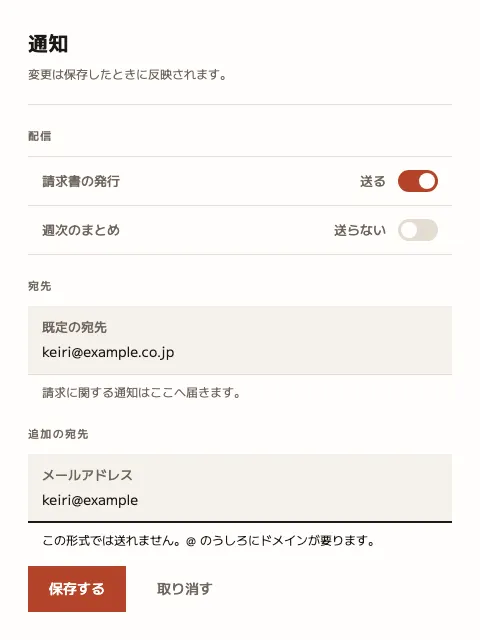
As measured
480 × 640 Seen as a design The artboard itself, drawn live — sharp at any zoom Structure, margins and columns overlaid
480 × 640 Seen as a design The artboard itself, drawn live — sharp at any zoom Structure, margins and columns overlaid
Copy and paste, or save a file and hand it over. For a machine with no network, one “Everything” file is enough.
Everything in this panel, including the contents behind each URL, in one Markdown file — Large, so it goes as a file (copy is for 32 KB and under)
Produce one interface component to the following specification.

- Canvas 480 × 640
- Margin top 28 right 28 bottom 28 left 28

## Emphasis
row 1 only, by fill and nothing else

## Type (px against a 480px canvas)
title  20px / 700 / tracking 0.01em
note  12px / 400 / leading 1.7
legend  11px / 500 / tracking 0.12em / uppercase
label  13px / 500
state  13px / 500
value  14px / 400
help  12px / 400 / leading 1.7
action  14px / 500

## Colour
Ground #FFFDFB / Surface #F6F2ED / Ink #1C1815 / Muted #6F675E / Accent #B4432A / Rule #E4DCD2

## Constraints — dropping these breaks it
- Never add a colour for state: on, off and invalid ride on one accent, rule weight and words. A red breaks the meaning as soon as the palette changes
- Show an error by thickening the rule and saying so — 1px hairline becomes a 2px ink rule, and the note below rises from muted to ink
- Draw fields as panels, not outlines: a hairline is only promised 1.10 against the page, so an outline can vanish under some palettes
- Put the label above the field — at 480 wide, a left-hand label starves the value of room
- One primary action. The second gets no fill and no border — just its words

Replace the content with [your content]. Keep the measurements and colours as given.
For an exact reproduction, use the verbatim HTML at https://design-vault.pages.dev/designs/settings-panel-single-accent/pattern.html.
/ai/designs/settings-panel-single-accent.json
format: component
density: medium
layout:
  kind: stack
  canvas:
    w: 480
    h: 640
  margin:
    top: 28
    right: 28
    bottom: 28
    left: 28
  emphasis:
    row: 1
    via:
      - fill
type:
  title:
    size: 20
    weight: 700
    tracking: 0.01em
  note:
    size: 12
    weight: 400
    leading: 1.7
  legend:
    size: 11
    weight: 500
    tracking: 0.12em
    transform: upper
  label:
    size: 13
    weight: 500
  state:
    size: 13
    weight: 500
  value:
    size: 14
    weight: 400
  help:
    size: 12
    weight: 400
    leading: 1.7
  action:
    size: 14
    weight: 500
colors:
  ground: "#FFFDFB"
  surface: "#F6F2ED"
  ink: "#1C1815"
  muted: "#6F675E"
  accent: "#B4432A"
  rule: "#E4DCD2"
rules:
  - "Never add a colour for state: on, off and invalid ride on one accent, rule weight and words. A red breaks the meaning as soon as the palette changes"
  - Show an error by thickening the rule and saying so — 1px hairline becomes a 2px ink rule, and the note below rises from muted to ink
  - "Draw fields as panels, not outlines: a hairline is only promised 1.10 against the page, so an outline can vanish under some palettes"
  - Put the label above the field — at 480 wide, a left-hand label starves the value of room
  - One primary action. The second gets no fill and no border — just its words
{
"format": "component",
"density": "medium",
"layout": {
"kind": "stack",
"canvas": {
"w": 480,
"h": 640
},
"margin": {
"top": 28,
"right": 28,
"bottom": 28,
"left": 28
},
"emphasis": {
"row": 1,
"via": [
"fill"
]
}
},
"type": {
"title": {
"size": 20,
"weight": 700,
"tracking": "0.01em"
},
"note": {
"size": 12,
"weight": 400,
"leading": 1.7
},
"legend": {
"size": 11,
"weight": 500,
"tracking": "0.12em",
"transform": "upper"
},
"label": {
"size": 13,
"weight": 500
},
"state": {
"size": 13,
"weight": 500
},
"value": {
"size": 14,
"weight": 400
},
"help": {
"size": 12,
"weight": 400,
"leading": 1.7
},
"action": {
"size": 14,
"weight": 500
}
},
"colors": {
"ground": "#FFFDFB",
"surface": "#F6F2ED",
"ink": "#1C1815",
"muted": "#6F675E",
"accent": "#B4432A",
"rule": "#E4DCD2"
},
"rules": [
"Never add a colour for state: on, off and invalid ride on one accent, rule weight and words. A red breaks the meaning as soon as the palette changes",
"Show an error by thickening the rule and saying so — 1px hairline becomes a 2px ink rule, and the note below rises from muted to ink",
"Draw fields as panels, not outlines: a hairline is only promised 1.10 against the page, so an outline can vanish under some palettes",
"Put the label above the field — at 480 wide, a left-hand label starves the value of room",
"One primary action. The second gets no fill and no border — just its words"
]
} /designs/settings-panel-single-accent/pattern.html — The artboard itself, font subset included — open it and this picture draws.
<!doctype html>
<meta charset="utf-8">
<title>設定パネル — 状態に色を足さない</title>
<meta name="dv-font" content="M PLUS 2:400;500;700">
<link rel="stylesheet" href="./font.css">
<style>
  /* この版そのもの。index.md の layout / type / colors は、この HTML を
     scripts/render-pattern.mjs で実測した結果であって、別に書いた説明ではない。 */
  :root {
    --ground: #FFFDFB;
    --surface: #F6F2ED;
    --ink: #1C1815;
    --muted: #6F675E;
    --accent: #B4432A;
    --rule: #E4DCD2;
  }
  * { box-sizing: border-box; margin: 0; }
  html, body { width: 480px; height: 640px; }
  body { font-family: "M PLUS 2", "IPAGothic", sans-serif; }

  .artboard {
    width: 480px; height: 640px;
    background: var(--ground); color: var(--ink);
    padding: 28px;                        /* → layout.margin */
  }
  /* [data-content] は版面そのもの。height:100% で余白と一対一に対応させる。 */
  .panel { height: 100%; display: flex; flex-direction: column; }

  .head { padding-bottom: 20px; border-bottom: 1px solid var(--rule); }
  .note { color: var(--muted); margin-top: 6px; }

  .group { padding-top: 22px; }
  .legend { color: var(--muted); padding-bottom: 12px; }

  /* 欄は罫で囲まず面で示す。罫の床は 1.10 しかないので、配色を差し替えると
     輪郭だけが消える。面なら地との差が残る。 */
  .field { background: var(--surface); padding: 11px 14px; border-bottom: 1px solid var(--rule); }
  .label { display: block; color: var(--muted); }
  .value { display: block; margin-top: 3px; }

  /* 誤りは赤ではなく、罫を太らせて文言で言う。状態のために色を増やすと、
     配色を差し替えたときに意味と色の対応が崩れる。 */
  .field[data-invalid] { border-bottom: 2px solid var(--ink); padding-bottom: 10px; }
  .help { color: var(--muted); margin-top: 7px; padding-left: 14px; }
  .help[data-invalid] { color: var(--ink); }

  .switch { display: flex; align-items: center; justify-content: space-between; padding: 13px 14px; border-bottom: 1px solid var(--rule); }
  .switch:first-of-type { border-top: 1px solid var(--rule); }
  /* 入切は accent 1 色と、つまみの位置と、文言。3 つとも同じことを言う。 */
  .track { width: 40px; height: 22px; border-radius: 11px; background: var(--rule); position: relative; flex: none; }
  .track[data-on] { background: var(--accent); }
  .knob { position: absolute; top: 3px; left: 3px; width: 16px; height: 16px; border-radius: 50%; background: var(--ground); }
  .track[data-on] .knob { left: 21px; }
  .state { color: var(--muted); margin-left: auto; margin-right: 12px; }

  .acts { margin-top: auto; display: flex; gap: 10px; align-items: center; }
  .btn { padding: 11px 20px; border: 1px solid var(--rule); background: var(--ground); }
  /* 主操作は 1 つ。2 つ目は塗らず、文字だけにする。 */
  .btn[data-emphasis] { background: var(--accent); border-color: var(--accent); color: var(--ground); }
  .btn[data-plain] { border-color: transparent; color: var(--muted); }

  .title  { font-size: 20px; font-weight: 700; letter-spacing: .01em; }
  .note,
  .help   { font-size: 12px; font-weight: 400; line-height: 1.7; }
  .legend { font-size: 11px; font-weight: 500; letter-spacing: .12em; text-transform: uppercase; }
  .label,
  .state  { font-size: 13px; font-weight: 500; }
  .value  { font-size: 14px; font-weight: 400; }
  .btn    { font-size: 14px; font-weight: 500; }
</style>

<div class="artboard" data-artboard>
  <div class="panel" data-content>
    <div class="head">
      <h1 class="title" data-type="title">通知</h1>
      <p class="note" data-type="note">変更は保存したときに反映されます。</p>
    </div>

    <div class="group">
      <p class="legend" data-type="legend">配信</p>
      <div class="switch">
        <span class="label" data-type="label">請求書の発行</span>
        <span class="state" data-type="state">送る</span>
        <span class="track" data-on><span class="knob"></span></span>
      </div>
      <div class="switch">
        <span class="label">週次のまとめ</span>
        <span class="state">送らない</span>
        <span class="track"><span class="knob"></span></span>
      </div>
    </div>

    <div class="group">
      <p class="legend">宛先</p>
      <div class="field">
        <span class="label">既定の宛先</span>
        <span class="value" data-type="value">keiri@example.co.jp</span>
      </div>
      <p class="help" data-type="help">請求に関する通知はここへ届きます。</p>
    </div>

    <div class="group">
      <p class="legend">追加の宛先</p>
      <div class="field" data-invalid>
        <span class="label">メールアドレス</span>
        <span class="value">keiri@example</span>
      </div>
      <p class="help" data-invalid>この形式では送れません。@ のうしろにドメインが要ります。</p>
    </div>

    <div class="acts">
      <span class="btn" data-row="1" data-emphasis="fill" data-type="action">保存する</span>
      <span class="btn" data-row="2" data-plain>取り消す</span>
    </div>
  </div>
</div>
/designs/settings-panel-single-accent/font.css — Not in Everything
/* dv-subset v2 — generated by scripts/subset-font.mjs. Do not edit.
 * font    M PLUS 2 400;500;700
 * chars   89 (8fd2460d616e1eed)
 *
 * pattern.html の文字だけを含む部分集合。描画時に外部へ取りに行かないよう同梱する。
 * 版の文字を変えたら取り直すこと — 忘れると足りない字が豆腐になる。
 * その取り忘れは pattern-entries.test.ts が上の指紋で検出する。
 */

@font-face {
  font-family: 'M PLUS 2';
  font-style: normal;
  font-weight: 400;
  font-display: block;
  src: url(./font-0.woff2) format('woff2');
  unicode-range: U+2e, U+40, U+61, U+63, U+65, U+69-6d, U+6f-70, U+72, U+78, U+2014, U+3002, U+3044, U+3046, U+304b-304e, U+3053-305c, U+305f-3060, U+3066-306b, U+306e-3071, U+3078-307a, U+307e, U+3081, U+3089-308d, U+3092-3094, U+3099-309a, U+30a2, U+30a4, U+30b9-30ba, U+30c8-30c9, U+30cd, U+30cf-30d1, U+30e1, U+30eb-30ec, U+30f3, U+30fc, U+4fdd, U+4fe1, U+5148, U+52a0, U+53cd, U+53d6, U+5909, U+5b58, U+5b9a-5b9b, U+5c4a, U+5f0f, U+5f62, U+614b, U+65e2, U+6620, U+66f4, U+66f8, U+6b21, U+6c42, U+6d88, U+72b6, U+767a, U+77e5, U+8272, U+884c, U+8981, U+8a2d, U+8acb, U+8db3, U+8ffd, U+9001, U+901a, U+9031, U+914d, U+95a2;
}
@font-face {
  font-family: 'M PLUS 2';
  font-style: normal;
  font-weight: 500;
  font-display: block;
  src: url(./font-0.woff2) format('woff2');
  unicode-range: U+2e, U+40, U+61, U+63, U+65, U+69-6d, U+6f-70, U+72, U+78, U+2014, U+3002, U+3044, U+3046, U+304b-304e, U+3053-305c, U+305f-3060, U+3066-306b, U+306e-3071, U+3078-307a, U+307e, U+3081, U+3089-308d, U+3092-3094, U+3099-309a, U+30a2, U+30a4, U+30b9-30ba, U+30c8-30c9, U+30cd, U+30cf-30d1, U+30e1, U+30eb-30ec, U+30f3, U+30fc, U+4fdd, U+4fe1, U+5148, U+52a0, U+53cd, U+53d6, U+5909, U+5b58, U+5b9a-5b9b, U+5c4a, U+5f0f, U+5f62, U+614b, U+65e2, U+6620, U+66f4, U+66f8, U+6b21, U+6c42, U+6d88, U+72b6, U+767a, U+77e5, U+8272, U+884c, U+8981, U+8a2d, U+8acb, U+8db3, U+8ffd, U+9001, U+901a, U+9031, U+914d, U+95a2;
}
@font-face {
  font-family: 'M PLUS 2';
  font-style: normal;
  font-weight: 700;
  font-display: block;
  src: url(./font-0.woff2) format('woff2');
  unicode-range: U+2e, U+40, U+61, U+63, U+65, U+69-6d, U+6f-70, U+72, U+78, U+2014, U+3002, U+3044, U+3046, U+304b-304e, U+3053-305c, U+305f-3060, U+3066-306b, U+306e-3071, U+3078-307a, U+307e, U+3081, U+3089-308d, U+3092-3094, U+3099-309a, U+30a2, U+30a4, U+30b9-30ba, U+30c8-30c9, U+30cd, U+30cf-30d1, U+30e1, U+30eb-30ec, U+30f3, U+30fc, U+4fdd, U+4fe1, U+5148, U+52a0, U+53cd, U+53d6, U+5909, U+5b58, U+5b9a-5b9b, U+5c4a, U+5f0f, U+5f62, U+614b, U+65e2, U+6620, U+66f4, U+66f8, U+6b21, U+6c42, U+6d88, U+72b6, U+767a, U+77e5, U+8272, U+884c, U+8981, U+8a2d, U+8acb, U+8db3, U+8ffd, U+9001, U+901a, U+9031, U+914d, U+95a2;
}
出典を持たない自作パターン。pattern.html が版そのもので、cover.png と
frontmatter の寸法はどちらもそこから機械的に出している。編集するのは pattern.html だけ。
A self-authored pattern. pattern.html is the artboard itself; both cover.png and the
measurements in the frontmatter are derived from it, so the three cannot drift apart.
Edit the artboard, never the numbers.