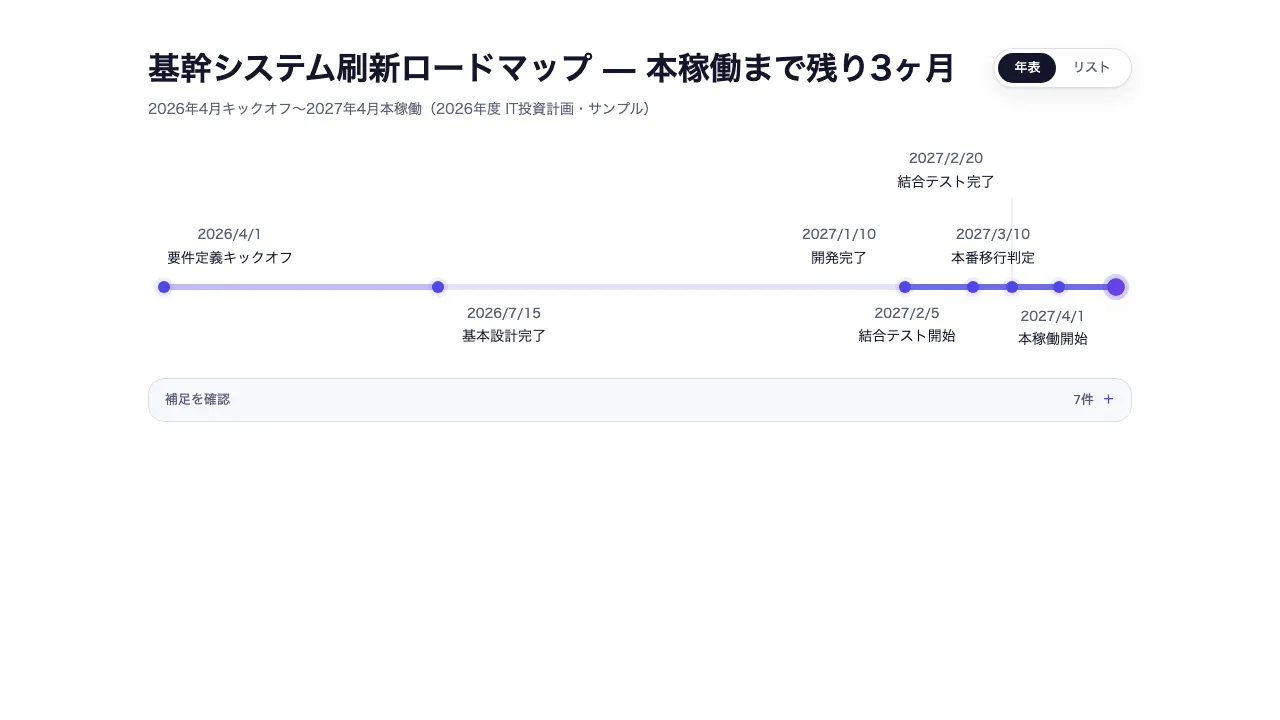
Seen as a design The generated document itself — its toggles and disclosures work here
Seen as a design The generated document itself — its toggles and disclosures work here
Copy and paste, or save a file and hand it over. For a machine with no network, one “Everything” file is enough.
Everything in this panel, including the contents behind each URL, in one Markdown file — Large, so it goes as a file (copy is for 32 KB and under)
Build an HTML document with "Timeline (Roadmap)". This layout runs, so there is no composition to rebuild — what it needs is content.

## What this layout does
Events placed along the axis in proportion to the real time between them, so the plan's density and its peaks come from the dates

## What you have to supply
- What each event is
- The date of each
- A note on the milestones, or which one to emphasise

## The shape of the input
- `title` — string — スライドタイトル。結論を書くメッセージラインを推奨
- `subtitle` — string(任意)— 補足・出典など
- `events` — { date: "YYYY-MM-DD", label, note?, highlight? } の配列。date の実経過時間に比例して横軸に自動配置(等間隔ではない)。note は図の下の補足欄で展開、highlight は最重要の 1 件のみ true

schema.ts holds the machine-checkable validation. Ask rather than guess when an input is missing.

## When not to use it
- Handling durations, concurrency and dependencies across tasks
- Showing a serial process in proportion to duration, with its bottleneck

## How to build it
Put the input in a JSON file and run:

```bash
node scripts/render.mjs timeline <input.json> --theme ink -o out.html
```

The output is one self-contained file and fetches nothing at render time.

## The source
- https://design-vault.pages.dev/designs/timeline/source/template.tsx
- https://design-vault.pages.dev/designs/timeline/source/schema.ts
- https://design-vault.pages.dev/designs/timeline/source/sample-data.json
- https://design-vault.pages.dev/designs/timeline/sample.html Template, input schema, sample data and metadata. This document was generated from those four. The generated document
/designs/timeline/source/template.tsx
import { useId } from "react";
import type { TimelineProps } from "./schema";

const parseDate = (d: string) => new Date(d).getTime();

/**
 * 日付の実経過時間に比例して 0-100 の横軸位置を返す(等間隔ではない)。
 * 全イベントが同一日付(span=0)のときや、不正な日付文字列が1件でも
 * 混ざっているときも、その事象が他の正常なイベントの位置計算を巻き込んで
 * NaN にしないよう中央 50 に丸める(clampScore と同じ「壊れたデータで
 * レイアウト全体を壊さない」方針)。
 */
export const computePositions = (events: { date: string }[]): number[] => {
  const times = events.map((e) => parseDate(e.date));
  const validTimes = times.filter((t) => Number.isFinite(t));
  if (validTimes.length === 0) return times.map(() => 50);
  const min = Math.min(...validTimes);
  const max = Math.max(...validTimes);
  const span = max - min;
  return times.map((t) => {
    if (!Number.isFinite(t) || span === 0) return 50;
    return ((t - min) / span) * 100;
  });
};

/**
 * "YYYY-MM-DD" は日付のみの ISO 文字列として UTC 深夜0時にパースされるため、
 * 表示も UTC ゲッターで揃える(ローカル getter だと UTC より西のタイムゾーンで
 * 前日にずれる)。
 */
export const formatDate = (d: string) => {
  const date = new Date(d);
  return `${date.getUTCFullYear()}/${date.getUTCMonth() + 1}/${date.getUTCDate()}`;
};

/** highlight 要素専用グラデーション(DESIGN.md: indigo→violet 限定・1件のみ) */
const HIGHLIGHT_GRADIENT = "bg-linear-to-br from-tertiary to-accent-violet";

/**
 * ギャラリー側のTailwindはソーステキストを静的スキャンするため、テンプレート
 * リテラルで組み立てたクラス名(例: `bg-tertiary/${n}`)は検出されない。
 * 密度バケットは必ずこの完全なリテラル文字列配列から選ぶこと。
 */
const DENSITY_CLASSES = [
  "bg-tertiary/15",
  "bg-tertiary/35",
  "bg-tertiary/55",
  "bg-tertiary/80",
] as const;

/** ギャップの平均に対する比率が小さいほど「密=山場」として濃いクラスを返す */
const densityClass = (gap: number, meanGap: number): string => {
  const ratio = meanGap === 0 ? 1 : gap / meanGap;
  if (ratio <= 0.5) return DENSITY_CLASSES[3];
  if (ratio <= 1) return DENSITY_CLASSES[2];
  if (ratio <= 2) return DENSITY_CLASSES[1];
  return DENSITY_CLASSES[0];
};

/**
 * 隣接イベント間の実時間ギャップを4段階の濃淡セグメントに変換する
 * (DESIGN.md: 「計画の密度や山場」を可視化する信号)。日付順ではなく配列の
 * 生の順序が渡された場合でも、実位置でソートしてから隣接差分を取る
 * (未ソート入力で負のギャップ/逆向きセグメントを生まないため)。
 * イベント0〜1件、または全イベントが同一日付(span=0)の退化ケースでは
 * 空配列を返し、呼び出し側は平坦な基線表示にフォールバックする。
 */
export const densitySegments = (
  events: { date: string }[],
): { left: number; width: number; className: string }[] => {
  if (events.length < 2) return [];
  const sortedPositions = [...computePositions(events)].sort((a, b) => a - b);
  if (sortedPositions[sortedPositions.length - 1] === sortedPositions[0]) {
    return [];
  }
  const gaps = sortedPositions
    .slice(1)
    .map((pos, i) => pos - sortedPositions[i]);
  const meanGap = gaps.reduce((a, b) => a + b, 0) / gaps.length;
  return gaps.map((gap, i) => ({
    left: sortedPositions[i],
    width: gap,
    className: densityClass(gap, meanGap),
  }));
};

/**
 * 年表を描くいちばん狭い基線の長さ(px)。md(768px)未満では年表を出さないので、
 * 768 −(p-12 の左右 96)−(mx-4 の左右 32)= 640。
 *
 * 段割りは % で持つ位置と px で持つ文字幅を突き合わせるので、換算に使う幅が要る。
 * これより広い画面では文字は基線に対して相対的に細くなるだけなので、ここで
 * 重ならなければ以降も重ならない。
 */
export const MIN_TRACK_PX = 640;

/** ラベルの箱の幅(w-36)。文字はこの中で折り返し、中央に置かれる */
const CARD_PX = 144;

/** 段の間隔と、基線にいちばん近い段までの隙間(px) */
const TIER_PX = 76;
const TIER_GAP_PX = 12;

/**
 * 描く前に文字の幅を見積もる。全角は 1em、半角は 0.58em。
 *
 * 実測(Chromium / Noto Sans JP + Inter): 14px の「結合テスト開始」が 98px = 7 字 ×
 * 1em、13px の "2026/7/15" が 63px = 9 字 × 0.54em。半角は書体と字によって振れるので
 * 少し広めに取る。箱の中で折り返すため、見積もりは箱の幅を超えない。
 *
 * 実際に描かれる幅ではなく見積もりなのは、段割りが描画の前に決まるため。
 * 見積もりが外れていないことは `pnpm layout:browser` が実ブラウザで測って確かめる。
 */
export const estimateTextWidth = (text: string, fontPx: number): number => {
  let em = 0;
  for (const ch of text) em += (ch.codePointAt(0) ?? 0) >= 0x1100 ? 1 : 0.58;
  return Math.min(em * fontPx, CARD_PX);
};

/**
 * ラベルの箱の中心が、マーカーからどれだけずれるか(px)。
 *
 * 端に近いマーカーの箱は左右寄せに切り替わる(下の cardAlign)ので、箱の中心は
 * マーカーの真上ではなくなる。ずれを見ないまま重なりを判定すると、いちばん
 * 混みやすい右端だけ判定が外れる。
 */
const cardCenterOffsetPx = (position: number, highlight?: boolean): number => {
  const halfDot = highlight ? 9 : 6; // size-4.5 / size-3 の半径
  if (position >= 70) return halfDot - CARD_PX / 2;
  if (position <= 30) return CARD_PX / 2 - halfDot;
  return 0;
};

/** ラベルが横に占める範囲(基線に対する %)。日付行と見出し行の広い方を取る */
export const labelExtent = (
  event: { date: string; label: string; highlight?: boolean },
  position: number,
): { left: number; right: number } => {
  const width = Math.max(
    estimateTextWidth(formatDate(event.date), 13), // text-label
    estimateTextWidth(event.label, 14), // text-body-sm
  );
  const center =
    position + (cardCenterOffsetPx(position, event.highlight) / MIN_TRACK_PX) * 100;
  const half = ((width / MIN_TRACK_PX) * 100) / 2;
  return { left: center - half, right: center + half };
};

/**
 * ラベルを重ねずに置ける段を、添字ではなく位置で決める。
 *
 * 添字の偶奇で上下に振り分けると、日付が近いイベントが続いたときに同じ段の隣
 * 同士が重なる(実測: サンプルの「結合テスト開始」と「本番移行判定」が 1280px で
 * 1 つの文字列に見えていた)。この型は日付の実経過時間に比例して置くのが売り
 * なので、密集は異常な入力ではなく普通の計画で起きる。
 *
 * 位置順に見て、直前にその段へ置いたラベルの右端より左端が右にあれば置ける。
 * どの段にも置けなければ段を増やす。段は上下 2 段から始めて交互に選ぶので、
 * 重なりが起きない入力では従来どおりの上下互い違いになり、混んだところだけ
 * 段が増える。
 *
 * 返り値は入力の添字ごとの段番号。偶数が上・奇数が下、2 で割った商が基線から
 * の遠さ。
 */
export const assignLanes = (
  events: { date: string; label: string; highlight?: boolean }[],
  positions: number[],
): number[] => {
  const order = events
    .map((_, i) => i)
    .sort((a, b) => positions[a] - positions[b]);
  const laneRight = [-Infinity, -Infinity]; // 段ごとの、最後に置いたラベルの右端
  const lanes = new Array<number>(events.length).fill(0);
  let previous = -1;
  for (const i of order) {
    const { left, right } = labelExtent(events[i], positions[i]);
    let chosen = -1;
    for (let k = 0; k < laneRight.length; k += 1) {
      const candidate = (previous + 1 + k) % laneRight.length;
      if (laneRight[candidate] <= left) {
        chosen = candidate;
        break;
      }
    }
    if (chosen === -1) {
      chosen = laneRight.length;
      laneRight.push(-Infinity);
    }
    laneRight[chosen] = right;
    lanes[i] = chosen;
    previous = chosen;
  }
  return lanes;
};

/** 段番号を、基線のどちら側の何段目かに開く */
export const lanePlacement = (lane: number) => ({
  above: lane % 2 === 0,
  tier: Math.floor(lane / 2),
});

/** その側で使った段数 —— 基線の上下に空けておく高さになる */
export const tierCount = (lanes: number[], above: boolean): number =>
  lanes.reduce((most, lane) => {
    const placement = lanePlacement(lane);
    return placement.above === above ? Math.max(most, placement.tier + 1) : most;
  }, 0);

/** エントランスの時差。間隔は global.css の --stagger-step で統一 */
const stagger = (i: number, baseMs = 0) =>
  `calc(${baseMs}ms + ${i} * var(--stagger-step))`;

export default function Timeline({
  title,
  subtitle,
  events,
  instanceId,
}: TimelineProps) {
  const autoId = useId();
  const uid = instanceId ?? autoId;
  const notes = events.filter((event) => event.note);
  const positions = computePositions(events);
  const sorted = events
    .map((e, i) => ({ e, position: positions[i] }))
    .sort((a, b) => a.position - b.position)
    .map(({ e }) => e);
  const segments = densitySegments(events);
  const lanes = assignLanes(events, positions);
  const aboveTiers = tierCount(lanes, true);
  const belowTiers = tierCount(lanes, false);

  return (
    <section
      data-timeline-root="true"
      className="group/timeline mx-auto max-w-slide bg-surface p-12 font-sans text-on-surface"
    >
      {/* 表示切替は CSS のみ(radio + :has())。成果物の単一ファイル制約を守る。
          md 未満では切替を出さないので、入力も畳んで焦点から外す */}
      <input
        type="radio"
        name={uid}
        id={`${uid}-map`}
        className="v-map sr-only max-md:hidden"
        defaultChecked
      />
      <input
        type="radio"
        name={uid}
        id={`${uid}-list`}
        className="v-list sr-only max-md:hidden"
      />

      <header className="mb-8 flex flex-wrap items-start justify-between gap-4">
        <div>
          <h1 className="text-h1">{title}</h1>
          {subtitle && (
            <p className="mt-2 text-body-sm text-secondary">{subtitle}</p>
          )}
        </div>
        <div className="hidden rounded-full border border-outline bg-surface p-1 shadow-card md:inline-flex">
          <label
            htmlFor={`${uid}-map`}
            className="cursor-pointer rounded-full px-4 py-1.5 text-label text-secondary group-has-[.v-map:checked]/timeline:bg-primary group-has-[.v-map:checked]/timeline:text-on-primary group-has-[.v-map:focus-visible]/timeline:ring-2 group-has-[.v-map:focus-visible]/timeline:ring-tertiary"
          >
            年表
          </label>
          <label
            htmlFor={`${uid}-list`}
            className="cursor-pointer rounded-full px-4 py-1.5 text-label text-secondary group-has-[.v-list:checked]/timeline:bg-primary group-has-[.v-list:checked]/timeline:text-on-primary group-has-[.v-list:focus-visible]/timeline:ring-2 group-has-[.v-list:focus-visible]/timeline:ring-tertiary"
          >
            リスト
          </label>
        </div>
      </header>

      {/* ── 年表投影: 日付の実経過時間に比例した横軸配置 ──
          md 未満では出さない。基線は 390px だと 262px しか無く、ラベルは折り返して
          なお 144px 幅なので、どう段を積んでも読めない(実測: 390px で 13 組が重なる)。
          狭い幅ではリストが既定になる —— 日付順の並びは年表と同じことを言う。 */}
      <div className="hidden md:group-has-[.v-map:checked]/timeline:block">
        <div
          className="relative mx-4 h-1.5"
          style={{
            marginTop: `${TIER_GAP_PX + aboveTiers * TIER_PX}px`,
            marginBottom: `${TIER_GAP_PX + belowTiers * TIER_PX}px`,
          }}
        >
          {segments.length > 0 ? (
            segments.map((seg, i) => (
              <div
                key={i}
                aria-hidden="true"
                className={`group/segment absolute inset-y-0 rounded-full ${seg.className}`}
                style={{ left: `${seg.left}%`, width: `${seg.width}%` }}
              />
            ))
          ) : (
            <div
              aria-hidden="true"
              className="absolute inset-x-0 top-1/2 h-px -translate-y-1/2 bg-outline"
            />
          )}
          {events.map((e, i) => {
            const pos = positions[i];
            const { above, tier } = lanePlacement(lanes[i]);
            const offset = TIER_GAP_PX + tier * TIER_PX;
            // 端に近いマーカーはカードが画面外にはみ出すため左右寄せに切り替える(matrix-2x2 と同じ対策)
            const cardAlign =
              pos >= 70
                ? "right-0"
                : pos <= 30
                  ? "left-0"
                  : "left-1/2 -translate-x-1/2";
            return (
              <div
                key={i}
                data-timeline-event={i}
                data-timeline-record="true"
                className="group/marker absolute top-1/2 -translate-x-1/2 -translate-y-1/2 animate-pop"
                style={{ left: `${pos}%`, animationDelay: stagger(i, 300) }}
              >
                <span
                  className={`block rounded-full shadow-card ${
                    e.highlight
                      ? `size-4.5 ring-4 ring-tertiary/25 ${HIGHLIGHT_GRADIENT}`
                      : "size-3 bg-tertiary ring-4 ring-tertiary/10"
                  }`}
                />
                {tier > 0 && (
                  /* 基線から遠い段のラベルは、引き出し線が無いとどの点のものか
                     分からなくなる。線は点から段の手前までを埋める */
                  <span
                    aria-hidden="true"
                    className="absolute left-1/2 w-px -translate-x-1/2 bg-outline"
                    style={{
                      [above ? "bottom" : "top"]: "100%",
                      height: `${offset - 4}px`,
                    }}
                  />
                )}
                <div
                  className={`absolute w-36 text-center ${cardAlign}`}
                  style={{
                    [above ? "bottom" : "top"]: "100%",
                    [above ? "marginBottom" : "marginTop"]: `${offset}px`,
                  }}
                >
                  <p className="whitespace-nowrap text-label text-secondary">
                    {formatDate(e.date)}
                  </p>
                  <p className="mt-0.5 text-body-sm">{e.label}</p>
                </div>
              </div>
            );
          })}
        </div>
      </div>

      {/* ── リスト投影: 同じ events を日付順に束ねる。md 未満ではこれが既定 ── */}
      <ol className="hidden space-y-3 max-md:block md:group-has-[.v-list:checked]/timeline:block">
        {sorted.map((e, i) => (
          <li
            key={i}
            data-timeline-record="true"
            className="animate-rise flex items-start gap-4 rounded-lg border border-outline bg-surface-subtle p-5"
            style={{ animationDelay: stagger(i) }}
          >
            <span
              className={`mt-1 size-3 shrink-0 rounded-full ${
                e.highlight ? HIGHLIGHT_GRADIENT : "bg-tertiary/60"
              }`}
            />
            <div className="flex-1">
              <p className="text-label text-secondary">{formatDate(e.date)}</p>
              <p className="mt-1 text-body-sm">{e.label}</p>
              {e.note && (
                <p className="mt-1 text-body-sm text-secondary">{e.note}</p>
              )}
            </div>
          </li>
        ))}
      </ol>

      {notes.length > 0 && (
        <details
          data-inline-disclosure="true"
          className="group mt-6 rounded-lg border border-outline bg-surface-subtle"
        >
          <summary className="flex cursor-pointer list-none items-center px-4 py-3 text-label text-secondary focus-visible:outline focus-visible:outline-2 focus-visible:outline-offset-2 focus-visible:outline-tertiary">
            <span>補足を確認</span>
            <span className="ml-auto font-mono">{notes.length}件</span>
            <span aria-hidden="true" className="ml-2 text-tertiary transition-transform group-open:rotate-45">+</span>
          </summary>
          <div className="grid gap-3 border-t border-outline p-4 sm:grid-cols-2">
            {notes.map((event, index) => (
              <article key={index} data-note-item="true" className="rounded-md bg-surface p-4">
                <h3 className="text-label">{event.label}</h3>
                <p className="mt-1 font-mono text-label text-secondary">{formatDate(event.date)}</p>
                <p className="mt-2 text-body-sm">{event.note}</p>
              </article>
            ))}
          </div>
        </details>
      )}
    </section>
  );
}
/designs/timeline/source/schema.ts
import { z } from "zod";

export const timelineEventSchema = z
  .object({
    date: z.iso.date(),
    label: z
      .string()
      .describe("見出し。年表投影では常時表示、リスト投影の本文にもなる"),
    note: z.string().optional().describe("図の下の補足欄で明示的に展開される詳細"),
    highlight: z
      .boolean()
      .optional()
      .describe(
        "最重要の1件のみ true(グラデーション表示。DESIGN.md: 大胆さは1画面1箇所)",
      ),
  })
  .strict();

export const schema = z
  .object({
    title: z.string().describe("スライドタイトル。結論を書くメッセージラインを推奨"),
    subtitle: z.string().optional().describe("補足・出典など"),
    events: z.array(timelineEventSchema),
    instanceId: z
      .string()
      .optional()
      .describe("同一ページに複数インスタンスを置くときの radio グループ識別子"),
  })
  .strict()
  .refine(
    (data) => data.events.filter((e) => e.highlight === true).length <= 1,
    {
      message: "highlight は最大1件のみ true にすること(DESIGN.md: 大胆さは1画面1箇所)",
      path: ["events"],
    },
  );

export type TimelineEvent = z.infer<typeof timelineEventSchema>;
export type TimelineProps = z.infer<typeof schema>;
/designs/timeline/source/meta.yaml
id: timeline
name:
  ja: "タイムライン(ロードマップ)"
  en: "Timeline (Roadmap)"
purpose:
  ja: "イベントを日付の実経過時間に比例して横軸に自動配置し、計画の密度や山場をデータ駆動で示す"
  en: "Events placed along the axis in proportion to the real time between them, so the plan's density and its peaks come from the dates"
status: published
# 索引カードの図版。pnpm layout:render が原本から描く。
still: ./still.png
category: sequence
catalogOrder: 40
jobs:
  - plan-sequence
useCases:
  - roadmap
layoutKinds:
  - timeline
tags: [timeline, roadmap, sequence, data-driven, interactive]
whenToUse:
  - ja: "プロジェクト・システム導入のロードマップ提示"
    en: "Presenting a roadmap for a project or a rollout"
  - ja: "中期経営計画などのマイルストーン整理"
    en: "Laying out the milestones of a medium-term plan"
  - ja: "過去の意思決定・変遷の振り返り"
    en: "Looking back over decisions and how things changed"
  - ja: "契約・稼働スケジュールの共有"
    en: "Sharing a contract or go-live schedule"
avoidWhen:
  - ja: "複数タスクの期間、並行性、依存関係を扱う場合"
    en: "Handling durations, concurrency and dependencies across tasks"
  - ja: "所要時間に比例する直列工程とボトルネックを示す場合"
    en: "Showing a serial process in proportion to duration, with its bottleneck"
requiredInputs:
  - ja: "イベント名"
    en: "What each event is"
  - ja: "各イベントの日付"
    en: "The date of each"
  - ja: "節目の補足または強調対象"
    en: "A note on the milestones, or which one to emphasise"
relatedLayouts: [critical-path-gantt, process-flow, waterfall]
dataSchema:
  title: "string — スライドタイトル。結論を書くメッセージラインを推奨"
  subtitle: "string(任意)— 補足・出典など"
  events: "{ date: \"YYYY-MM-DD\", label, note?, highlight? } の配列。date の実経過時間に比例して横軸に自動配置(等間隔ではない)。note は図の下の補足欄で展開、highlight は最重要の 1 件のみ true"
sources: []
/designs/timeline/source/sample-data.json
{
  "title": "基幹システム刷新ロードマップ — 本稼働まで残り3ヶ月",
  "subtitle": "2026年4月キックオフ〜2027年4月本稼働(2026年度 IT投資計画・サンプル)",
  "events": [
    {
      "date": "2026-04-01",
      "label": "要件定義キックオフ",
      "note": "現行業務フローの棚卸しと新システムのスコープ確定から着手"
    },
    {
      "date": "2026-07-15",
      "label": "基本設計完了",
      "note": "主要3部門のヒアリングを反映。データ移行方式はこの時点で確定"
    },
    {
      "date": "2027-01-10",
      "label": "開発完了",
      "note": "計画から6ヶ月の開発期間。追加要望は次期フェーズへ切り出し済み"
    },
    {
      "date": "2027-02-05",
      "label": "結合テスト開始",
      "note": "本番相当のデータ量で3週間実施"
    },
    {
      "date": "2027-02-20",
      "label": "結合テスト完了",
      "note": "重大な不具合なし。ユーザ受入テストへ移行"
    },
    {
      "date": "2027-03-10",
      "label": "本番移行判定",
      "note": "移行可否を経営会議で最終判断"
    },
    {
      "date": "2027-04-01",
      "label": "本稼働開始",
      "note": "全部門で新システムに切り替え。旧システムは3ヶ月並行稼働後に廃止",
      "highlight": true
    }
  ]
}