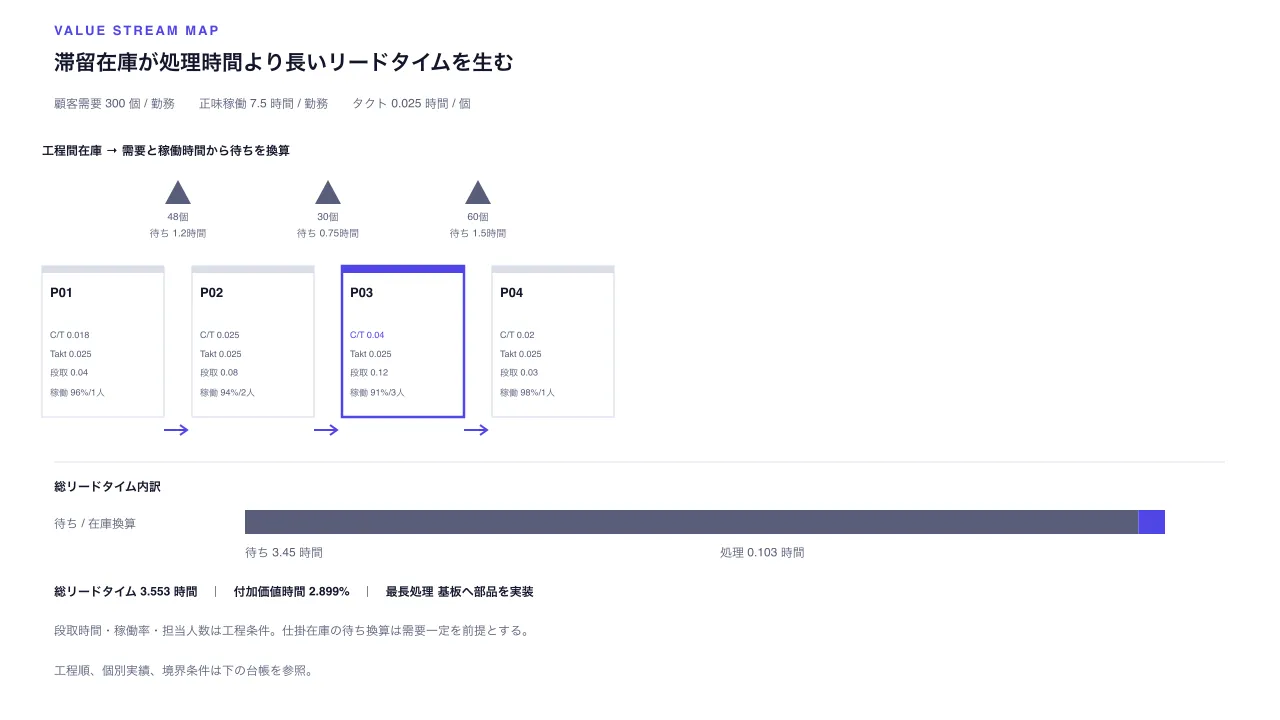
作品として見る 生成された文書そのもの — 切り替えも開閉もそのまま動きます
作品として見る 生成された文書そのもの — 切り替えも開閉もそのまま動きます
コピーして貼るか、ファイルに保存して渡す。ネットにつながらない環境には「全部入り」を 1 つ渡せば足りる。
このパネルの中身を、URL の先にあるファイルの中身まで含めて 1 つにまとめた Markdown — 大きいのでファイルで渡す(コピーは 32KB まで)
「仕掛在庫とリードタイムの価値流れ図」でHTML資料を作ってください。この型は実行できるので、版面を組み直す必要はありません — 必要なのは中身です。

## この型がすること
工程別サイクルタイム・段取・稼働条件と工程間在庫を並べ、顧客需要から算出するタクトに対して、付加価値時間と在庫換算の待ちを分けて読む。

## 渡す必要があるもの
- 一勤務あたりの顧客需要と正味稼働時間を同じ時間単位で示す。タクトは稼働時間÷需要で導出する。
- 3〜8工程のサイクル・段取時間、稼働率、担当人数と、隣接工程間の仕掛在庫を順序どおりに指定する。

## 入力の形
- `title` — string — 処理時間と滞留の違いを伝える見出し
- `subtitle` — string? — 対象製品・期間・生産条件
- `timeUnit` — string — 時間値の共通単位
- `demandPerShift` — number — 一勤務あたりの顧客需要量
- `netAvailableTime` — number — 一勤務あたりの正味稼働時間
- `operations` — array (id, label, cycleTime, changeoverTime, uptimePercent, operators) — 3〜8工程
- `buffers` — array (id, afterOperationId, label, inventoryUnits) — 各隣接工程間の仕掛在庫。待ち時間は在庫÷需要×正味稼働時間

入力の機械可読な検証は schema.ts が持ちます。足りない入力は推測せず質問してください。

## 向かない場合
- 工程順・分岐だけを簡潔に示す場合はprocess-flowを使う。仕掛在庫やタクトはこの契約には含まれない。
- 工程の前後関係や開始・終了境界だけを概観する場合はSIPOCを使う。ここでは在庫・時間の定量値を要する。

## 作り方
入力を JSON にまとめ、次を実行します。

```bash
node scripts/render.mjs value-stream-map <入力.json> --theme ink -o out.html
```

出力は 1 ファイルで完結し、外部から何も読み込みません。

## 原本
- https://design-vault.pages.dev/designs/value-stream-map/source/template.tsx
- https://design-vault.pages.dev/designs/value-stream-map/source/schema.ts
- https://design-vault.pages.dev/designs/value-stream-map/source/sample-data.json
- https://design-vault.pages.dev/designs/value-stream-map/sample.html
テンプレート・入力スキーマ・サンプルデータ・メタ情報。この文書はこの 4 つから生成されています。 生成された文書
/designs/value-stream-map/source/template.tsx
import type { Props } from "./schema";

const CSS = String.raw`
.asset{font-family:var(--font-sans);color:var(--color-on-surface);background:var(--color-surface);max-width:var(--container-slide);margin:auto;padding:2.25rem 2.5rem;line-height:1.5}.asset *{box-sizing:border-box}.asset h1{font-size:var(--text-h1);line-height:1.3;margin:0}.asset .subtitle{color:var(--color-secondary);margin:.6rem 0 1.25rem}.asset .eyebrow{font:600 var(--text-label) var(--font-mono);letter-spacing:.1em;color:var(--color-tertiary)}.asset .plot{display:block;width:100%;height:auto}.asset .plot text{font-family:var(--font-sans);font-size:12px;fill:var(--color-secondary)}.asset .plot .ink{fill:var(--color-on-surface)}.asset .summary{display:grid;grid-template-columns:repeat(4,minmax(0,1fr));gap:.75rem;margin:1rem 0 1.5rem}.asset .metric{padding:.8rem;background:var(--color-surface-subtle);border-top:3px solid var(--color-tertiary);min-width:0}.asset .metric dt{font-size:var(--text-label);color:var(--color-secondary)}.asset .metric dd{margin:.25rem 0 0;font:700 var(--text-h3) var(--font-mono);overflow-wrap:anywhere}.asset .ledger{border-collapse:collapse;width:100%;font-variant-numeric:tabular-nums}.asset .ledger th,.asset .ledger td{text-align:left;vertical-align:top;padding:.65rem .75rem;border-bottom:1px solid var(--color-outline);overflow-wrap:anywhere}.asset .ledger th{color:var(--color-secondary)}.asset .ledger .mono{font-family:var(--font-mono)}.asset details{margin-top:1rem}.asset summary{cursor:pointer;min-height:2.75rem;padding:.5rem 0;color:var(--color-secondary)}.asset .note{border-left:3px solid var(--color-outline);padding:.75rem 1rem;color:var(--color-secondary)}
@media(max-width:760px){.asset{padding:1.5rem 1rem}.asset h1{font-size:var(--text-h2)}.asset .summary{grid-template-columns:1fr 1fr}.asset .ledger,.asset .ledger tbody,.asset .ledger tr,.asset .ledger td{display:block}.asset .ledger thead{display:none}.asset .ledger tr{padding:.65rem 0;border-bottom:1px solid var(--color-outline)}.asset .ledger td{display:grid;grid-template-columns:9rem minmax(0,1fr);gap:.75rem;border:0;padding:.2rem 0}.asset .ledger td:before{content:attr(data-label);font-size:var(--text-label);color:var(--color-secondary)}.asset-value-stream-map .plot{display:none}}
`;

type Operation = Props["operations"][number];
type Buffer = Props["buffers"][number];
const fmt = (value: number) => Number.isInteger(value) ? value.toLocaleString("ja-JP") : value.toLocaleString("ja-JP", { maximumFractionDigits: 3 });
const waitFor = (buffer: Buffer, data: Props) => buffer.inventoryUnits / data.demandPerShift * data.netAvailableTime;
const shorten = (value: string, size = 20) => [...value].length > size ? [...value].slice(0, size - 1).join("") + "…" : value;

export default function Template(d: Props) {
  const takt = d.netAvailableTime / d.demandPerShift;
  const valueAdded = d.operations.reduce((sum, operation) => sum + operation.cycleTime, 0);
  const waiting = d.buffers.reduce((sum, buffer) => sum + waitFor(buffer, d), 0);
  const leadTime = valueAdded + waiting;
  const bottleneck = [...d.operations].sort((a, b) => b.cycleTime - a.cycleTime)[0];
  const xAt = (index: number) => 42 + index * 150;
  const bufferAfter = (operation: Operation) => d.buffers.find(buffer => buffer.afterOperationId === operation.id)!;
  const waitWidth = leadTime ? waiting / leadTime * 920 : 0;
  return <section className="asset asset-value-stream-map">
    <style>{CSS}</style>
    <header>
      <p className="eyebrow">VALUE STREAM MAP / LEAD TIME AND FLOW</p>
      <h1>{d.title}</h1>
      {d.subtitle && <p className="subtitle">{d.subtitle}</p>}
    </header>
    <svg className="plot" data-layout-still="true" width="1280" height="720" viewBox="0 0 1280 720" role="img" aria-labelledby="vsm-title vsm-desc" fontFamily="sans-serif" fontSize="12" fill="var(--color-secondary)">
      <title id="vsm-title">{d.title}</title>
      <desc id="vsm-desc">顧客需要 {fmt(d.demandPerShift)} 個/勤務、タクト {fmt(takt)} {d.timeUnit}。工程処理時間 {fmt(valueAdded)} {d.timeUnit}、在庫換算の待ち {fmt(waiting)} {d.timeUnit}、総リードタイム {fmt(leadTime)} {d.timeUnit}。</desc>
      <rect x="0" y="0" width="1280" height="720" fill="var(--color-surface)" />
      <text x="54" y="35" fontSize="13" fontWeight="700" letterSpacing="2" fill="var(--color-tertiary)">VALUE STREAM MAP</text>
      <text x="54" y="70" fontSize="21" fontWeight="700" fill="var(--color-on-surface)">{d.title}</text>
      <text x="54" y="108">顧客需要 {fmt(d.demandPerShift)} 個 / 勤務  正味稼働 {fmt(d.netAvailableTime)} {d.timeUnit} / 勤務  タクト {fmt(takt)} {d.timeUnit} / 個</text>
      <text x="42" y="155" fontWeight="700" fill="var(--color-on-surface)">工程間在庫 → 需要と稼働時間から待ちを換算</text>
      {d.buffers.map((buffer, index) => {
        const x = xAt(index) + 136;
        return <g key={buffer.id} data-vsm-record={buffer.id}>
          <polygon points={`${x},180 ${x - 13},204 ${x + 13},204`} fill="var(--color-secondary)" />
          <text x={x} y="220" textAnchor="middle" fontSize="10">{fmt(buffer.inventoryUnits)}個</text>
          <text x={x} y="237" textAnchor="middle" fontSize="10">待ち {fmt(waitFor(buffer, d))}{d.timeUnit}</text>
        </g>;
      })}
      {d.operations.map((operation, index) => {
        const x = xAt(index);
        const y = 266;
        const queue = index < d.operations.length - 1 ? bufferAfter(operation) : undefined;
        return <g key={operation.id} data-vsm-record={operation.id}>
          <rect x={x} y={y} width="122" height="151" fill="var(--color-surface)" stroke={operation.id === bottleneck.id ? "var(--color-tertiary)" : "var(--color-outline)"} strokeWidth={operation.id === bottleneck.id ? 2.5 : 1.2} />
          <rect x={x} y={y} width="122" height="7" fill={operation.id === bottleneck.id ? "var(--color-tertiary)" : "var(--color-outline)"} />
          <text x={x + 8} y={y + 31} fontSize="13" fontWeight="700" fill="var(--color-on-surface)">P{String(index + 1).padStart(2, "0")}</text>
          <text x={x + 8} y={y + 72} fontSize="9" fill={operation.cycleTime > takt ? "var(--color-tertiary)" : "var(--color-secondary)"}>C/T {fmt(operation.cycleTime)}</text>
          <text x={x + 8} y={y + 91} fontSize="9">Takt {fmt(takt)}</text>
          <text x={x + 8} y={y + 110} fontSize="9">段取 {fmt(operation.changeoverTime)}</text>
          <text x={x + 8} y={y + 130} fontSize="9">稼働 {fmt(operation.uptimePercent)}%/{operation.operators}人</text>
          {queue && <g>
            <line x1={x + 122} y1="430" x2={x + 145} y2="430" stroke="var(--color-tertiary)" strokeWidth="2" />
            <path d={`M ${x + 138} 425 L ${x + 145} 430 L ${x + 138} 435`} fill="none" stroke="var(--color-tertiary)" strokeWidth="2" />
          </g>}
        </g>;
      })}
      <line x1="54" y1="462" x2="1225" y2="462" stroke="var(--color-outline)" />
      <text x="54" y="491" fontWeight="700" fill="var(--color-on-surface)">総リードタイム内訳</text>
      <text x="54" y="528">待ち / 在庫換算</text>
      <rect x="245" y="510" width={waitWidth} height="24" fill="var(--color-secondary)" />
      <rect x={245 + waitWidth} y="510" width={920 - waitWidth} height="24" fill="var(--color-tertiary)" />
      <text x="245" y="557">待ち {fmt(waiting)} {d.timeUnit}</text>
      <text x="720" y="557">処理 {fmt(valueAdded)} {d.timeUnit}</text>
      <text x="54" y="596" fontWeight="700" fill="var(--color-on-surface)">総リードタイム {fmt(leadTime)} {d.timeUnit} | 付加価値時間 {leadTime ? fmt(valueAdded / leadTime * 100) : 0}% | 最長処理 {shorten(bottleneck.label)}</text>
      <text x="54" y="635">段取時間・稼働率・担当人数は工程条件。仕掛在庫の待ち換算は需要一定を前提とする。</text>
      <text x="54" y="675">工程順、個別実績、境界条件は下の台帳を参照。</text>
    </svg>
    <dl className="summary">
      <div className="metric"><dt>タクトタイム</dt><dd>{fmt(takt)} {d.timeUnit} / 個</dd></div>
      <div className="metric"><dt>付加価値処理</dt><dd>{fmt(valueAdded)} {d.timeUnit}</dd></div>
      <div className="metric"><dt>在庫換算の待ち</dt><dd>{fmt(waiting)} {d.timeUnit}</dd></div>
      <div className="metric"><dt>総リードタイム</dt><dd>{fmt(leadTime)} {d.timeUnit}</dd></div>
    </dl>
    <p className="note">タクトは正味稼働時間÷顧客需要です。バッファの待ちは在庫量を一定需要で時間換算します。需要変動・故障・工程間の相互依存はこの現在状態図に含みません。</p>
    <details open>
      <summary>工程・工程間在庫のデータを確認({d.operations.length + d.buffers.length}件)</summary>
      <table className="ledger"><thead><tr><th>順序 / 項目</th><th>処理・在庫</th><th>段取・待ち</th><th>稼働条件</th></tr></thead>
        <tbody>
          {d.operations.map((operation, index) => <tr key={operation.id} data-vsm-record={operation.id}>
            <td data-label="順序 / 項目">工程 {index + 1} / {operation.label}</td><td data-label="処理・在庫" className="mono">C/T {fmt(operation.cycleTime)} {d.timeUnit}</td><td data-label="段取・待ち" className="mono">段取 {fmt(operation.changeoverTime)} {d.timeUnit}</td><td data-label="稼働条件">稼働 {fmt(operation.uptimePercent)}% ・ {operation.operators}人{operation.cycleTime > takt ? " ・ タクト超過" : ""}</td>
          </tr>)}
          {d.buffers.map((buffer, index) => <tr key={buffer.id} data-vsm-record={buffer.id}>
            <td data-label="順序 / 項目">工程{index + 1}後 / {buffer.label}</td><td data-label="処理・在庫" className="mono">{fmt(buffer.inventoryUnits)}個</td><td data-label="段取・待ち" className="mono">待ち {fmt(waitFor(buffer, d))} {d.timeUnit}</td><td data-label="稼働条件">需要 {fmt(d.demandPerShift)}個 / 勤務</td>
          </tr>)}
        </tbody>
      </table>
    </details>
  </section>;
}
/designs/value-stream-map/source/schema.ts
import { z } from "zod";

const text = z.string().trim().min(1).max(160);
const label = z.string().trim().min(1).max(30);
const id = z.string().trim().min(1).max(24);
const finite = z.number().finite();

const operation = z.object({
  id: id.describe("工程の一意なID"),
  label: label.describe("工程名"),
  cycleTime: finite.positive().describe("一単位あたりの処理時間。timeUnitと同じ単位"),
  changeoverTime: finite.nonnegative().describe("品種切替え時間。timeUnitと同じ単位"),
  uptimePercent: finite.min(0).max(100).describe("稼働可能時間の割合"),
  operators: z.number().int().min(1).max(50).describe("工程の標準担当人数"),
}).strict();
const buffer = z.object({
  id: id.describe("工程間バッファの一意なID"),
  afterOperationId: id.describe("仕掛在庫の直前にある工程ID"),
  label: label.describe("仕掛・待ち行列の名前"),
  inventoryUnits: finite.nonnegative().describe("次工程の前に滞留する在庫個数"),
}).strict();
const unique = (values: string[]) => new Set(values).size === values.length;

export const schema = z.object({
  title: text.describe("処理時間と滞留の違いを伝える見出し"),
  subtitle: text.optional().describe("対象製品・期間・生産条件"),
  timeUnit: z.string().trim().min(1).max(12).describe("時間値の共通単位"),
  demandPerShift: finite.positive().describe("一勤務あたりの顧客需要量"),
  netAvailableTime: finite.positive().describe("一勤務あたりの正味稼働時間。timeUnitと同じ単位"),
  operations: z.array(operation).min(3).max(8).describe("価値付加処理の順序と工程別データ"),
  buffers: z.array(buffer).min(2).max(7).describe("隣接工程間の仕掛在庫"),
}).strict().superRefine((data, ctx) => {
  if (data.buffers.length !== data.operations.length - 1) {
    ctx.addIssue({ code: "custom", path: ["buffers"], message: "隣接する各工程間にバッファを一つずつ設定" });
  }
  data.buffers.forEach((item, index) => {
    if (data.operations[index]?.id !== item.afterOperationId) {
      ctx.addIssue({ code: "custom", path: ["buffers", index, "afterOperationId"], message: "バッファは対応する直前工程の直後に並ぶ" });
    }
  });
  if (!unique([...data.operations.map(item => item.id), ...data.buffers.map(item => item.id)])) {
    ctx.addIssue({ code: "custom", path: ["operations"], message: "工程とバッファのIDはすべて一意" });
  }
});

export type Props = z.infer<typeof schema>;
/designs/value-stream-map/source/meta.yaml
id: value-stream-map
name:
  ja: 仕掛在庫とリードタイムの価値流れ図
  en: Value Stream Map with WIP and Lead Time
purpose:
  ja: 工程別サイクルタイム・段取・稼働条件と工程間在庫を並べ、顧客需要から算出するタクトに対して、付加価値時間と在庫換算の待ちを分けて読む。
  en: Map process cycle, changeover and uptime alongside inter-process inventory, then separate value-added time from demand-based waiting against takt.
status: published
still: ./still.png
category: operations
catalogOrder: 840
jobs:
  - prioritize-diagnose
  - plan-sequence
useCases:
  - process
  - prioritization
layoutKinds:
  - flow
tags:
  - value-stream-map
  - lean-operations
  - takt-time
  - work-in-process
  - offline
  - responsive
whenToUse:
  - ja: 顧客需要に必要なタクトと工程別処理能力を比べ、在庫が積み上がる箇所や待ち時間の大きい区間を見つける。
    en: Use to compare process capacity with demand-based takt and locate inventory buildup or long waits.
  - ja: リードタイム全体のうち実際の処理時間が占める割合を示し、改善対象を選ぶ。
    en: Use to separate processing time from total lead time when choosing where to improve.
avoidWhen:
  - ja: 工程順・分岐だけを簡潔に示す場合はprocess-flowを使う。仕掛在庫やタクトはこの契約には含まれない。
    en: Use process-flow for simple step order and branching without WIP and takt analysis.
  - ja: 工程の前後関係や開始・終了境界だけを概観する場合はSIPOCを使う。ここでは在庫・時間の定量値を要する。
    en: Use SIPOC for a high-level boundary overview; this layout requires quantified inventory and time values.
requiredInputs:
  - ja: 一勤務あたりの顧客需要と正味稼働時間を同じ時間単位で示す。タクトは稼働時間÷需要で導出する。
    en: Provide customer demand and net available time per shift in the same time unit; takt is derived as available time divided by demand.
  - ja: 3〜8工程のサイクル・段取時間、稼働率、担当人数と、隣接工程間の仕掛在庫を順序どおりに指定する。
    en: Supply cycle and changeover time, uptime, and operators for three to eight ordered processes, plus WIP for every adjacent process pair.
relatedLayouts:
  - process-flow
  - sipoc-overview
  - critical-path-gantt
dataSchema:
  title: string — 処理時間と滞留の違いを伝える見出し
  subtitle: string? — 対象製品・期間・生産条件
  timeUnit: string — 時間値の共通単位
  demandPerShift: number — 一勤務あたりの顧客需要量
  netAvailableTime: number — 一勤務あたりの正味稼働時間
  operations: array (id, label, cycleTime, changeoverTime, uptimePercent, operators) — 3〜8工程
  buffers: array (id, afterOperationId, label, inventoryUnits) — 各隣接工程間の仕掛在庫。待ち時間は在庫÷需要×正味稼働時間
sources: []
/designs/value-stream-map/source/sample-data.json
{
  "title": "滞留在庫が処理時間より長いリードタイムを生む",
  "subtitle": "架空サンプル|電子部品の受注組立ライン・1勤務あたりの顧客需要",
  "timeUnit": "時間",
  "demandPerShift": 300,
  "netAvailableTime": 7.5,
  "operations": [
    { "id": "p-receive", "label": "部品と受注仕様を照合", "cycleTime": 0.018, "changeoverTime": 0.04, "uptimePercent": 96, "operators": 1 },
    { "id": "p-prepare", "label": "基板と部材を準備", "cycleTime": 0.025, "changeoverTime": 0.08, "uptimePercent": 94, "operators": 2 },
    { "id": "p-assemble", "label": "基板へ部品を実装", "cycleTime": 0.04, "changeoverTime": 0.12, "uptimePercent": 91, "operators": 3 },
    { "id": "p-inspect", "label": "通電と外観を検査", "cycleTime": 0.02, "changeoverTime": 0.03, "uptimePercent": 98, "operators": 1 }
  ],
  "buffers": [
    { "id": "b01", "afterOperationId": "p-receive", "label": "部材確認後の仕掛", "inventoryUnits": 48 },
    { "id": "b02", "afterOperationId": "p-prepare", "label": "実装待ち基板", "inventoryUnits": 30 },
    { "id": "b03", "afterOperationId": "p-assemble", "label": "検査待ち完成品", "inventoryUnits": 60 }
  ]
}