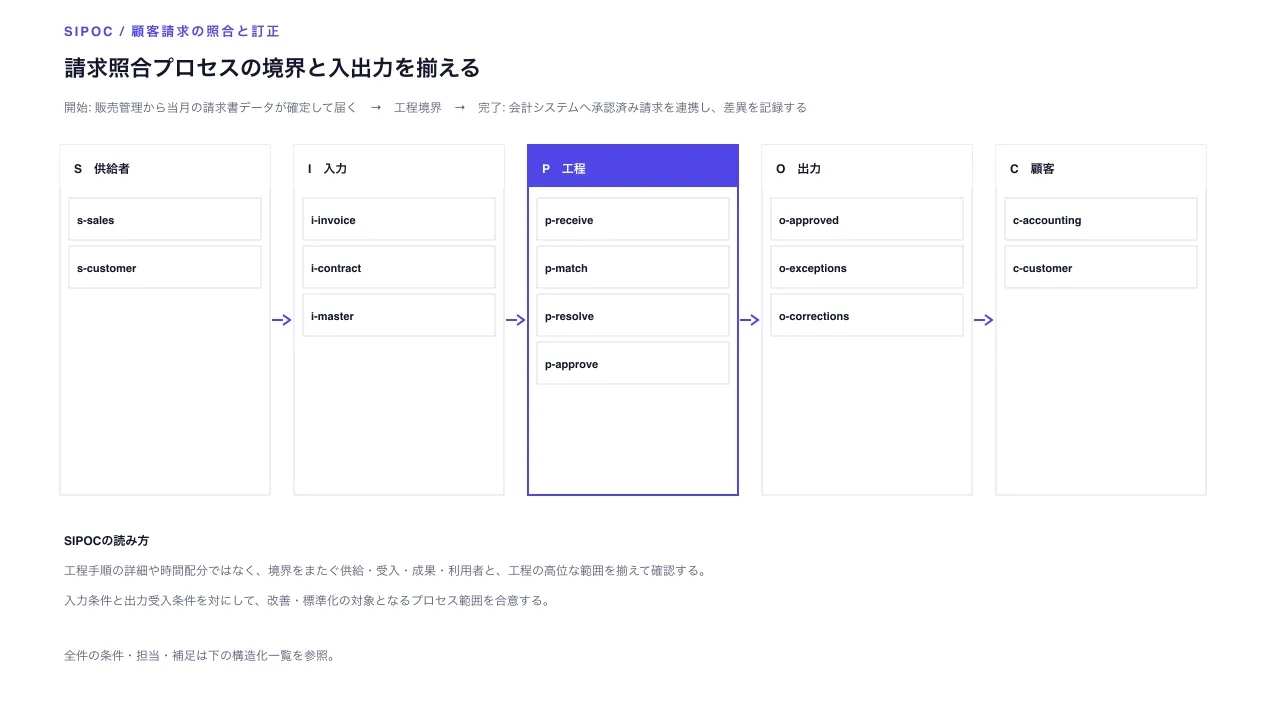
Seen as a design The generated document itself — its toggles and disclosures work here
Seen as a design The generated document itself — its toggles and disclosures work here
Copy and paste, or save a file and hand it over. For a machine with no network, one “Everything” file is enough.
Everything in this panel, including the contents behind each URL, in one Markdown file — Large, so it goes as a file (copy is for 32 KB and under)
Build an HTML document with "SIPOC Process Boundary Overview". This layout runs, so there is no composition to rebuild — what it needs is content.

## What this layout does
Align suppliers, inputs, process, outputs, customers, and boundary conditions to agree on the scope being improved.

## What you have to supply
- Define the process name and its start and end conditions.
- Provide two to five suppliers, two to six inputs, three to six process steps, two to six outputs, and two to five customers, with unique IDs across sections.

## The shape of the input
- `title` — string — 工程範囲と入出力を要約する見出し
- `subtitle` — string? — 対象部門・期間・前提
- `processName` — string — 境界の内側で扱う工程名
- `boundary` — object (start, end) — 開始条件と完了条件
- `suppliers` — array (id, label, provided) — 供給者2〜5件
- `inputs` — array (id, label, requirement) — 入力2〜6件と品質条件
- `steps` — array (id, label) — 工程内の高位段階3〜6件
- `outputs` — array (id, label, acceptance) — 出力2〜6件と受入条件
- `customers` — array (id, label, need) — 顧客2〜5件と期待

schema.ts holds the machine-checkable validation. Ask rather than guess when an input is missing.

## When not to use it
- Use process-flow or swimlane for step order, branches, durations, or owner lanes.
- Use a service blueprint to align frontstage and backstage work across customer touchpoints.

## How to build it
Put the input in a JSON file and run:

```bash
node scripts/render.mjs sipoc-overview <input.json> --theme ink -o out.html
```

The output is one self-contained file and fetches nothing at render time.

## The source
- https://design-vault.pages.dev/designs/sipoc-overview/source/template.tsx
- https://design-vault.pages.dev/designs/sipoc-overview/source/schema.ts
- https://design-vault.pages.dev/designs/sipoc-overview/source/sample-data.json
- https://design-vault.pages.dev/designs/sipoc-overview/sample.html
Template, input schema, sample data and metadata. This document was generated from those four. The generated document
/designs/sipoc-overview/source/template.tsx
import type { Props } from "./schema";

const CSS = String.raw`
.asset{font-family:var(--font-sans);color:var(--color-on-surface);background:var(--color-surface);max-width:var(--container-slide);margin:auto;padding:2.5rem 3rem;line-height:1.5}.asset *{box-sizing:border-box}.asset h1{font-size:var(--text-h1);line-height:1.3;margin:0}.asset .subtitle{color:var(--color-secondary);margin:.6rem 0 1.25rem}.asset .eyebrow{font:600 var(--text-label) var(--font-mono);letter-spacing:.1em;color:var(--color-tertiary)}.asset .plot{display:block;width:100%;height:auto}.asset .plot text{font-family:var(--font-sans);font-size:13px;fill:var(--color-secondary)}.asset .plot .ink{fill:var(--color-on-surface)}.asset .five-parts{display:grid;grid-template-columns:repeat(5,minmax(0,1fr));gap:.75rem;margin:1rem 0}.asset .part{padding:1rem;background:var(--color-surface-subtle);border-top:3px solid var(--color-tertiary);min-width:0}.asset .part h2{font-size:var(--text-h3);margin:0}.asset .part li{margin:.5rem 0;overflow-wrap:anywhere}.asset .ledger{border-collapse:collapse;width:100%;font-variant-numeric:tabular-nums}.asset .ledger th,.asset .ledger td{text-align:left;vertical-align:top;padding:.65rem .75rem;border-bottom:1px solid var(--color-outline);overflow-wrap:anywhere}.asset .ledger th{color:var(--color-secondary)}.asset .ledger .mono{font-family:var(--font-mono)}.asset details{margin-top:1rem}.asset summary{cursor:pointer;min-height:2.75rem;padding:.5rem 0;color:var(--color-secondary)}.asset .boundary{display:grid;grid-template-columns:1fr auto 1fr;gap:1rem;align-items:center;padding:1rem;background:var(--color-surface-subtle);border-left:4px solid var(--color-tertiary)}.asset .boundary span:last-child{text-align:right}.asset .note{border-left:3px solid var(--color-outline);padding:.75rem 1rem;color:var(--color-secondary)}
@media(max-width:760px){.asset{padding:1.5rem 1rem}.asset h1{font-size:var(--text-h2)}.asset .five-parts{grid-template-columns:1fr}.asset .boundary{grid-template-columns:1fr;gap:.4rem}.asset .boundary span:last-child{text-align:left}.asset .ledger,.asset .ledger tbody,.asset .ledger tr,.asset .ledger td{display:block}.asset .ledger thead{display:none}.asset .ledger tr{padding:.65rem 0;border-bottom:1px solid var(--color-outline)}.asset .ledger td{display:grid;grid-template-columns:8rem minmax(0,1fr);gap:.75rem;border:0;padding:.2rem 0}.asset .ledger td:before{content:attr(data-label);font-size:var(--text-label);color:var(--color-secondary)}}
`;

const shorten = (value: string, size = 54) => [...value].length > size ? [...value].slice(0, size - 1).join("") + "…" : value;
type Record = { id: string; label: string; detail: string; group: string };

export default function Template(d: Props) {
  const sections = [
    { id: "suppliers", code: "S", title: "供給者", records: d.suppliers.map(item => ({ id: item.id, label: item.label, detail: item.provided })) },
    { id: "inputs", code: "I", title: "入力", records: d.inputs.map(item => ({ id: item.id, label: item.label, detail: item.requirement })) },
    { id: "steps", code: "P", title: "工程", records: d.steps.map(item => ({ id: item.id, label: item.label, detail: "工程内部の高位な段階" })) },
    { id: "outputs", code: "O", title: "出力", records: d.outputs.map(item => ({ id: item.id, label: item.label, detail: item.acceptance })) },
    { id: "customers", code: "C", title: "顧客", records: d.customers.map(item => ({ id: item.id, label: item.label, detail: item.need })) },
  ];
  const allRecords: Record[] = sections.flatMap(section => section.records.map(record => ({ ...record, group: section.title })));
  const xs = [60, 294, 528, 762, 996];
  return <section className="asset asset-sipoc-overview">
    <style>{CSS}</style>
    <header>
      <p className="eyebrow">SIPOC / PROCESS BOUNDARY</p>
      <h1>{d.title}</h1>
      {d.subtitle && <p className="subtitle">{d.subtitle}</p>}
    </header>
    <div className="boundary"><span><strong>開始:</strong> {d.boundary.start}</span><strong>{d.processName}</strong><span><strong>完了:</strong> {d.boundary.end}</span></div>
    <svg className="plot" data-layout-still="true" width="1280" height="720" viewBox="0 0 1280 720" role="img" aria-labelledby="sipoc-title sipoc-desc" fontFamily="sans-serif" fontSize="12" fill="var(--color-secondary)">
      <title id="sipoc-title">{d.title}</title>
      <desc id="sipoc-desc">工程 {d.processName} の開始と終了の境界、供給者、入力、工程、出力、顧客を並べたSIPOC概要。</desc>
      <rect x="0" y="0" width="1280" height="720" fill="var(--color-surface)" />
      <text x="64" y="36" fontSize="13" fontWeight="700" letterSpacing="2" fill="var(--color-tertiary)">SIPOC / {d.processName}</text>
      <text x="64" y="76" fontSize="22" fontWeight="700" fill="var(--color-on-surface)">{d.title}</text>
      <text x="64" y="112" fontSize="12">開始: {shorten(d.boundary.start)} → 工程境界 → 完了: {shorten(d.boundary.end)}</text>
      {sections.map((section, sectionIndex) => {
        const x = xs[sectionIndex];
        return <g key={section.id}>
          <rect x={x} y="145" width="210" height="350" fill={section.id === "steps" ? "var(--color-surface)" : "var(--color-surface)"} stroke={section.id === "steps" ? "var(--color-tertiary)" : "var(--color-outline)"} strokeWidth={section.id === "steps" ? 2 : 1} />
          <rect x={x} y="145" width="210" height="42" fill={section.id === "steps" ? "var(--color-tertiary)" : "var(--color-surface)"} />
          <text x={x + 14} y="173" fontSize="12" fontWeight="700" fill={section.id === "steps" ? "var(--color-surface)" : "var(--color-on-surface)"}>{section.code} {section.title}</text>
          {section.records.map((record, index) => {
            const y = 198 + index * 48;
            return <g key={record.id} data-sipoc-record={record.id}>
              <rect x={x + 9} y={y} width="192" height="42" fill="var(--color-surface)" stroke="var(--color-outline)" />
              <text x={x + 17} y={y + 26} fontSize="11" fontWeight="700" fill="var(--color-on-surface)">{record.id}</text>
            </g>;
          })}
        </g>;
      })}
      {[0, 1, 2, 3].map(index => {
        const x1 = xs[index] + 212, x2 = xs[index + 1] - 4, y = 320;
        return <g key={index}>
          <line x1={x1} y1={y} x2={x2 - 7} y2={y} stroke="var(--color-tertiary)" strokeWidth="2" />
          <path d={`M ${x2 - 7} ${y - 5} L ${x2} ${y} L ${x2 - 7} ${y + 5}`} fill="none" stroke="var(--color-tertiary)" strokeWidth="2" />
        </g>;
      })}
      <text x="64" y="545" fontWeight="700" fill="var(--color-on-surface)">SIPOCの読み方</text>
      <text x="64" y="575">工程手順の詳細や時間配分ではなく、境界をまたぐ供給・受入・成果・利用者と、工程の高位な範囲を揃えて確認する。</text>
      <text x="64" y="605">入力条件と出力受入条件を対にして、改善・標準化の対象となるプロセス範囲を合意する。</text>
      <text x="64" y="660">全件の条件・担当・補足は下の構造化一覧を参照。</text>
    </svg>
    <div className="five-parts">{sections.map(section => <section className="part" key={section.id}><h2>{section.title}</h2><ul>{section.records.map(record => <li key={record.id}><strong className="mono">{record.id}</strong> {record.label}</li>)}</ul></section>)}</div>
    <p className="note">SIPOCはプロセス境界と主要な入出力を揃える概要図です。詳細手順・担当レーン・待ち時間を表すものではありません。</p>
    <details open>
      <summary>境界の全レコードと条件を確認({allRecords.length}件)</summary>
      <table className="ledger"><thead><tr><th>区分</th><th>項目</th><th>契約・補足</th></tr></thead>
        <tbody>{allRecords.map(record => <tr key={record.id} data-sipoc-record={record.id}>
          <td data-label="区分">{record.group}</td><td data-label="項目"><span className="mono">{record.id}</span><br />{record.label}</td><td data-label="契約・補足">{record.detail}</td>
        </tr>)}</tbody>
      </table>
    </details>
  </section>;
}
/designs/sipoc-overview/source/schema.ts
import { z } from "zod";

const text = z.string().trim().min(1).max(160);
const detail = z.string().trim().min(1).max(80);
const label = z.string().trim().min(1).max(30);
const id = z.string().trim().min(1).max(24);
const supplier = z.object({
  id: id.describe("供給者レコードの一意なID"),
  label: label.describe("供給者の組織または役割"),
  provided: detail.describe("供給する資源・情報・サービス"),
}).strict();
const input = z.object({
  id: id.describe("入力レコードの一意なID"),
  label: label.describe("工程が受け取る入力"),
  requirement: detail.describe("入力に必要な条件・品質"),
}).strict();
const step = z.object({
  id: id.describe("工程レコードの一意なID"),
  label: label.describe("対象工程の高位な段階"),
}).strict();
const output = z.object({
  id: id.describe("出力レコードの一意なID"),
  label: label.describe("工程が生み出す成果"),
  acceptance: detail.describe("成果の受入条件"),
}).strict();
const customer = z.object({
  id: id.describe("顧客レコードの一意なID"),
  label: label.describe("成果を受け取る顧客・利用者"),
  need: detail.describe("顧客が成果へ期待する価値・要件"),
}).strict();
const unique = (values: string[]) => new Set(values).size === values.length;

export const schema = z.object({
  title: text.describe("工程範囲と入出力を要約する見出し"),
  subtitle: text.optional().describe("対象部門・期間・前提"),
  processName: label.describe("境界の内側で扱う工程名"),
  boundary: z.object({
    start: detail.describe("工程の開始点・受入条件"),
    end: detail.describe("工程の終了点・完了条件"),
  }).strict().describe("工程境界を示す開始条件と完了条件"),
  suppliers: z.array(supplier).min(2).max(5).describe("工程へ資源・情報を渡す供給者"),
  inputs: z.array(input).min(2).max(6).describe("工程が受け入れる入力と品質条件"),
  steps: z.array(step).min(3).max(6).describe("工程内部の高位な主要段階"),
  outputs: z.array(output).min(2).max(6).describe("工程が生成する成果と受入条件"),
  customers: z.array(customer).min(2).max(5).describe("成果を受け取る顧客と期待価値"),
}).strict().refine(data => unique([
  ...data.suppliers.map(record => record.id),
  ...data.inputs.map(record => record.id),
  ...data.steps.map(record => record.id),
  ...data.outputs.map(record => record.id),
  ...data.customers.map(record => record.id),
]), "供給者・入力・工程・出力・顧客のIDはすべて一意");

export type Props = z.infer<typeof schema>;
/designs/sipoc-overview/source/meta.yaml
id: sipoc-overview
name:
  ja: SIPOC工程境界の概要
  en: SIPOC Process Boundary Overview
purpose:
  ja: 供給者・入力・工程・出力・顧客の五領域と開始・終了条件を一枚に揃え、どこまでを改善対象とするか合意する。
  en: Align suppliers, inputs, process, outputs, customers, and boundary conditions to agree on the scope being improved.
status: published
still: ./still.png
category: workflow
catalogOrder: 830
jobs:
  - explain-structure
  - trace-flow
useCases:
  - process
  - requirements
layoutKinds:
  - table
tags:
  - sipoc
  - process-boundary
  - input-output-contract
  - offline
  - responsive
whenToUse:
  - ja: 改善や標準化の開始時に、工程の起点・終点、受け入れる入力、届ける成果と顧客を部門横断で合意する。
    en: Use at the start of improvement work to align cross-functional teams on process start and end, accepted inputs, outputs, and customers.
  - ja: 詳細手順を描く前に、どの供給者が何を渡し、工程が何を生成するかを明確にする。
    en: Use to clarify who supplies what and what the process produces before documenting detailed procedures.
avoidWhen:
  - ja: 工程の順序・分岐・時間や担当レーンを説明する場合はprocess-flowまたはswimlaneを使う。
    en: Use process-flow or swimlane for step order, branches, durations, or owner lanes.
  - ja: 顧客接点ごとの表・裏の動きを同じ段階列へ揃える場合はservice-blueprintを使う。
    en: Use a service blueprint to align frontstage and backstage work across customer touchpoints.
requiredInputs:
  - ja: 工程名と開始・終了の境界条件を定義する。
    en: Define the process name and its start and end conditions.
  - ja: 供給者2〜5、入力2〜6、工程段階3〜6、出力2〜6、顧客2〜5件を用意し、IDは全領域で一意にする。
    en: Provide two to five suppliers, two to six inputs, three to six process steps, two to six outputs, and two to five customers, with unique IDs across sections.
relatedLayouts:
  - process-flow
  - service-blueprint
  - requirements-response-table
dataSchema:
  title: string — 工程範囲と入出力を要約する見出し
  subtitle: string? — 対象部門・期間・前提
  processName: string — 境界の内側で扱う工程名
  boundary: object (start, end) — 開始条件と完了条件
  suppliers: array (id, label, provided) — 供給者2〜5件
  inputs: array (id, label, requirement) — 入力2〜6件と品質条件
  steps: array (id, label) — 工程内の高位段階3〜6件
  outputs: array (id, label, acceptance) — 出力2〜6件と受入条件
  customers: array (id, label, need) — 顧客2〜5件と期待
sources: []
/designs/sipoc-overview/source/sample-data.json
{
  "title": "請求照合プロセスの境界と入出力を揃える",
  "subtitle": "架空サンプル|月次請求の確認・訂正業務",
  "processName": "顧客請求の照合と訂正",
  "boundary": {
    "start": "販売管理から当月の請求書データが確定して届く",
    "end": "会計システムへ承認済み請求を連携し、差異を記録する"
  },
  "suppliers": [
    { "id": "s-sales", "label": "販売管理担当", "provided": "当月の請求書と契約変更の確定データ" },
    { "id": "s-customer", "label": "顧客窓口", "provided": "訂正依頼の内容と顧客承認の記録" }
  ],
  "inputs": [
    { "id": "i-invoice", "label": "請求書データ", "requirement": "契約IDと対象月が全明細に設定されている" },
    { "id": "i-contract", "label": "契約条件", "requirement": "料金・開始日・変更履歴が承認済みである" },
    { "id": "i-master", "label": "顧客マスター", "requirement": "請求先・税区分・送付方法が現行状態である" }
  ],
  "steps": [
    { "id": "p-receive", "label": "対象データを受領する" },
    { "id": "p-match", "label": "契約と明細を照合する" },
    { "id": "p-resolve", "label": "差異の根拠を確認する" },
    { "id": "p-approve", "label": "訂正内容を承認する" }
  ],
  "outputs": [
    { "id": "o-approved", "label": "承認済み請求", "acceptance": "契約条件・請求先・金額の照合が完了している" },
    { "id": "o-exceptions", "label": "差異一覧", "acceptance": "金額差と解決担当・期限が記録されている" },
    { "id": "o-corrections", "label": "訂正履歴", "acceptance": "修正前後の値と承認者を追跡できる" }
  ],
  "customers": [
    { "id": "c-accounting", "label": "経理部門", "need": "締め日までに検証済み請求を仕訳へ反映する" },
    { "id": "c-customer", "label": "請求先顧客", "need": "契約どおりの金額と明細を期限内に受け取る" }
  ]
}