# Results Cover — The Period and Disclosure Date Lead, Not the Company
Produce one slide to the following specification.

- Canvas 1920 × 1080
- Margin top 96 right 140 bottom 56 left 140

## Type (px against a 1920px canvas)
company  28px / 500 / tracking 0.08em / tabular numerals
fy  44px / 500 / tabular numerals
quarter  152px / 700 / tracking -0.01em / leading 1.1 / tabular numerals
doc  56px / 500 / tabular numerals
date  30px / 500 / tabular numerals
who  24px / 400 / tabular numerals

## Colour
Ground #10243F / Surface #1A3253 / Ink #FFFFFF / Muted #A7B4C7 / Accent #8DB4E2 / Rule #2C4566

## Constraints — dropping these breaks it
- The period leads — the same company issues one every quarter, so a big company name says nothing about which one
- Split fiscal year, quarter and document name into three lines; only the quarter is largest
- Always give the disclosure date — whoever revisits it checks from the cover when the numbers are from
- One thick vertical bar left of the period block is the only ornament

Replace the content with [your content]. Keep the measurements and colours as given.
For an exact reproduction, use the verbatim HTML at https://design-vault.pages.dev/designs/results-cover-period/pattern.html.

---

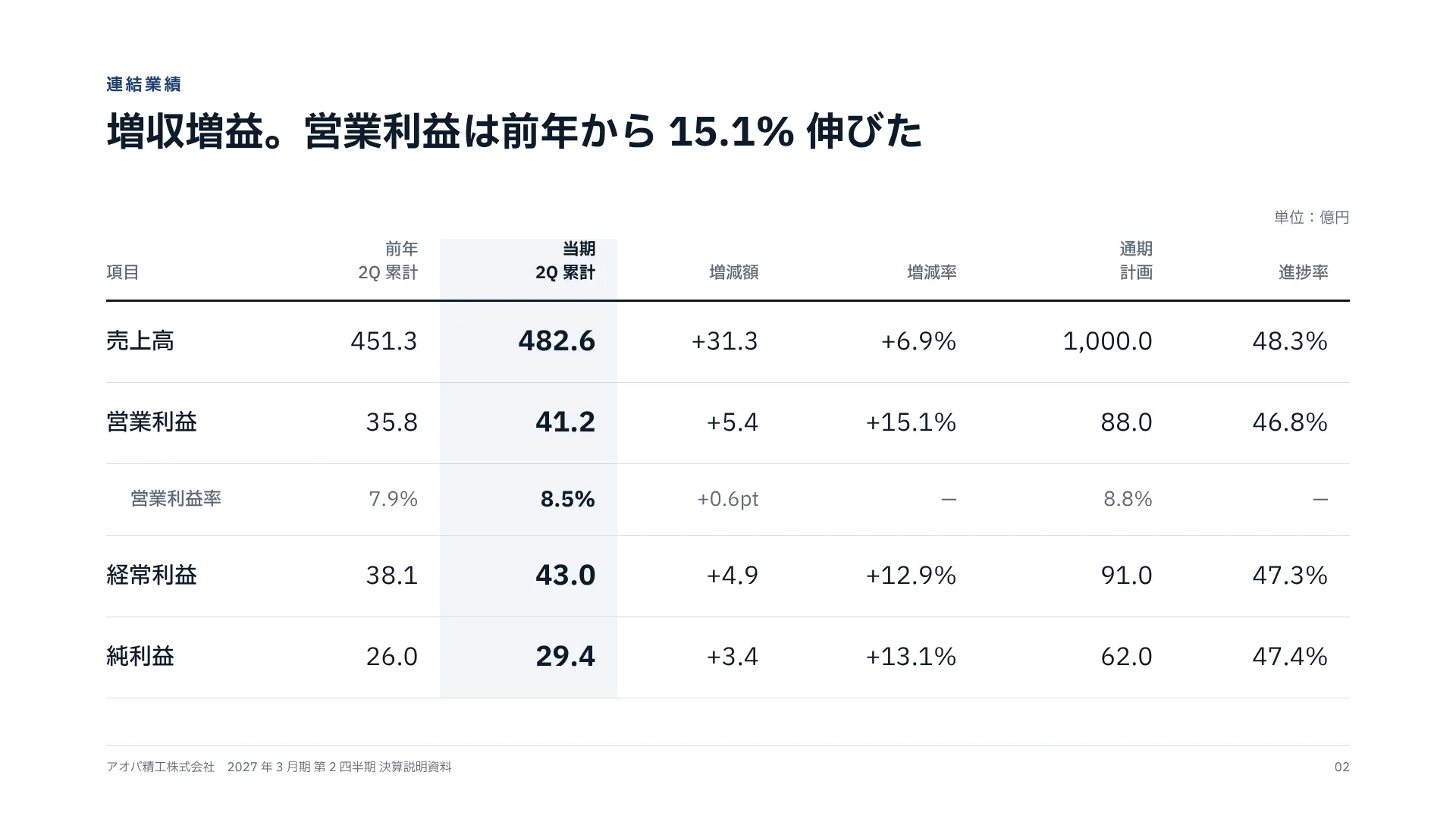
# P&L Summary — Shade Only the Current Column, Align the Digits and Units
Produce one slide to the following specification.

- Canvas 1920 × 1080
- Margin top 96 right 140 bottom 56 left 140

## Type (px against a 1920px canvas)
kicker  22px / 700 / tracking 0.16em / tabular numerals
title  52px / 700 / leading 1.35 / tabular numerals
unit  20px / 400 / tabular numerals
colHead  22px / 500 / leading 1.4 / tabular numerals
item  30px / 500 / tabular numerals
prior  32px / 400 / tabular numerals
current  36px / 700 / tabular numerals
delta  32px / 400 / tabular numerals
folio  16px / 400 / tabular numerals

## Colour
Ground #FFFFFF / Surface #F2F4F8 / Ink #0E1A2B / Muted #5B6879 / Accent #1D3F72 / Rule #D6DCE5

## Constraints — dropping these breaks it
- Shade only the current column and set its figures larger and bold; the comparisons stay on the ground
- State the unit once at the top right — repeated after every figure, the digits stop lining up
- Every figure right-aligned, tabular, one decimal place
- Indent and grey the ratio row (operating margin) so it reads apart from the amounts

Replace the content with [your content]. Keep the measurements and colours as given.
For an exact reproduction, use the verbatim HTML at https://design-vault.pages.dev/designs/pl-summary-yoy-table/pattern.html.

---

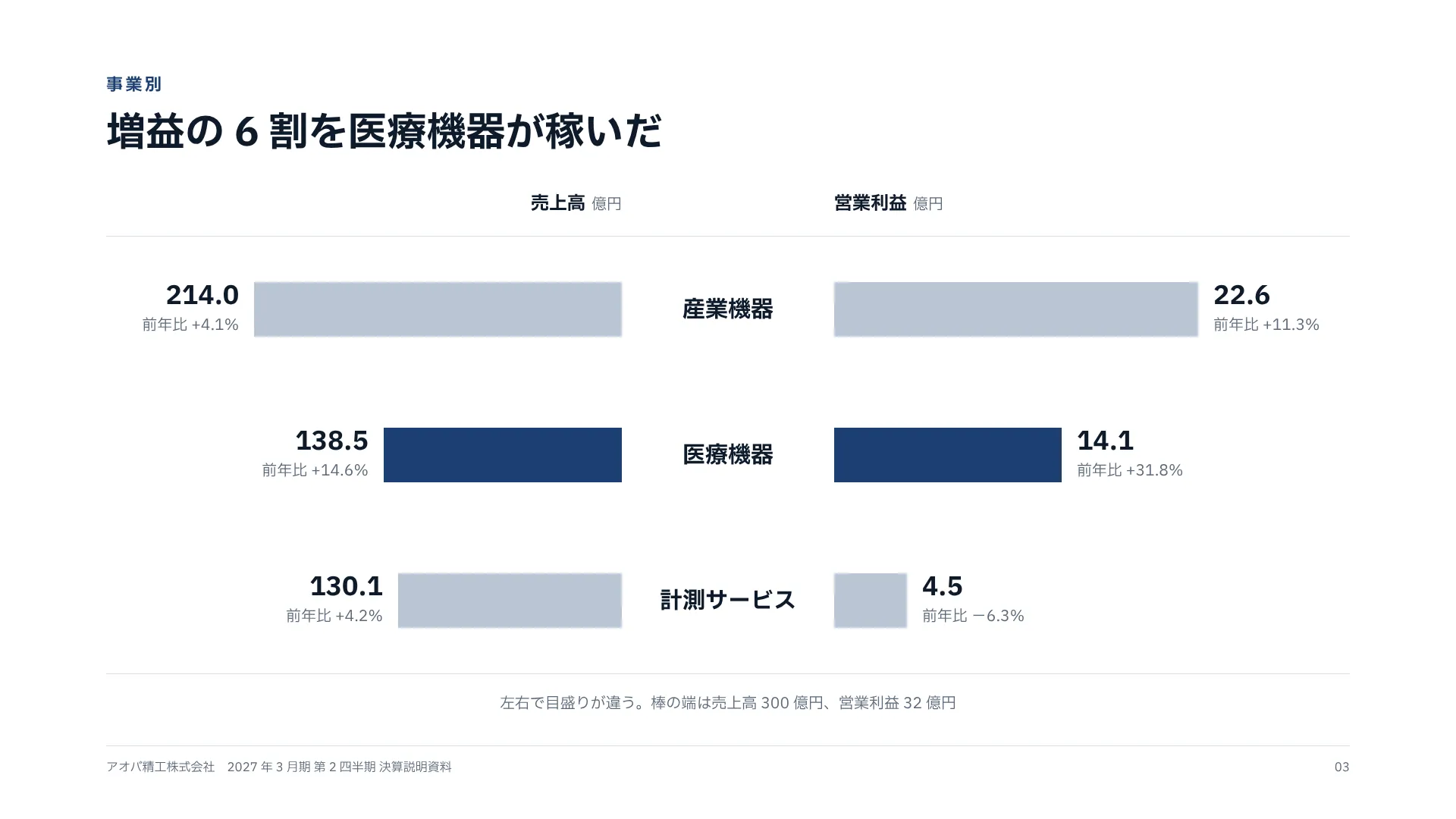
# Segments — Revenue to the Left, Profit to the Right, Names in the Middle
Produce one slide to the following specification.

- Canvas 1920 × 1080
- Margin top 96 right 140 bottom 56 left 140

## Type (px against a 1920px canvas)
kicker  22px / 700 / tracking 0.16em / tabular numerals
title  52px / 700 / leading 1.35 / tabular numerals
axisHead  24px / 700 / tabular numerals
value  34px / 700 / leading 1.1 / tabular numerals
yoy  20px / 400 / tabular numerals
segment  30px / 700 / tabular numerals
note  20px / 400 / tabular numerals
folio  16px / 400 / tabular numerals

## Colour
Ground #FFFFFF / Surface #F2F4F8 / Ink #0E1A2B / Muted #5B6879 / Accent #1D3F72 / Rule #D6DCE5

## Constraints — dropping these breaks it
- The two sides may use different scales, but say so under the chart — otherwise people compare lengths across
- Put the value and year-on-year change at each bar's end; draw no axis
- Darken both bars of the segment the headline names, and only those
- Four segments at most — beyond that, use a table

Replace the content with [your content]. Keep the measurements and colours as given.
For an exact reproduction, use the verbatim HTML at https://design-vault.pages.dev/designs/segment-butterfly-bars/pattern.html.

---

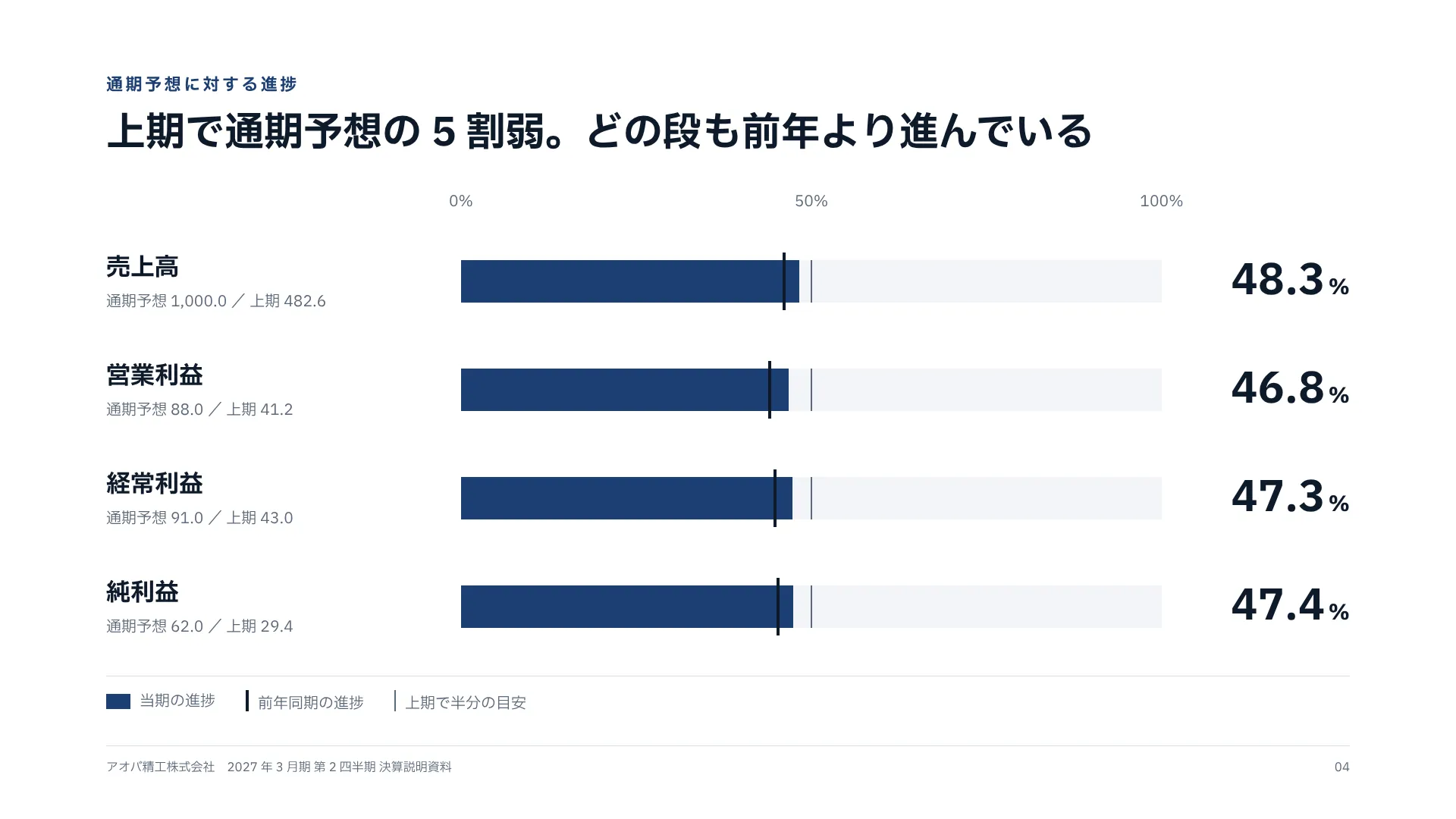
# Progress to Forecast — Fill This Year Into a 100% Bar, Mark Last Year on Top
Produce one slide to the following specification.

- Canvas 1920 × 1080
- Margin top 96 right 140 bottom 56 left 140

## Type (px against a 1920px canvas)
kicker  22px / 700 / tracking 0.16em / tabular numerals
title  52px / 700 / leading 1.35 / tabular numerals
tick  20px / 400 / tabular numerals
item  32px / 700 / tabular numerals
plan  20px / 400 / tabular numerals
rate  56px / 700 / leading 1 / tabular numerals
legend  20px / 400 / tabular numerals
folio  16px / 400 / tabular numerals

## Colour
Ground #FFFFFF / Surface #F2F4F8 / Ink #0E1A2B / Muted #5B6879 / Accent #1D3F72 / Rule #D6DCE5

## Constraints — dropping these breaks it
- The bar ends at the full-year forecast — scale to amounts and the lines cannot be compared
- Mark last year's progress as a tick — a progress rate alone cannot be judged high or low
- For a half year, draw a thin line at 50%; note any seasonality
- The rate goes large at the right; forecast and actual sit small under each line's name

Replace the content with [your content]. Keep the measurements and colours as given.
For an exact reproduction, use the verbatim HTML at https://design-vault.pages.dev/designs/forecast-progress-rate/pattern.html.

---

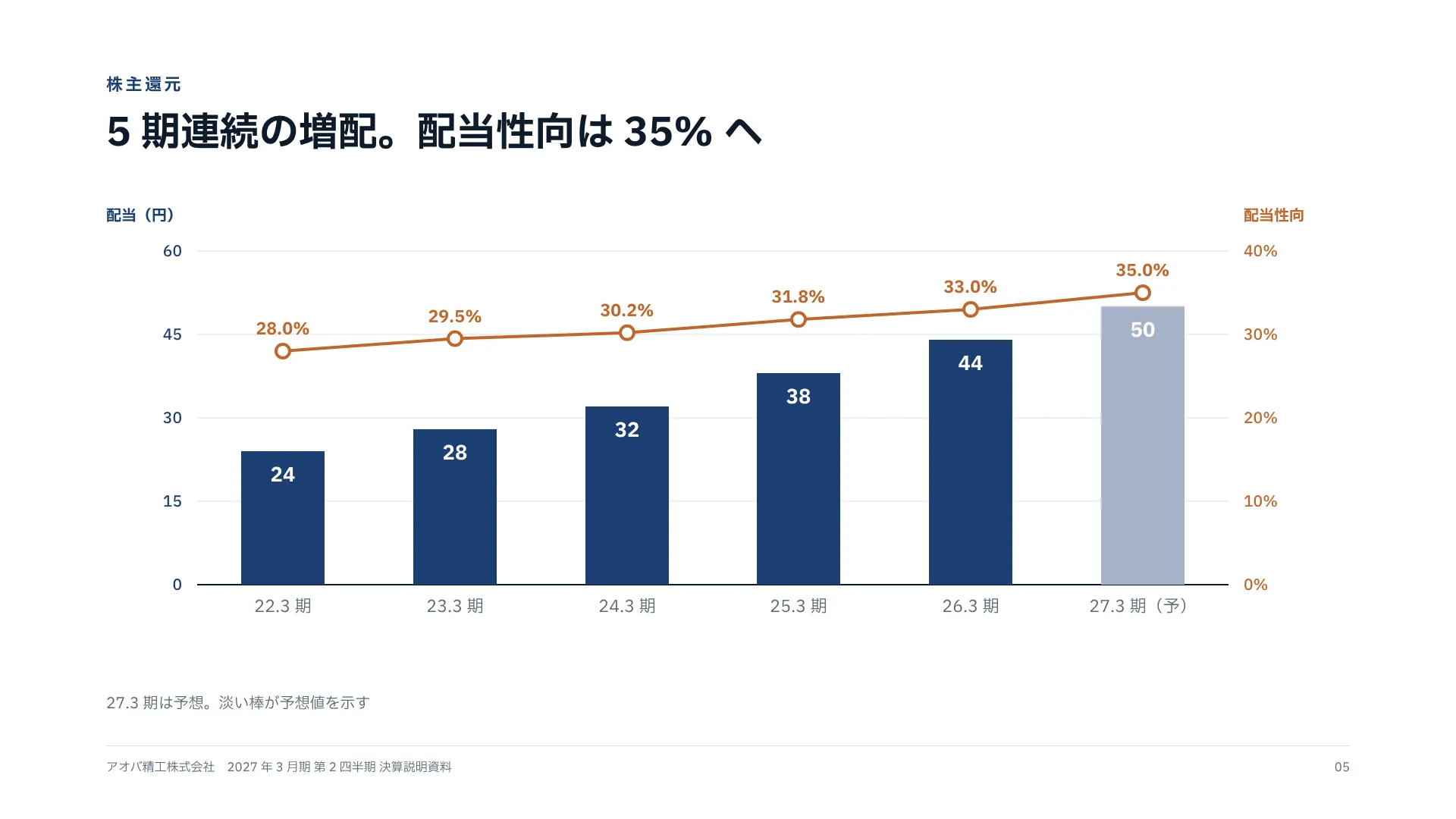
# Dividend History — Dividend Bars and Payout Line on Two Axes, Each Tied by Colour
Produce one slide to the following specification.

- Canvas 1920 × 1080
- Margin top 96 right 140 bottom 56 left 140

## Type (px against a 1920px canvas)
kicker  22px / 700 / tracking 0.16em / tabular numerals
title  52px / 700 / leading 1.35 / tabular numerals
note  20px / 400 / tabular numerals
folio  16px / 400 / tabular numerals

## Colour
Ground #FFFFFF / Surface #F2F4F8 / Ink #0E1A2B / Muted #5B6879 / Accent #1D3F72 / Rule #D6DCE5 / #C0662B

## Constraints — dropping these breaks it
- Colour each axis's numbers and title like its series — in one colour, the line gets read against the left scale
- Give both axes the same number of steps so they share gridlines
- Draw forecast years as pale bars and mark them (F) under the axis
- Bar values inside the bars, line values above the points — never on the same level

Replace the content with [your content]. Keep the measurements and colours as given.
For an exact reproduction, use the verbatim HTML at https://design-vault.pages.dev/designs/dividend-payout-dual-axis/pattern.html.

---

# Mid-Term Plan — The Goal as a Beam, Three Pillars, and a Foundation
Produce one slide to the following specification.

- Canvas 1920 × 1080
- Margin top 96 right 140 bottom 56 left 140
- 3 equal columns, gap 16

## Type (px against a 1920px canvas)
kicker  22px / 700 / tracking 0.16em / tabular numerals
title  52px / 700 / leading 1.35 / tabular numerals
beamLabel  24px / 500 / tabular numerals
beamGoal  40px / 700 / tabular numerals
pillarNo  22px / 700 / tabular numerals
pillar  36px / 700 / tabular numerals
kpiLabel  22px / 400 / tabular numerals
target  88px / 700 / leading 1.05 / tabular numerals
how  22px / 400 / leading 1.6 / tabular numerals
baseLabel  24px / 700 / tabular numerals
baseText  26px / 500 / tabular numerals
folio  16px / 400 / tabular numerals

## Colour
Ground #FFFFFF / Surface #F2F4F8 / Ink #0E1A2B / Muted #5B6879 / Accent #1D3F72 / Rule #D6DCE5

## Constraints — dropping these breaks it
- Each pillar carries one numeric target — without one, a pillar is a slogan
- Pair each target with this year's estimate so the distance shows
- Draw beam, pillars and foundation as distinct layers — side by side, nothing reads as holding anything up
- Three pillars; four or more are not remembered

Replace the content with [your content]. Keep the measurements and colours as given.
For an exact reproduction, use the verbatim HTML at https://design-vault.pages.dev/designs/midterm-plan-pillars/pattern.html.

---

# KPI Scorecard — Target, Actual, Gap, Eight-Quarter Trend and Verdict on One Row
Produce one slide to the following specification.

- Canvas 1920 × 1080
- Margin top 96 right 140 bottom 56 left 140

## Type (px against a 1920px canvas)
kicker  22px / 700 / tracking 0.16em / tabular numerals
title  52px / 700 / leading 1.35 / tabular numerals
colHead  22px / 500 / tabular numerals
item  30px / 500 / tabular numerals
target  30px / 400 / tabular numerals
actual  36px / 700 / tabular numerals
gap  30px / 400 / tabular numerals
judge  24px / 700 / tabular numerals
note  20px / 400 / tabular numerals
folio  16px / 400 / tabular numerals

## Colour
Ground #FFFFFF / Surface #F2F4F8 / Ink #0E1A2B / Muted #5B6879 / Accent #1D3F72 / Rule #D6DCE5

## Constraints — dropping these breaks it
- Use colour only for the verdict — colour the trend lines too and nothing stands out
- Each trend line has its own scale; note that only the shape is meant to be read
- Express gaps in points, always with a sign
- Two verdicts, met or not — a three-colour signal means explaining amber every time

Replace the content with [your content]. Keep the measurements and colours as given.
For an exact reproduction, use the verbatim HTML at https://design-vault.pages.dev/designs/kpi-scorecard-sparklines/pattern.html.

---

# Topics — Three Cards Lined Up by Date, Category and Headline
Produce one slide to the following specification.

- Canvas 1920 × 1080
- Margin top 96 right 140 bottom 56 left 140
- 3 equal columns, gap 40

## Type (px against a 1920px canvas)
kicker  22px / 700 / tracking 0.16em / tabular numerals
title  52px / 700 / leading 1.35 / tabular numerals
date  24px / 700 / tabular numerals
category  20px / 500 / tabular numerals
headline  32px / 700 / leading 1.45 / tabular numerals
body  22px / 400 / leading 1.7 / tabular numerals
folio  16px / 400 / tabular numerals

## Colour
Ground #FFFFFF / Surface #F2F4F8 / Ink #0E1A2B / Muted #5B6879 / Accent #1D3F72 / Rule #D6DCE5

## Constraints — dropping these breaks it
- Three events in date order — rank them by importance and the sequence gets misread
- Put one number in each card (units, countries, investment)
- Images are 16:9 stand-ins; until photos exist, pale navy shapes only mark the slot
- Keep each headline to one line; whatever spills goes into the detail line

Replace the content with [your content]. Keep the measurements and colours as given.
For an exact reproduction, use the verbatim HTML at https://design-vault.pages.dev/designs/topics-dated-cards/pattern.html.
# Results Cover — The Period and Disclosure Date Lead, Not the Company
format: slide-16x9
density: low
layout:
  kind: stack
  canvas:
    w: 1920
    h: 1080
  margin:
    top: 96
    right: 140
    bottom: 56
    left: 140
type:
  company:
    size: 28
    weight: 500
    tracking: 0.08em
    numeric: tabular
  fy:
    size: 44
    weight: 500
    numeric: tabular
  quarter:
    size: 152
    weight: 700
    tracking: -0.01em
    leading: 1.1
    numeric: tabular
  doc:
    size: 56
    weight: 500
    numeric: tabular
  date:
    size: 30
    weight: 500
    numeric: tabular
  who:
    size: 24
    weight: 400
    numeric: tabular
colors:
  ground: "#10243F"
  surface: "#1A3253"
  ink: "#FFFFFF"
  muted: "#A7B4C7"
  accent: "#8DB4E2"
  rule: "#2C4566"
rules:
  - The period leads — the same company issues one every quarter, so a big company name says nothing about which one
  - Split fiscal year, quarter and document name into three lines; only the quarter is largest
  - Always give the disclosure date — whoever revisits it checks from the cover when the numbers are from
  - One thick vertical bar left of the period block is the only ornament

---

# P&L Summary — Shade Only the Current Column, Align the Digits and Units
format: slide-16x9
density: high
layout:
  kind: table
  canvas:
    w: 1920
    h: 1080
  margin:
    top: 96
    right: 140
    bottom: 56
    left: 140
type:
  kicker:
    size: 22
    weight: 700
    tracking: 0.16em
    numeric: tabular
  title:
    size: 52
    weight: 700
    leading: 1.35
    numeric: tabular
  unit:
    size: 20
    weight: 400
    numeric: tabular
  colHead:
    size: 22
    weight: 500
    leading: 1.4
    numeric: tabular
  item:
    size: 30
    weight: 500
    numeric: tabular
  prior:
    size: 32
    weight: 400
    numeric: tabular
  current:
    size: 36
    weight: 700
    numeric: tabular
  delta:
    size: 32
    weight: 400
    numeric: tabular
  folio:
    size: 16
    weight: 400
    numeric: tabular
colors:
  ground: "#FFFFFF"
  surface: "#F2F4F8"
  ink: "#0E1A2B"
  muted: "#5B6879"
  accent: "#1D3F72"
  rule: "#D6DCE5"
rules:
  - Shade only the current column and set its figures larger and bold; the comparisons stay on the ground
  - State the unit once at the top right — repeated after every figure, the digits stop lining up
  - Every figure right-aligned, tabular, one decimal place
  - Indent and grey the ratio row (operating margin) so it reads apart from the amounts

---

# Segments — Revenue to the Left, Profit to the Right, Names in the Middle
format: slide-16x9
density: medium
layout:
  kind: axis
  canvas:
    w: 1920
    h: 1080
  margin:
    top: 96
    right: 140
    bottom: 56
    left: 140
type:
  kicker:
    size: 22
    weight: 700
    tracking: 0.16em
    numeric: tabular
  title:
    size: 52
    weight: 700
    leading: 1.35
    numeric: tabular
  axisHead:
    size: 24
    weight: 700
    numeric: tabular
  value:
    size: 34
    weight: 700
    leading: 1.1
    numeric: tabular
  yoy:
    size: 20
    weight: 400
    numeric: tabular
  segment:
    size: 30
    weight: 700
    numeric: tabular
  note:
    size: 20
    weight: 400
    numeric: tabular
  folio:
    size: 16
    weight: 400
    numeric: tabular
colors:
  ground: "#FFFFFF"
  surface: "#F2F4F8"
  ink: "#0E1A2B"
  muted: "#5B6879"
  accent: "#1D3F72"
  rule: "#D6DCE5"
rules:
  - The two sides may use different scales, but say so under the chart — otherwise people compare lengths across
  - Put the value and year-on-year change at each bar's end; draw no axis
  - Darken both bars of the segment the headline names, and only those
  - Four segments at most — beyond that, use a table

---

# Progress to Forecast — Fill This Year Into a 100% Bar, Mark Last Year on Top
format: slide-16x9
density: medium
layout:
  kind: axis
  canvas:
    w: 1920
    h: 1080
  margin:
    top: 96
    right: 140
    bottom: 56
    left: 140
type:
  kicker:
    size: 22
    weight: 700
    tracking: 0.16em
    numeric: tabular
  title:
    size: 52
    weight: 700
    leading: 1.35
    numeric: tabular
  tick:
    size: 20
    weight: 400
    numeric: tabular
  item:
    size: 32
    weight: 700
    numeric: tabular
  plan:
    size: 20
    weight: 400
    numeric: tabular
  rate:
    size: 56
    weight: 700
    leading: 1
    numeric: tabular
  legend:
    size: 20
    weight: 400
    numeric: tabular
  folio:
    size: 16
    weight: 400
    numeric: tabular
colors:
  ground: "#FFFFFF"
  surface: "#F2F4F8"
  ink: "#0E1A2B"
  muted: "#5B6879"
  accent: "#1D3F72"
  rule: "#D6DCE5"
rules:
  - The bar ends at the full-year forecast — scale to amounts and the lines cannot be compared
  - Mark last year's progress as a tick — a progress rate alone cannot be judged high or low
  - For a half year, draw a thin line at 50%; note any seasonality
  - The rate goes large at the right; forecast and actual sit small under each line's name

---

# Dividend History — Dividend Bars and Payout Line on Two Axes, Each Tied by Colour
format: slide-16x9
density: medium
layout:
  kind: axis
  canvas:
    w: 1920
    h: 1080
  margin:
    top: 96
    right: 140
    bottom: 56
    left: 140
type:
  kicker:
    size: 22
    weight: 700
    tracking: 0.16em
    numeric: tabular
  title:
    size: 52
    weight: 700
    leading: 1.35
    numeric: tabular
  note:
    size: 20
    weight: 400
    numeric: tabular
  folio:
    size: 16
    weight: 400
    numeric: tabular
colors:
  ground: "#FFFFFF"
  surface: "#F2F4F8"
  ink: "#0E1A2B"
  muted: "#5B6879"
  accent: "#1D3F72"
  rule: "#D6DCE5"
  series:
    - "#C0662B"
rules:
  - Colour each axis's numbers and title like its series — in one colour, the line gets read against the left scale
  - Give both axes the same number of steps so they share gridlines
  - Draw forecast years as pale bars and mark them (F) under the axis
  - Bar values inside the bars, line values above the points — never on the same level

---

# Mid-Term Plan — The Goal as a Beam, Three Pillars, and a Foundation
format: slide-16x9
density: medium
layout:
  kind: 3-column
  canvas:
    w: 1920
    h: 1080
  margin:
    top: 96
    right: 140
    bottom: 56
    left: 140
  columns:
    count: 3
    gap: 16
type:
  kicker:
    size: 22
    weight: 700
    tracking: 0.16em
    numeric: tabular
  title:
    size: 52
    weight: 700
    leading: 1.35
    numeric: tabular
  beamLabel:
    size: 24
    weight: 500
    numeric: tabular
  beamGoal:
    size: 40
    weight: 700
    numeric: tabular
  pillarNo:
    size: 22
    weight: 700
    numeric: tabular
  pillar:
    size: 36
    weight: 700
    numeric: tabular
  kpiLabel:
    size: 22
    weight: 400
    numeric: tabular
  target:
    size: 88
    weight: 700
    leading: 1.05
    numeric: tabular
  how:
    size: 22
    weight: 400
    leading: 1.6
    numeric: tabular
  baseLabel:
    size: 24
    weight: 700
    numeric: tabular
  baseText:
    size: 26
    weight: 500
    numeric: tabular
  folio:
    size: 16
    weight: 400
    numeric: tabular
colors:
  ground: "#FFFFFF"
  surface: "#F2F4F8"
  ink: "#0E1A2B"
  muted: "#5B6879"
  accent: "#1D3F72"
  rule: "#D6DCE5"
rules:
  - Each pillar carries one numeric target — without one, a pillar is a slogan
  - Pair each target with this year's estimate so the distance shows
  - Draw beam, pillars and foundation as distinct layers — side by side, nothing reads as holding anything up
  - Three pillars; four or more are not remembered

---

# KPI Scorecard — Target, Actual, Gap, Eight-Quarter Trend and Verdict on One Row
format: slide-16x9
density: high
layout:
  kind: table
  canvas:
    w: 1920
    h: 1080
  margin:
    top: 96
    right: 140
    bottom: 56
    left: 140
type:
  kicker:
    size: 22
    weight: 700
    tracking: 0.16em
    numeric: tabular
  title:
    size: 52
    weight: 700
    leading: 1.35
    numeric: tabular
  colHead:
    size: 22
    weight: 500
    numeric: tabular
  item:
    size: 30
    weight: 500
    numeric: tabular
  target:
    size: 30
    weight: 400
    numeric: tabular
  actual:
    size: 36
    weight: 700
    numeric: tabular
  gap:
    size: 30
    weight: 400
    numeric: tabular
  judge:
    size: 24
    weight: 700
    numeric: tabular
  note:
    size: 20
    weight: 400
    numeric: tabular
  folio:
    size: 16
    weight: 400
    numeric: tabular
colors:
  ground: "#FFFFFF"
  surface: "#F2F4F8"
  ink: "#0E1A2B"
  muted: "#5B6879"
  accent: "#1D3F72"
  rule: "#D6DCE5"
rules:
  - Use colour only for the verdict — colour the trend lines too and nothing stands out
  - Each trend line has its own scale; note that only the shape is meant to be read
  - Express gaps in points, always with a sign
  - Two verdicts, met or not — a three-colour signal means explaining amber every time

---

# Topics — Three Cards Lined Up by Date, Category and Headline
format: slide-16x9
density: medium
layout:
  kind: 3-column
  canvas:
    w: 1920
    h: 1080
  margin:
    top: 96
    right: 140
    bottom: 56
    left: 140
  columns:
    count: 3
    gap: 40
type:
  kicker:
    size: 22
    weight: 700
    tracking: 0.16em
    numeric: tabular
  title:
    size: 52
    weight: 700
    leading: 1.35
    numeric: tabular
  date:
    size: 24
    weight: 700
    numeric: tabular
  category:
    size: 20
    weight: 500
    numeric: tabular
  headline:
    size: 32
    weight: 700
    leading: 1.45
    numeric: tabular
  body:
    size: 22
    weight: 400
    leading: 1.7
    numeric: tabular
  folio:
    size: 16
    weight: 400
    numeric: tabular
colors:
  ground: "#FFFFFF"
  surface: "#F2F4F8"
  ink: "#0E1A2B"
  muted: "#5B6879"
  accent: "#1D3F72"
  rule: "#D6DCE5"
rules:
  - Three events in date order — rank them by importance and the sequence gets misread
  - Put one number in each card (units, countries, investment)
  - Images are 16:9 stand-ins; until photos exist, pale navy shapes only mark the slot
- Keep each headline to one line; whatever spills goes into the detail line  Results Cover — The Period and Disclosure Date Lead, Not the Company
  P&L Summary — Shade Only the Current Column, Align the Digits and Units
  Segments — Revenue to the Left, Profit to the Right, Names in the Middle
  Progress to Forecast — Fill This Year Into a 100% Bar, Mark Last Year on Top
  Dividend History — Dividend Bars and Payout Line on Two Axes, Each Tied by Colour
 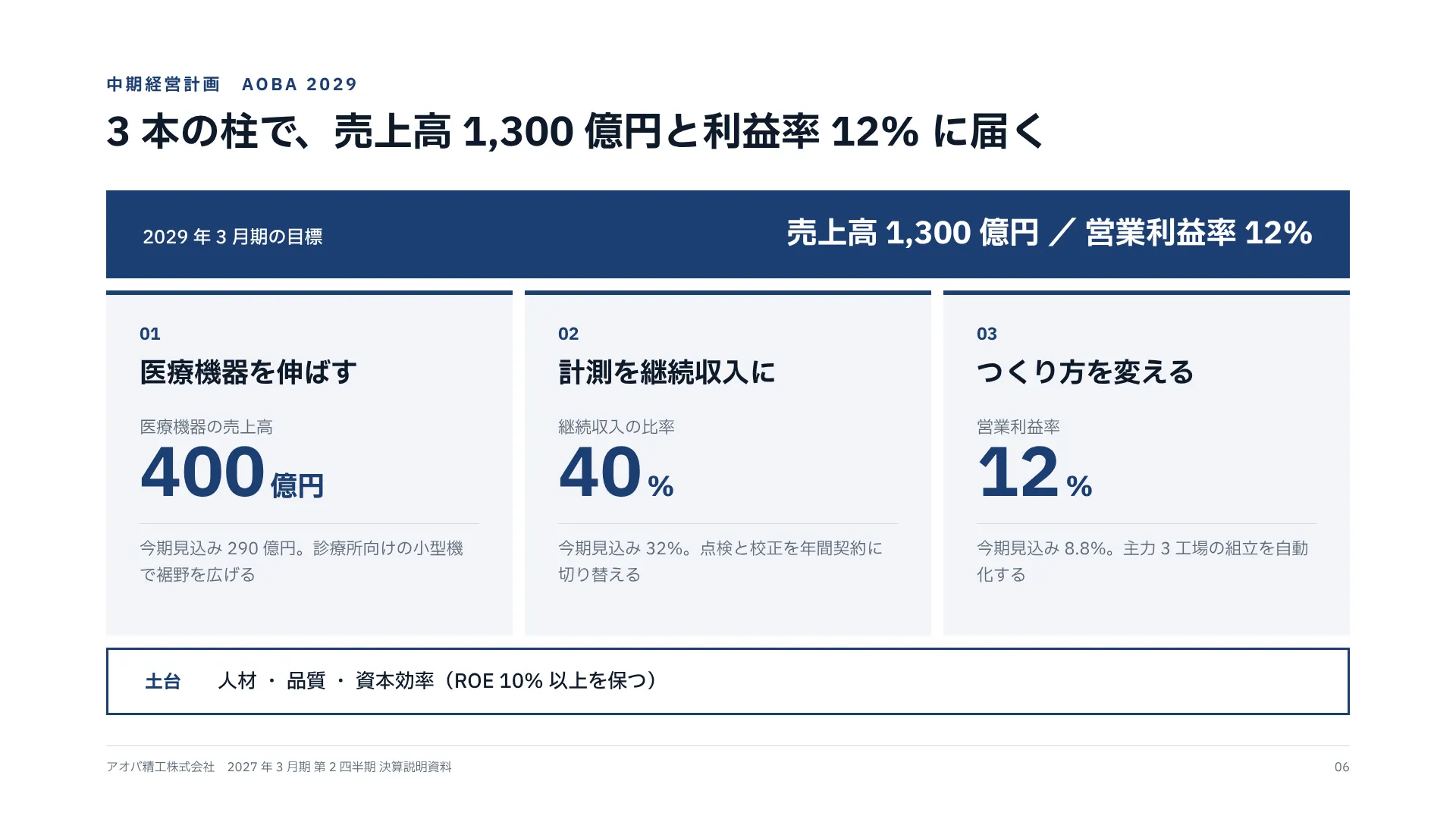 Mid-Term Plan — The Goal as a Beam, Three Pillars, and a Foundation
 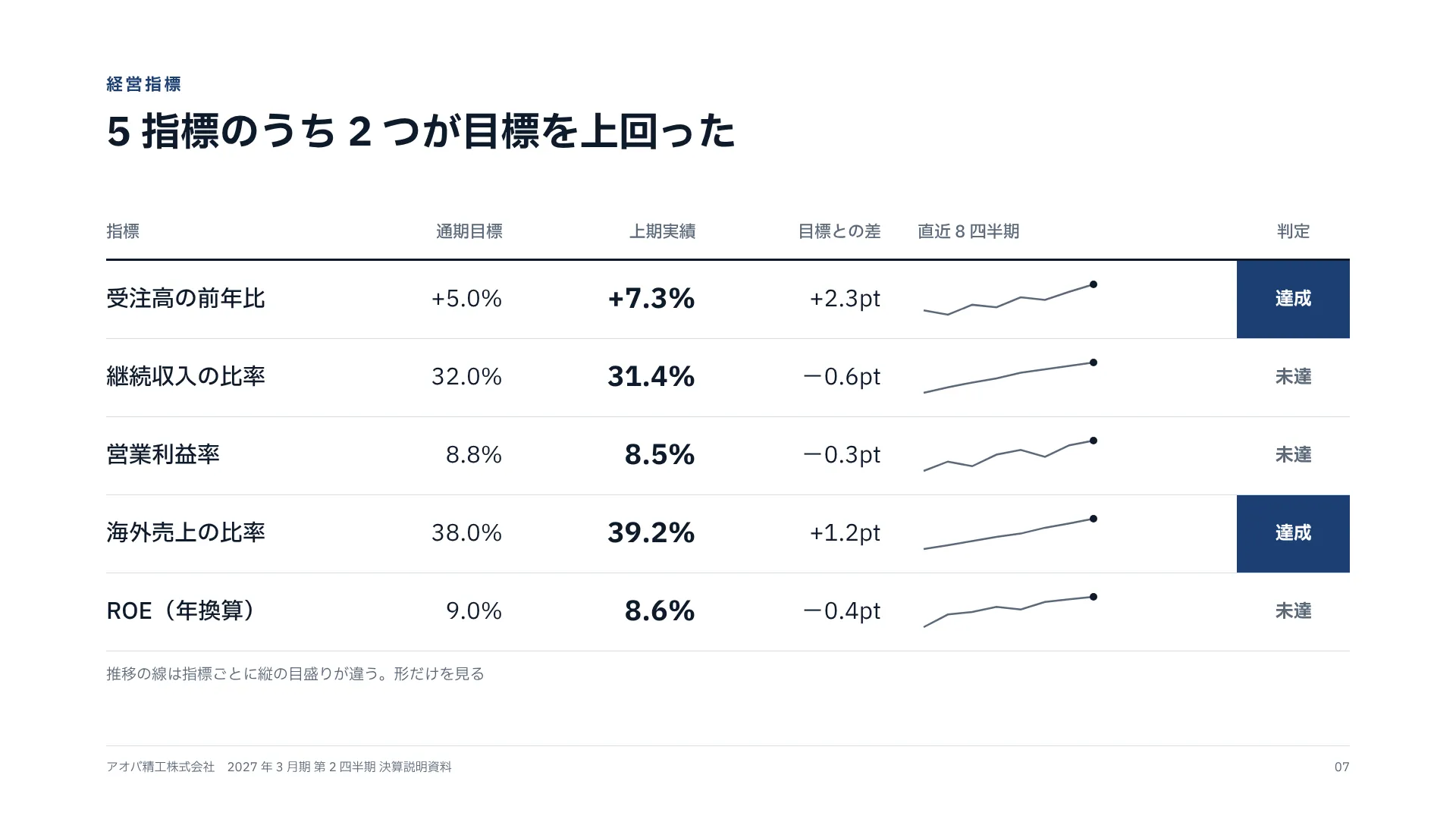 KPI Scorecard — Target, Actual, Gap, Eight-Quarter Trend and Verdict on One Row
 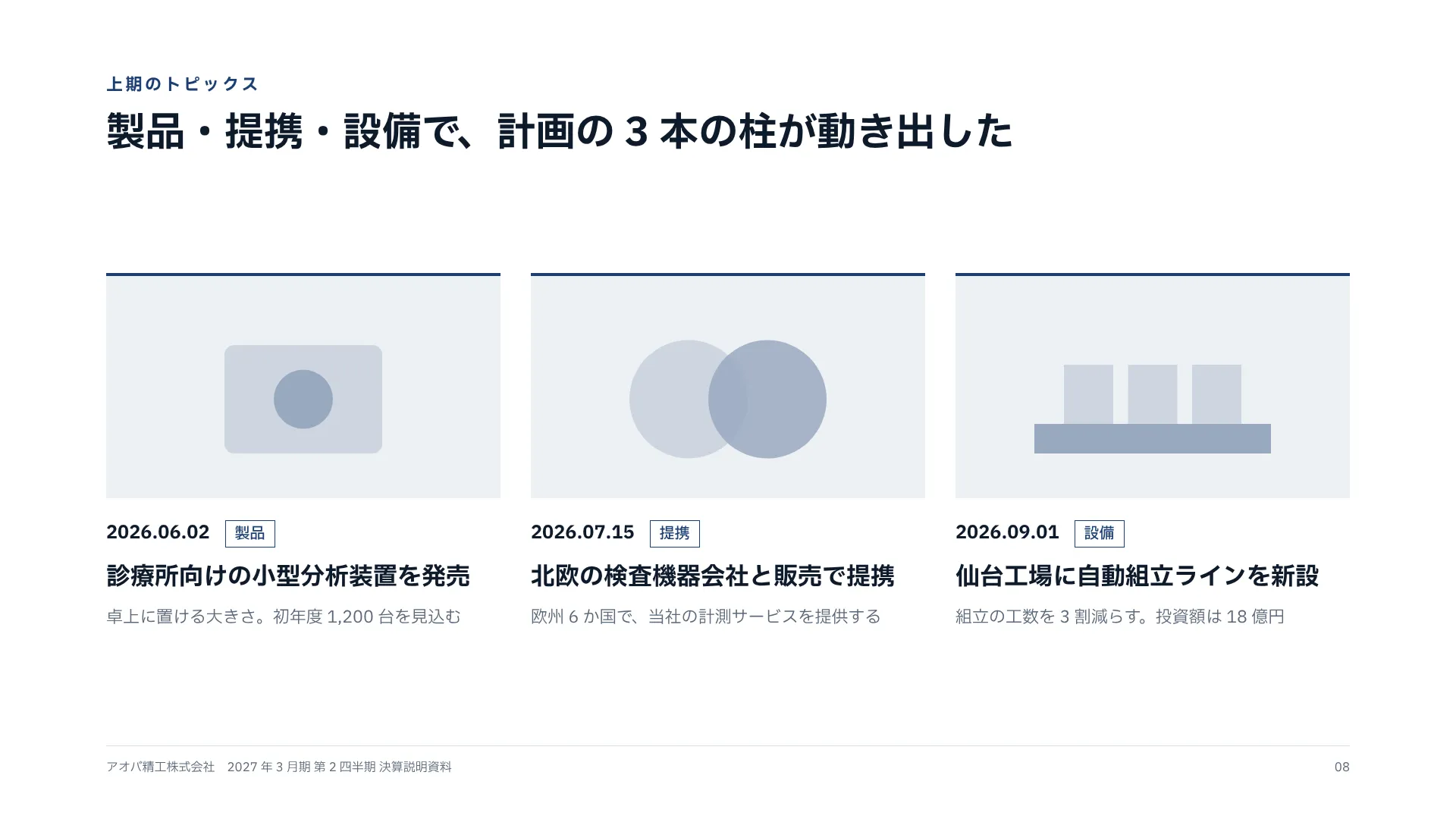 Topics — Three Cards Lined Up by Date, Category and Headline