Seen as a design The generated document itself — its toggles and disclosures work here
Seen as a design The generated document itself — its toggles and disclosures work here
Copy and paste, or save a file and hand it over. For a machine with no network, one “Everything” file is enough.
Everything in this panel, including the contents behind each URL, in one Markdown file — Large, so it goes as a file (copy is for 32 KB and under)
Build an HTML document with "Customer Journey Map (Experience Gap)". This layout runs, so there is no composition to rebuild — what it needs is content.

## What this layout does
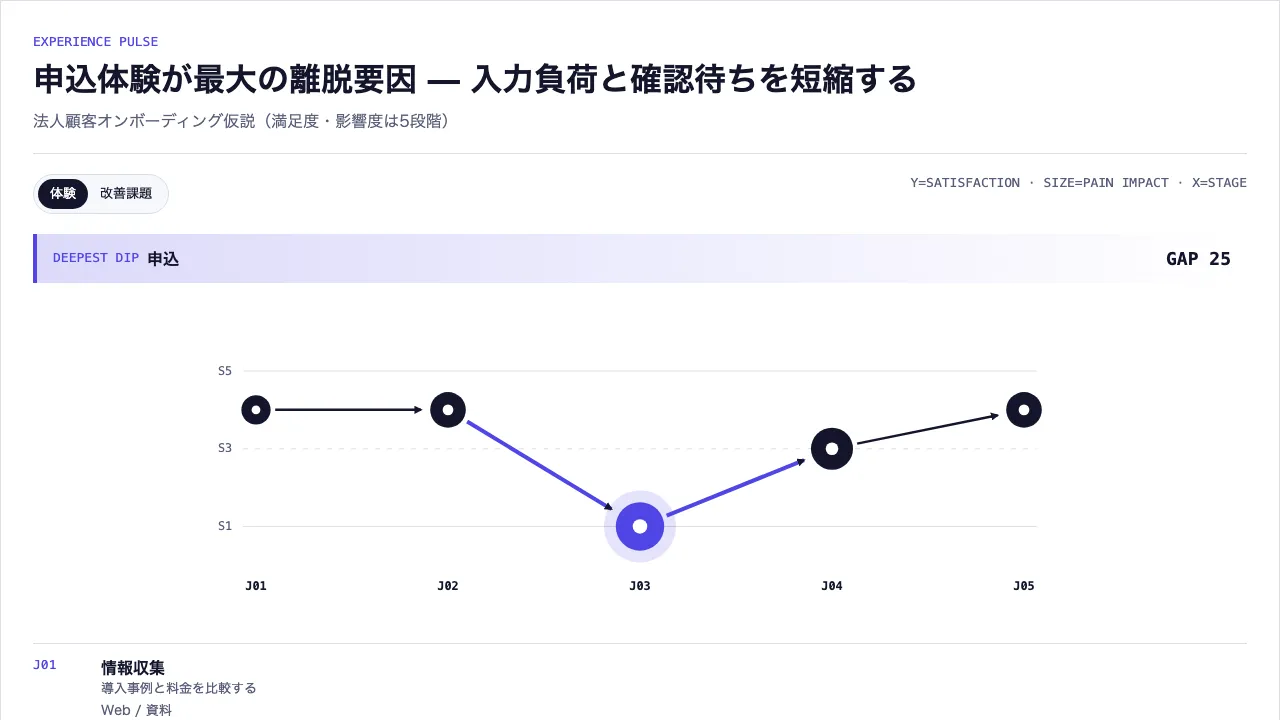
Stages along the axis, satisfaction as a pulse line, touchpoints and pain tied to the same stage, and the largest gap to close read off them

## What you have to supply
- The stages and what the customer does
- The touchpoints at each
- Satisfaction and the impact of each pain

## The shape of the input
- `stages` — { id, label, action, touchpoints[], satisfaction, painImpact, note? }[] — 3〜7段階

schema.ts holds the machine-checkable validation. Ask rather than guess when an input is missing.

## When not to use it
- Analysing how a single population falls in count
- Making owners and step durations the subject

## How to build it
Put the input in a JSON file and run:

```bash
node scripts/render.mjs customer-journey-map <input.json> --theme ink -o out.html
```

The output is one self-contained file and fetches nothing at render time.

## The source
- https://design-vault.pages.dev/designs/customer-journey-map/source/template.tsx
- https://design-vault.pages.dev/designs/customer-journey-map/source/schema.ts
- https://design-vault.pages.dev/designs/customer-journey-map/source/sample-data.json
- https://design-vault.pages.dev/designs/customer-journey-map/sample.html Template, input schema, sample data and metadata. This document was generated from those four. The generated document
/designs/customer-journey-map/source/template.tsx
import { useId } from "react";
import type { CustomerJourneyMapProps, JourneyStage } from "./schema";

const round = (value: number) => Number(value.toFixed(2));

// 2 つの識別子を `-` で繋ぐと単射にならない —— ("a-b","c") と ("a","b-c") が
// 同じ鍵になり、React の key と data 属性の identity が別物どうしで一致する。
// 区切りに使う文字を各辺で逃がしてから繋ぐ。
const joinIds = (...parts: (string | number)[]) =>
  parts.map((p) => String(p).replace(/[_-]/g, (c) => `_${c.charCodeAt(0).toString(16)}_`)).join("-");

export function rankJourneyGaps(stages: JourneyStage[]) {
  return stages
    .map((stage, index) => ({
      ...stage,
      gap: stage.painImpact * (6 - stage.satisfaction),
      inputIndex: index,
    }))
    .sort((a, b) => b.gap - a.gap || a.inputIndex - b.inputIndex);
}

export function journeyPoints(stages: JourneyStage[]) {
  return stages.map((stage, index) => ({
    id: stage.id,
    xPercent: round(4 + (index / Math.max(stages.length - 1, 1)) * 92),
    yPercent: round(((5 - stage.satisfaction) / 4) * 100),
  }));
}

export function journeyGeometry(stages: JourneyStage[]) {
  const nodes = stages.map((stage, index) => ({
    ...stage,
    x: round(80 + (index / Math.max(stages.length - 1, 1)) * 840),
    y: round(70 + ((5 - stage.satisfaction) / 4) * 170),
    radius: round(9 + stage.painImpact * 3.5),
  }));
  const edges = nodes.slice(0, -1).map((node, index) => ({
    id: joinIds(node.id, nodes[index + 1].id),
    source: node,
    target: nodes[index + 1],
  }));
  return { nodes, edges };
}

export default function CustomerJourneyMap({
  title,
  subtitle,
  stages,
  instanceId,
}: CustomerJourneyMapProps) {
  // 既定を固定文字列にすると、id を指定せず 2 つ置いたときに radio の name と
  // SVG marker の id を共有してしまう。他の型と同じく useId() に寄せる。
  const autoId = useId();
  const uid = (instanceId ?? autoId).replace(
      // 逃がし文字(`_`)自身も逃がすので単射。捨てる形にすると `a:b` と `a/b` が
      // 同じ id になる。
      /[^a-zA-Z0-9-]/g,
      (c: string) => `_${c.charCodeAt(0).toString(16)}_`,
    ) || "customer-journey";
  const ranked = rankJourneyGaps(stages);
  const priority = ranked[0];
  const geometry = journeyGeometry(stages);
  const notes = stages.filter((stage) => stage.note);
  const markerId = `${uid}-journey-arrow`;

  return (
    <section
      className="asset group/journey overflow-hidden rounded-xl border border-outline bg-surface p-5 text-primary shadow-card sm:p-8"
      data-layout="customer-journey-map"
    >
      <header className="border-b border-outline pb-5">
        <p className="font-mono text-label text-tertiary">EXPERIENCE PULSE</p>
        <h1 className="mt-2 text-h1 text-balance">{title}</h1>
        {subtitle && <p className="mt-2 text-body text-secondary">{subtitle}</p>}
      </header>

      <div className="mt-5 flex flex-wrap justify-between gap-3">
        <div className="inline-flex rounded-full border border-outline bg-surface-subtle p-1 text-label">
          <label className="rounded-full px-3 py-1.5 has-[:checked]:bg-primary has-[:checked]:text-on-primary">
            <input className="journey-view-map sr-only" type="radio" name={`${uid}-view`} defaultChecked />体験
          </label>
          <label className="rounded-full px-3 py-1.5 has-[:checked]:bg-primary has-[:checked]:text-on-primary">
            <input className="journey-view-gap sr-only" type="radio" name={`${uid}-view`} />改善課題
          </label>
        </div>
        <span className="font-mono text-label text-secondary">Y=SATISFACTION · SIZE=PAIN IMPACT · X=STAGE</span>
      </div>

      <div
        className="mt-5 grid gap-2 border-l-4 border-tertiary bg-gradient-to-r from-tertiary/20 to-transparent px-4 py-3 sm:grid-cols-[auto_1fr_auto] sm:items-center"
        data-journey-default-priority="true"
      >
        <span className="font-mono text-label text-tertiary">DEEPEST DIP</span>
        <strong>{priority.label}</strong>
        <span className="font-mono text-h3">GAP {priority.gap}</span>
      </div>

      <div data-journey-view="map" className="mt-6 group-has-[.journey-view-gap:checked]/journey:hidden">
        <svg
          className="hidden h-80 w-full sm:block"
          viewBox="0 0 1000 350"
          role="img"
          aria-label="顧客体験の満足度推移と痛点影響度を一つの脈線で示すジャーニー"
          data-primary-geometry="customer-journey-map"
          data-geometry-channels="stage-position satisfaction-height pain-radius gap-emphasis"
        >
          <defs>
            <marker id={markerId} viewBox="0 0 10 10" refX="8" refY="5" markerWidth="9" markerHeight="9" markerUnits="userSpaceOnUse" orient="auto">
              <path d="M 0 0 L 10 5 L 0 10 z" className="fill-primary" />
            </marker>
          </defs>

          {[5, 3, 1].map((score) => {
            const y = 70 + ((5 - score) / 4) * 170;
            return (
              <g key={score}>
                <line x1="66" x2="934" y1={y} y2={y} className="stroke-outline" strokeDasharray={score === 3 ? "5 7" : undefined} vectorEffect="non-scaling-stroke" />
                <text x="54" y={y + 4} textAnchor="end" className="fill-secondary font-mono text-label">S{score}</text>
              </g>
            );
          })}

          {geometry.edges.map((edge) => {
            const dx = edge.target.x - edge.source.x;
            const dy = edge.target.y - edge.source.y;
            const distance = Math.hypot(dx, dy) || 1;
            const ux = dx / distance;
            const uy = dy / distance;
            const startX = edge.source.x + ux * (edge.source.radius + 5);
            const startY = edge.source.y + uy * (edge.source.radius + 5);
            const endX = edge.target.x - ux * (edge.target.radius + 10);
            const endY = edge.target.y - uy * (edge.target.radius + 10);
            const touchesPriority = edge.source.id === priority.id || edge.target.id === priority.id;
            return (
              <path
                key={edge.id}
                d={`M ${startX} ${startY} L ${endX} ${endY}`}
                fill="none"
                className={touchesPriority ? "stroke-tertiary" : "stroke-primary"}
                strokeWidth={touchesPriority ? 4 : 2.5}
                vectorEffect="non-scaling-stroke"
                markerEnd={`url(#${markerId})`}
                data-primary-edge={edge.id}
              />
            );
          })}

          {geometry.nodes.map((node, index) => {
            const isPriority = node.id === priority.id;
            const labelY = Math.min(290, node.y + node.radius + 22);
            return (
              <g
                key={node.id}
                tabIndex={0}
                data-journey-stage={node.id}
                data-primary-record={node.id}
                data-geometry-a={node.satisfaction}
                data-geometry-b={node.painImpact}
                data-primary-emphasis={isPriority ? "true" : undefined}
              >
                {isPriority && <circle cx={node.x} cy={node.y} r={node.radius + 13} className="fill-tertiary/15" />}
                <circle cx={node.x} cy={node.y} r={node.radius} className={isPriority ? "fill-tertiary" : "fill-primary"} />
                <circle cx={node.x} cy={node.y} r={Math.max(4, node.radius * 0.3)} className="fill-surface" />
                <title>{node.action}</title>
                <text x={node.x} y="310" textAnchor="middle" className="fill-primary font-mono text-label font-semibold">J{String(index + 1).padStart(2, "0")}</text>
              </g>
            );
          })}
        </svg>

        <div className="journey-desktop-ledger mt-4 hidden divide-y divide-outline border-y border-outline sm:block">
          {stages.map((stage, index) => {
            const gap = ranked.find((item) => item.id === stage.id)!.gap;
            return (
              <article key={stage.id} data-journey-desktop-stage={stage.id} data-journey-stage={stage.id} data-primary-record={stage.id} className="grid grid-cols-[3.5rem_minmax(0,1fr)] gap-3 py-3">
                <span className="font-mono text-label text-tertiary">J{String(index + 1).padStart(2, "0")}</span>
                <div className="min-w-0 break-words">
                  <strong data-primary-label={stage.id}>{stage.label}</strong>
                  <p className="text-label text-secondary">{stage.action}</p>
                  <p className="mt-1 text-label text-secondary">{stage.touchpoints.join(" / ")}</p>
                  <p className="mt-1 font-mono text-label">満足度 {stage.satisfaction} · 痛点影響 {stage.painImpact} · GAP {gap}</p>
                </div>
              </article>
            );
          })}
        </div>

        <div className="relative space-y-3 pl-7 sm:hidden">
          <span className="absolute bottom-2 left-2 top-2 w-px bg-outline" aria-hidden="true" />
          {stages.map((stage, index) => (
            <article key={stage.id} data-journey-stage={stage.id} data-journey-mobile-stage={stage.id} className="relative grid grid-cols-[3rem_1fr_auto] gap-3 border-b border-outline py-3 pl-3">
              <span className={`absolute -left-6 top-4 h-3 w-3 rounded-full ${stage.id === priority.id ? "bg-tertiary ring-4 ring-tertiary/20" : "bg-primary"}`} aria-hidden="true" />
              <span className="font-mono text-label text-tertiary">J{index + 1}</span>
              <div className="min-w-0 break-words"><strong>{stage.label}</strong><p className="text-label text-secondary">{stage.action}</p><p className="mt-1 text-label text-secondary">{stage.touchpoints.join(" / ")}</p></div>
              <span className="font-mono text-label">S{stage.satisfaction} · I{stage.painImpact} · G{ranked.find((item) => item.id === stage.id)?.gap}</span>
            </article>
          ))}
        </div>
      </div>

      <div data-journey-view="gap-ledger" className="mt-6 hidden group-has-[.journey-view-gap:checked]/journey:block">
        <div className="divide-y divide-outline border-y border-outline">
          {ranked.map((stage, index) => (
            <article key={stage.id} data-journey-stage={stage.id} className={`grid grid-cols-[3rem_1fr_auto] items-center gap-3 py-3 ${index === 0 ? "border-l-4 border-tertiary pl-3" : "pl-4"}`}>
              <span className="font-mono text-label text-secondary">{String(index + 1).padStart(2, "0")}</span>
              <div><strong>{stage.label}</strong><p className="text-label text-secondary">影響{stage.painImpact} × 満足不足{6 - stage.satisfaction} · {stage.touchpoints.join(" / ")}</p></div>
              <span className="font-mono text-h3">{stage.gap}</span>
            </article>
          ))}
        </div>
      </div>

      {notes.length > 0 && (
        <details data-inline-disclosure className="mt-6 rounded-lg border border-outline bg-surface-subtle p-4">
          <summary className="cursor-pointer font-semibold">補足を確認({notes.length}件)</summary>
          {notes.map((stage) => <p key={stage.id} data-note-item="true" className="mt-3 text-body text-secondary"><strong className="text-primary">{stage.label}:</strong> {stage.note}</p>)}
        </details>
      )}
    </section>
  );
}
/designs/customer-journey-map/source/schema.ts
import { z } from "zod";
export const journeyStageSchema = z.object({ id: z.string().min(1), label: z.string().min(1), action: z.string().min(1), touchpoints: z.array(z.string().min(1)).min(1).max(4), satisfaction: z.number().int().min(1).max(5), painImpact: z.number().int().min(1).max(5), note: z.string().optional() }).strict();
export const schema = z.object({ title: z.string().min(1), subtitle: z.string().optional(), stages: z.array(journeyStageSchema).min(3).max(7), instanceId: z.string().optional() }).strict().superRefine((value, ctx) => {
  // id は identity として使う(React の key、data 属性、対応強調の突き合わせ)。
  // 重複すると別物どうしが同じ要素を指し、操作が意図しない相手に効く。
  {
    const ids = value.stages.map((item) => item.id);
    if (new Set(ids).size !== ids.length) {
      ctx.addIssue({ code: "custom", path: ["stages"], message: "stages ids must be unique" });
    }
  }
});
export type JourneyStage = z.infer<typeof journeyStageSchema>;
export type CustomerJourneyMapProps = z.infer<typeof schema>;
/designs/customer-journey-map/source/meta.yaml
id: customer-journey-map
name:
  ja: "カスタマージャーニーマップ(体験ギャップ)"
  en: "Customer Journey Map (Experience Gap)"
purpose:
  ja: "顧客段階を横軸、満足度を脈線、接点とpain impactを同じstageへ結び、最大改善ギャップを導出する"
  en: "Stages along the axis, satisfaction as a pulse line, touchpoints and pain tied to the same stage, and the largest gap to close read off them"
# A5 の裁定で draft として移設し、2026-09-04 に型ごとの承認を取って公開した。
status: published
# 索引カードの図版。pnpm layout:render が原本から描く。
still: ./still.png
category: experience
catalogOrder: 170
jobs:
  - trace-flow
  - prioritize-diagnose
useCases:
  - case-study
  - process
layoutKinds:
  - timeline
tags: [customer-journey, experience, touchpoint, satisfaction, pain-point]
whenToUse:
  - ja: "顧客体験の山谷と改善優先点を一続きで説明したい場合"
    en: "Explaining the peaks and troughs of an experience and what to fix first"
  - ja: "接点横断の体験設計を合意したい場合"
    en: "Agreeing an experience design across touchpoints"
avoidWhen:
  - ja: "同一母集団の件数減少を分析したい場合"
    en: "Analysing how a single population falls in count"
  - ja: "部門担当と工程時間を主題にしたい場合"
    en: "Making owners and step durations the subject"
requiredInputs:
  - ja: "顧客段階と行動"
    en: "The stages and what the customer does"
  - ja: "各段階の接点"
    en: "The touchpoints at each"
  - ja: "満足度とpain impact"
    en: "Satisfaction and the impact of each pain"
relatedLayouts: [conversion-funnel, timeline, heatmap]
dataSchema:
  stages: "{ id, label, action, touchpoints[], satisfaction, painImpact, note? }[] — 3〜7段階"
sources: []
/designs/customer-journey-map/source/sample-data.json
{
  "title": "申込体験が最大の離脱要因 — 入力負荷と確認待ちを短縮する",
  "subtitle": "法人顧客オンボーディング仮説(満足度・影響度は5段階)",
  "stages": [
    {"id":"discover","label":"情報収集","action":"導入事例と料金を比較する","touchpoints":["Web","資料"],"satisfaction":4,"painImpact":2},
    {"id":"consult","label":"相談","action":"要件と適用範囲を確認する","touchpoints":["営業","オンライン会議"],"satisfaction":4,"painImpact":3},
    {"id":"apply","label":"申込","action":"企業情報と利用条件を入力する","touchpoints":["申込フォーム","メール"],"satisfaction":1,"painImpact":5,"note":"同じ企業情報を複数画面で再入力し、審査状況も確認できない想定"},
    {"id":"setup","label":"初期設定","action":"管理者と権限を登録する","touchpoints":["管理画面","導入支援"],"satisfaction":3,"painImpact":4},
    {"id":"adopt","label":"定着","action":"利用状況を確認し改善する","touchpoints":["ダッシュボード","CS"],"satisfaction":4,"painImpact":3}
  ],
  "instanceId": "b2b-onboarding-journey"
}